

YouTube may occasionally throw a strange “Too many requests” error. This error indicates that YouTube’s servers received too many requests from your computer in a given amount of time. In other words, the service is kindly asking you to stop sending requests. Let’s explore what could be causing YouTube error 429 on your machine.
How Do I Get Rid of YouTube Error 429 “Too Many Requests”?
Clear Your Cache and Disable Your Extensions
Some of the extensions you installed on your browser might contain malware. That could explain why your browser is sending a high number of requests to YouTube.
Make sure to clear your browser cache and cookies. Then, go to Extensions and manually toggle off all the extensions. If you notice any strange extensions that you don’t remember installing, delete them straight away.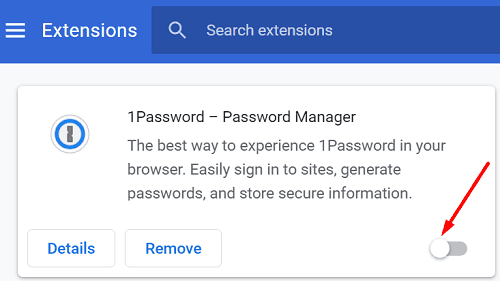
If your browser has a built-in antimalware scanner, use it. For example, if you’re using Google Chrome, go to Settings, scroll down to Advanced, and then scroll down again to Clean up computer. Let Chrome scan and remove malware from your computer. Then refresh the browser, relaunch YouTube, and check if error code 429 is still there.
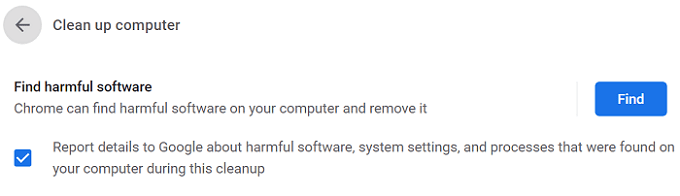
Additionally, make sure to check for updates and install the latest browser version on your machine. Or you can use a different browser.
Scan Your System for Malware
Viruses can change your computer’s behavior and force it to run arbitrary code. Use your default antivirus solution and run an in-depth scan. For detailed instructions on how to run a full system scan, go to your antivirus support page. Restart your machine, and check if the issue persists.
Flush Your DNS and Restart Your Router
Make sure to flush your DNS cache. This is a handy method, especially when you have trouble accessing YouTube or other web pages, for that matter.

Additionally, you can also renew your IP address. Press the Windows and X keys, and select Command Prompt (admin). Then run the following commands one by one, hitting Enter after each command:
- ipconfig /release
- ipconfig /renew
Don’t forget to restart your router as well. Alternatively, you can also unplug your network devices. Leave them unplugged for one minute to get rid of flea power. If the error persists, switch to a different connection, such as a mobile hotspot, and check if you notice any improvements.
Conclusion
Error code 429 indicates that YouTube received too many requests from your computer and is kindly asking you to stop. To get rid of this error, clear your browser cache and disable your extensions. Additionally, run an antivirus scan, renew your IP address, flush your DNS, and restart your router. You can also switch to a different connection.
Did these solutions help you fix the problem? Feel free to share your feedback in the comments below.




There’s no way this is true. I tried to reply to someone’s comment one time this morning after I woke up and it gave me error 429. After just one time. Then I tried it a few times. Then I closed and reopened the app and commented on the main comments in the video and it worked. Comments also work on other videos. But it is this one specific comment that it gives me the error on. If it was really a “too many requests on the server” issue, why am I still able to comment on any other comment? This is more likely a YouTube censoring issue. These google sites never give proper examination or details. Also just so people know, YouTube will give errors if you use a vpn. Unfortunately they don’t seem to like those and you will have to turn it off to comment. But please quit trying to make it peoples fault that YouTube wants to cause all kinds of censorship and issues for people. It’s them not us.
This is on my phone, not a desktop. So how do I fix that?
Hi my name is Khalel my YouTube has a operation again so I was thinking if help get back my words on YouTube comments please once again Kkulix thank you.
The operation screen is on my YouTube and I can’t type my comments in can you please help me get it off please.
Fix YouTube to getting the operation off my screen.
My phone and computer is saying that on my comments the operatoraition could not complete my word I was thinking if you can
help me.
How would I fox it on the mobile YouTube app?