

If you get hit with a message on your Apple iPhone or iPad that says “Purchase – In-app purchases are not allowed” when trying to buy purchases from within apps, it may be related to a restriction setting on the device.
- From the Home screen, swipe over to the screen with the “Settings” icon, then select it.
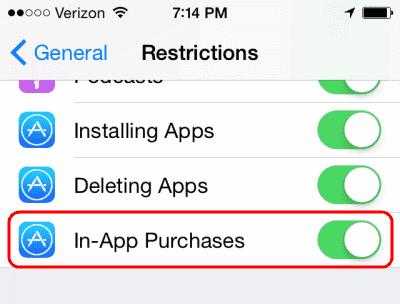
- In iOS12 and higher choose “Screen Time” > “Content Privacy & Restrictions” > “Content Privacy“. In iOS 11 and lower, choose “General” > “Restrictions“.
- Type your restriction password. If you don’t remember setting a password, ask anybody else who may have had access to the device.
- Scroll down to the “In App Purchases” or “iTunes & App Store Purchases” option and ensure it is turned “On/Allow“.

Note: Some apps may have their own purchase settings under “Settings”.

Nothing works. This is very frustrating.
I have spent hours trying to fix this but nothing works. Frustrating is not a big enough word for this! I cannot figure out why apple has not fixed this with all of these complaints
Guess it’s the first bug to get us to buy new iPhones :/
I do not want to purchase Netflix as I already am a member. I simply want to use it on my Ipad as wekk as on my televisions.
I used this fix (above) and it worked immediately. Settings > Screen Time > Content & Privacy Restrictions > clicked to toggle ON for Content & Privacy Restrictions which allowed in app purchase. For me, the default was ‘allow’ once you hit toggle to ‘on’. If that doesn’t work for you continue on to > ITunes and App Store Purchases > In-App Purchase > Allow
I am having the same problem as others. “in-app purchase is not supported.” I just started having this problem tonight, since the update to OS 14.0.1 downloaded last night.
Very simple. IPad Pro will not you download Kindle books. I use an Huawei tablet which does not have these restrictions. and screen quality is just as good as IPad Pro. It also plays some YouTube full screen when Apple does not.
Just lets me know many others are just as frustrated and baffled. Still no fix. Did Amazon or Apple restrict this for more fees?
I’m having the same issue. No matter what I try it still says “in app purchases aren’t allowed.” It’s become extremely frustrating.
No. I have the same problem as Claudia. This iPad simply will not allow in app purchases. Why? Is there a glitch in the programming?
I understand that content purchases through an app on an Apple device would incur a fee to be paid to Apple. This is why the Amazon app, for example, says something like “this app does not support purchasing” for such as Kindle books.
So, the answer is to ensure you have the Apple device listed on your Amazon account, and then use the Safari browser to access your Amazon account on the web to purchase the Kindle book to then be available through your Kindle app.
I *think* that works, but not yet tried it… I imagine the same applied to Google content – actually, any non-Apple content too
This does not help at all. I have downloaded a Kindle material for years u til recently. I followed all the directions to the letter but still get the same message.
Does not work on my newer iPad or iPhone 7. Cleared devices and reset everything, hard restarts, nothing works.
I’m having the same problem. It tells me to enable it in my restriction settings but I already have and it keeps telling me the same thing.
I’ve got the same problem as Claudia. It’s been a week and I still can’t find out what’s wrong. Some games stay on processing or loading. Other games have the circle going round and round. Any help out there please?
Same issue as those before me and no one has responded…..please help!!! In app purchases not allowed yet all set to “allow” and nothing under app in settings.
I m trying to cast Google movies from my iphone 6 but when i select the movie it says in-app not supported on this device. I have checked and my in-app purchases are set to Allow?????
Everything in settings etc. etc. is set to go but every time I wish to make a game in app purchase all I get is a circle going round and round. I can’t tell you how many times I have gone to settings, restrictions, checked in with Apple etc. etc. and I’m still not able to make any purchases whether it’s for June’s Journey or Pearl’s peril. Very frustrating!
I m trying to cast Google movies from my iphone 6 but when i select the movie it says in-app not supported on this device. I have checked and my in-app purchases are set to Allow?????
Thanks. Great help!