
Microsoft Office is one of the most-used office suites in the world today, but that doesn’t necessarily mean everyone has it installed on their device. Still, its popularity also means that you don’t need the official Microsoft Office suite to access documents made for it. There are plenty of other third-party and Microsoft options out there, free or paid, that can do the job easily.
In this article, we’ll be looking at how to open Microsoft Office files without Office.
A World of Solutions – How to Open Microsoft Office Files Without Office
There’s no shortage of options out there to open and edit those “.pptx” and “.docx” files. We’ve organized just a few below for you:
Web Browsers
If you’re wondering how to open Office files without Office, an easy solution may already be installed on your machine. Web browsers are not only able to handle PDFs but Office files too. Microsoft Edge can open many Office documents directly in the browser using Microsoft 365 integration. To activate it:
Step 1. Click the “More” button (three dots) in the top-right and click “Downloads” in the dropdown menu.
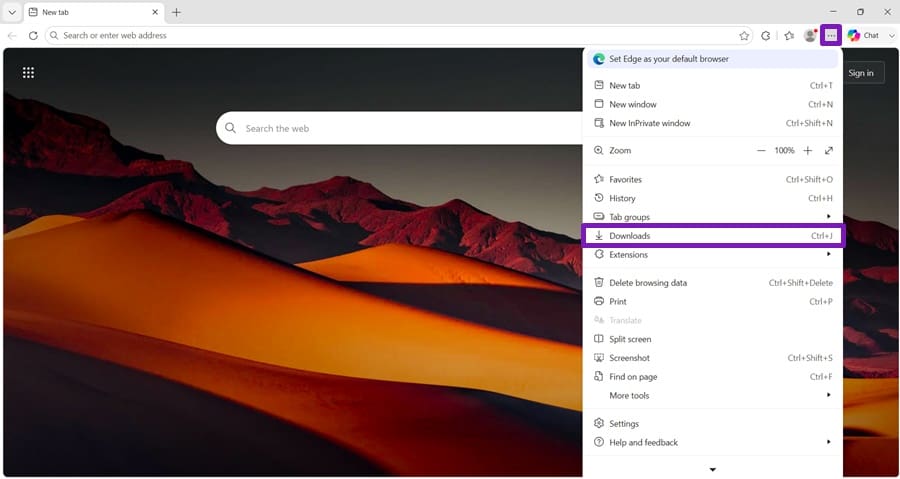
Step 2. Click the “More” button in “Downloads,” then click “Downloads settings.”
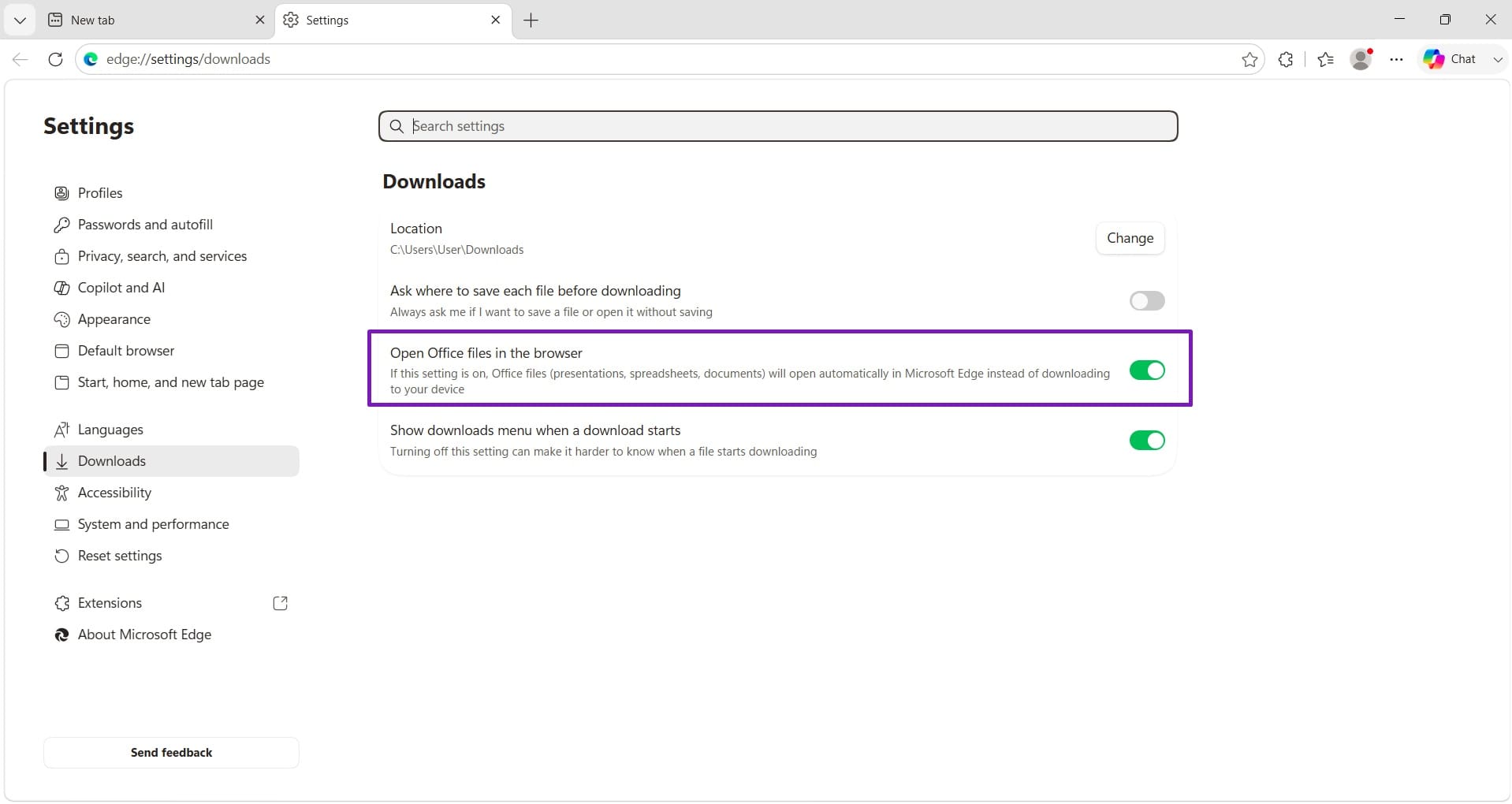
Step 3. In the menu, ensure “Open Office files in the browser” is toggled to “On.”
Edge isn’t the only browser that can work with Office files. There are plenty of third-party extensions for Chrome, Firefox, and Brave that can read, view, and edit files. Speaking of Chrome:
Google Workspace

Google Workspace has carved out its own special online niche with a suite of tools that perform the same tasks as those in Microsoft Office. Better still, if you have an individual Google account, you can use the alternatives to all the major Microsoft Office apps for free. These easily support their file formats, plus you get the use of the Google Cloud for your work as well.
If you’re on a smart device, these can be downloaded as apps, but for PC use, it’s best to stick with using them in any major browser.
Apache OpenOffice

This is the open-source Office alternative that started it all. While OpenOffice may not be the most advanced of these offerings, it works well with older hardware, is friendly to wallets, and can definitely open those Office files.
Libre Office
LibreOffice began as a 2010 offshoot of Apache OpenOffice and has since gone from strength to strength on its own. If you’ve been recommended free, open-source alternatives to Office, this is most likely one of them. While it doesn’t have cloud functionality, it has no problem opening Office files, and that’s what matters in this situation. What’s more, it can easily go toe-to-toe with anything Office has to offer.
It’s a great and free alternative.
WPS Office Software
WPS Office is a freemium suite that’s able to run on various operating systems. If you don’t mind the adverts and the limited features of the free tier, it’s another completely viable way to open your Excel and Word files. What makes WPS stand out is its customizability and lightweight designs. Work the menus to your preference and view those Office files in a flash.
Apple iWork

If you’re running Mac and want to get those Office files open, then the good news is that the native iWork apps have you covered. Pages, Numbers, and Keynote are available free for Apple users, which makes viewing and sharing spreadsheets and presentations from Office easier.