
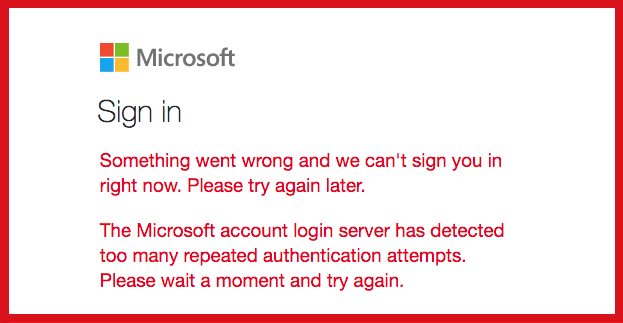
When you try to log in to your Microsoft account, you may sometimes get a strange error that blocks the login process. For example, the login servers may fail to respond to your connection request promptly. Or they may refuse to validate your request due to repeated failed authentication attempts.
When this issue occurs, you usually get the following error: “The Microsoft login server has detected too many repeated authentication attempts. Please wait a moment and try again“. If you have already waited for 30 minutes, but the error persists, follow the troubleshooting steps below.
Microsoft Has Detected Too Many Repeated Authentication Attempts
Open OneDrive
If you’re getting this error when trying to sign in to Outlook, OneNote, or other Microsoft apps, open OneDrive first. Enter your login details if you’re not already logged in. Then, go to Documents, and open one of your files. Exit OneDrive and check if the issue persists.
Sign in Using a Browser
If this error pops up when trying to log in to a desktop app, check if you can sign in using a web browser. Most of the time, web apps aren’t affected by the same issues plaguing desktop apps.
If the problem persists on your browser as well, try clearing the cache. Additionally, disable all of your extensions, and check for browser updates. Check if you notice any improvements in Incognito Mode. If you still can’t sign in, go to Settings and reset your browser.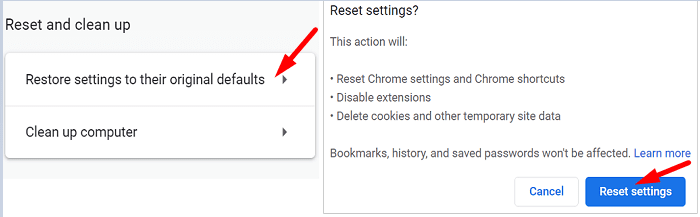
If the error persists, uninstall and reinstall your browser and check if this method works.
Reset Your Connection
Flush your DNS and restart your router to fix any network-related issues that might be preventing you from logging in to your MS account.
- Launch Command Prompt with admin rights.
- Then enter the following commands one by one, and press Enter after each one:
ipconfig /flushdnsipconfig /registerdnsipconfig /releaseipconfig /renewnetsh winsock reset
- Restart your computer.

If the problem persists, unplug your router and leave it unplugged for two minutes to reset your connection to Microsoft’s servers. Then plug your router back into the wall outlet, and check if you can log in to your Microsoft account.
If nothing works, reset your Microsoft account password and contact support.
Conclusion
If you can’t log in to your Microsoft account due to too many failed authentication attempts, check if you can sign in using a web browser. Additionally, clear your cache and cookies, disable your extensions, and reset your browser. If the issue persists, flush your DNS and restart your router.
Did these tips help you fix the problem? Which of the solutions above worked for you? Comment down below.




If you are getting error too many login attempts or acc. locked. you have to wait 24hrs for Microsoft to reset to enable you to reset your acc.
I’d love to spin a big conspiracy story about Microsoft being out to get me, but I know they do not have time or inclination to do anything of the sort. Now for my theory on the problem that may be causing this!
I’m logged into OneNote on a Lenovo Windows 10 system as I have not upgraded to 11 ‘yet’. I’d been on an iPad using OneNote when it refused to log in and kicked up that same message. Too many attempts… hmm, yes, I had logged in on the Lenovo some time ago… let’s take a look. Wasn’t wanting me to log in there either in the standalone app but I am logged into the Explorer version and can view my files perfectly well. What can this mean?! I persisted and got logged in on the Lenovo laptop and it sync’d, so all the notes from the iPad appeared. Now, back to the iPad. Still couldn’t log in on it. These two apps ARE communicating all the same. This tells me it’s in my case a bug in their iPad software OR it could be not wanting me to have several log ins on different devices. Take your pick, it’s only a theory but being the tech goddess I am means I don’t back down easily and won’t stop until I get in on both devices. I’ll keep pounding on it until it relents and relinquishes to my will… because that’s just how I roll. Maybe Microsoft doesn’t have the best support for non enterprise customers but it never hurts to sent them a support ticket to make them aware that the issue persists and if you don’t take the time to do this, don’t complain about how it’s never fixed. If I figure this issue out I’ll report back to share my findings.
Mine worked when system time was corrected and the Time Zone was all in sync with Sytem Clock.
haritux.in
18 months has gone by, and I still have the same problem, Microsoft only uses canned replies… None work. They simply have no-one with the ability to diagnose!
I have a laptop with Win-7, suspect, they are likely sabotaging that unit.
10 works on my desktop.
Another laptop, with Win-11, has so many software problems I will never switch from 10 to 11.
Win 11 is as bad as Win 8 was!.
XP was good! Win-7 was excellent.! Much trouble ever sense! .
it is “Time for an Alternative!”
It is my belief that Micky-Soft has deliberately black-listed my laptop!
lef
IT DOES NOT WORK I’ve tried multiple times and it say the same thing every time like what does it mean
I need a solution because I need to cancel a subscription, but because this is happening I can’t.
Does not work .. very frustrated after 2 weeks of searching and trying multiple solutions
Mitch I think i am getting this “you have too many logged in attempts ” for weeks. and my other security shows someone trying to get into my account. I have 2 step authentication so they haven’t yet. Is there some way to change my outlook password with this going on?