Skip to content
LogoTechnipages
LogoTechnipages
  • Topics
        • Android
        • Browsers
        • Gaming
        • Hardware
        • Internet
        • iPhone
        • Linux
        • macOS
        • Office
        • Reviews
        • Software
        • Windows
        • Definitions
        • All Recent Posts
  • Product Reviews
  • About

Can You Hide Your Facebook Dating Profile?

Madalina DinitaMay 31, 2021 Comments (4)
hide-facebook-dating-profile

Facebook has a dating service similar to Tinder’s called Facebook Dating. If you haven’t found your soulmate yet, you can give Facebook Dating a try and let the digital Cupid find the right match for you. But maybe you don’t want your friends to learn you’re using Facebook Dating. Let’s see how you can keep your dating profile private.

Contents

  • 1 Can You Be Invisible on Facebook Dating?
  • 2 The Exception
  • 3 Conclusion

Can You Be Invisible on Facebook Dating?

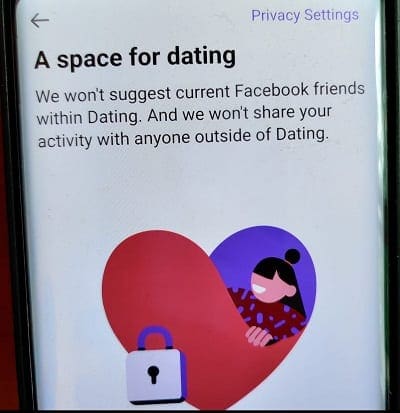
The good news is that Facebook has already thought about that. Your dating profile is automatically hidden from your Facebook friends who are also using the dating app. In other words, you can’t see their dating profile, and they can’t see yours.
facebook-dating

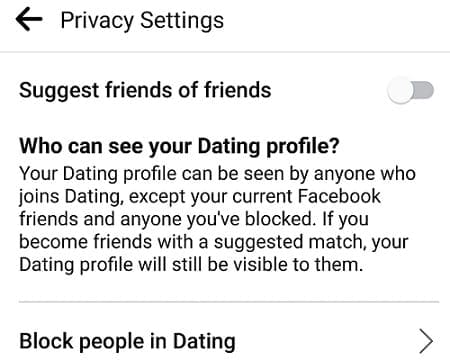
If you want to take this one step further, you can tweak your privacy settings and prevent Facebook from suggesting friends of your friends as potential matches.

  1. Navigate to Settings, click on General, and go to Privacy.facebook-dating-privacy-settings
  2. Then turn off Suggest friends of friends.

facebook-dating-disable-friends-of-friends

The Exception

Facebook Dating’s Secret Crush feature lets you create a list of up to nine friends you have a crush on. The catch is that if they also add you to their crush list, they’ll be able to see you’re using Dating. It seems that’s the only way your friends can find you on Facebook Dating.

Rest assured, your Facebook friends won’t receive any notifications that you joined Dating. No dating-related information will appear on your News Feed. Your regular Facebook account and your Dating profile are two different things.

If you no longer wish to use Facebook Dating, you can delete your profile and keep your Facebook account active. To do that, go to Dating Settings, select General, and then Delete profile.
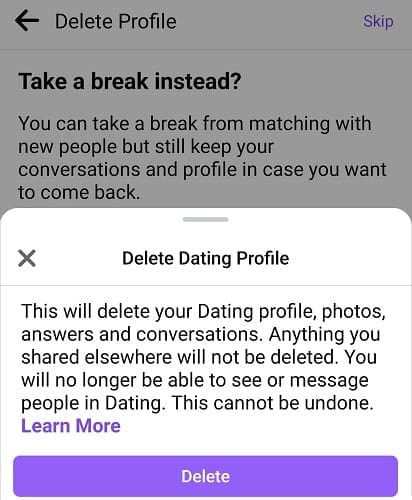
delete-facebook-dating-profile

On the other hand, if you decide to delete your Facebook account, your Dating profile will automatically get deleted.

Conclusion

There are two ways your Facebook friends can learn you’re using the Dating service: if you tell them, or they add you to their crush list. Otherwise, your dating profile is hidden from your Facebook friends.

Do you use Facebook Dating? Compared to other dating apps out there, why do you prefer Facebook’s dating service? Let us know in the comments below.

Categories: Internet

Author Madalina Dinita

Madalina has been a Windows fan ever since she got her hands on her first Windows XP computer. She is interested in all things technology, especially emerging technologies -- AI and DNA computing in particular.

You Might Also Like

  • How to Play Chrome’s Secret Dino Game

    Judy SanhzInternet
  • Dolphin for Android: How to Change Homepage

    Mel HawthorneAndroid
  • How to Manage Your Signed-in Devices on Netflix

    Mel HawthorneInternet
  • Deep Web Search Engines DuckDuckGo

    DuckDuckGo News: Block Google’s Annoying Pop-Up

    Aaron KimBrowsers

Comments

  1. Peter says:
    October 1, 2022 at 1:48 am

    I have the same problem. I deleted my Facebook dating profile and I can’t find the dating back I need it my dating back, how to do that ?

  2. John says:
    January 30, 2022 at 3:01 am

    I cannot locate my facebook dating app on my phone, on fb. Where is it? Did I accidentally delete it?? how can I put it back on?

  3. Lisa says:
    November 14, 2021 at 8:22 am

    If I temporarily hide my main Facebook page, can I still use the Facebook dating app.

  4. Ramiro says:
    November 11, 2021 at 11:33 pm

    I deleted my Facebook dating profile and I can’t find the dating back I need it my dating back

Leave a Reply

Your email address will not be published. Required fields are marked *

  • clipchamp unexpected application error

    Clipchamp Unexpected Application Error: Here’s the Solution 

  • winload.efi file missing error

    Winload.EFI File Missing Error on Boot – How to Fix

  • fix error 0x9cfc7550

    How to Fix Error 0x9cfc7550 (We Couldn’t Create a New Partition) in Windows 

  • fix error code 0x3000008 1

    How to Fix Error Code 0x3000008 for Remote Desktop Connection

  • fix error code 0x80190001 1

    How to Quickly Fix Error 0x80190001 for Microsoft or Outlook Account Login 

profile pic

The Experts Behind Technipages

My name is Mitch Bartlett. I've been working in technology for over 20 years in a wide range of tech jobs from Tech Support to Software Testing. I started this site as a technical guide for myself and it has grown into what I hope is a useful reference for all.

Learn More

technipages logo white
linkedin icon

Technipages is part of Guiding Tech Media, a leading digital media publisher focused on helping people figure out technology. Learn more about our mission and team here.

© 2025 Guiding Tech Media All Rights Reserved

  • About Us
  • Contact
  • Terms of Use
  • Privacy Policy

© 2025 Guiding Tech Media All Rights Reserved

Information from your device can be used to personalize your ad experience.
Do not sell my personal information.

Last Updated on May 31, 2021 by Judy Sanhz