Skip to content
LogoTechnipages
LogoTechnipages
  • Topics
        • Android
        • Browsers
        • Gaming
        • Hardware
        • Internet
        • iPhone
        • Linux
        • macOS
        • Office
        • Reviews
        • Software
        • Windows
        • Definitions
        • All Recent Posts
  • Product Reviews
  • About

Microsoft Word: How to Center a Table

Mitch BartlettFebruary 2, 2022 Comments (0)
MS Word Header

When using Microsoft Word, it’s not really clear how to center a table. If you’re stuck, we’ll show you how.

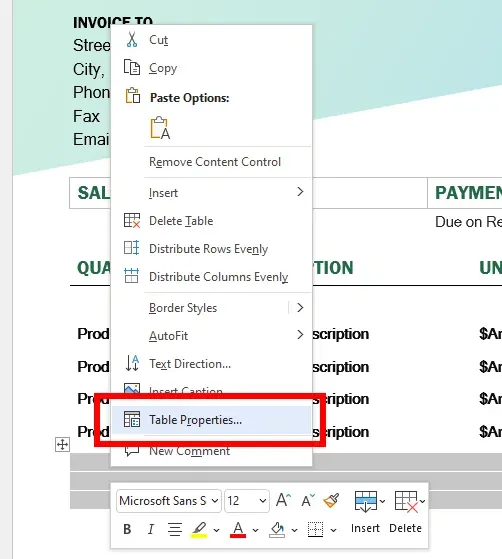
  1. Left-click on the table you wish to align center to highlight it, then right-click the table. Mac users can hold the Control key and click. A menu will appear. Select Table Properties….
  2. Under the Table tab, go to the Alignment section and select Center.
  3. Click OK, and the table is now centered on the page.
This guide is intended for users of Microsoft Word 2007, 2010, 2013, 2016, 2019, and Word in Office 365 for Microsoft Windows and macOS.

Categories: Office

Author Mitch Bartlett

Through my career that spans over 20 years I have become an expert in Microsoft Systems Administration, Android, and macOS. I started this site as a technical guide for myself and it has grown into what I hope is a useful knowledgebase for everyone.

You Might Also Like

  • Word 365: Enable or Disable AutoRecover Save

    Mitch BartlettOffice
  • Outlook Logo Header

    Turn Mail Notification Sound On/Off in Outlook 2016

    Mitch BartlettOffice
  • Outlook: “Library Not Registered” Error

    Mitch BartlettOffice
  • Outlook Won’t Work in MacOS High Sierra – Fix

    Mitch BartlettOffice

Leave a Reply

Your email address will not be published. Required fields are marked *

  • bluetooth toggle missing windows 11

    What to Do When Your Bluetooth Toggle Is Missing (Windows 11)

  • microsoft paint features

    Unleash Your Inner Artist – Advanced Microsoft Paint Features You Might Not Know About

  • how to make chromebook run faster

    8 Ways to Make Your Chromebook Run Faster

  • error code 0xC0000428

    What Is Error Code 0xC0000428 and How to Fix It

  • windows 11 usb tethering

    Your Guide to USB Tethering on Windows 11

profile pic

The Experts Behind Technipages

My name is Mitch Bartlett. I've been working in technology for over 20 years in a wide range of tech jobs from Tech Support to Software Testing. I started this site as a technical guide for myself and it has grown into what I hope is a useful reference for all.

Learn More

technipages logo white
linkedin icon

Technipages is part of Guiding Tech Media, a leading digital media publisher focused on helping people figure out technology. Learn more about our mission and team here.

© 2026 Guiding Tech Media All Rights Reserved

  • About Us
  • Contact
  • Terms of Use
  • Privacy Policy

© 2026 Guiding Tech Media All Rights Reserved

Information from your device can be used to personalize your ad experience.
Do not sell my personal information.

Last Updated on February 2, 2022 by Mitch Bartlett