Skip to content
LogoTechnipages
LogoTechnipages
  • Topics
        • Android
        • Browsers
        • Gaming
        • Hardware
        • Internet
        • iPhone
        • Linux
        • macOS
        • Office
        • Reviews
        • Software
        • Windows
        • Definitions
        • All Recent Posts
  • Product Reviews
  • About

How to Connect Apple TV to an Old Analog TV

Mitch BartlettOctober 23, 2020 Comments (12)
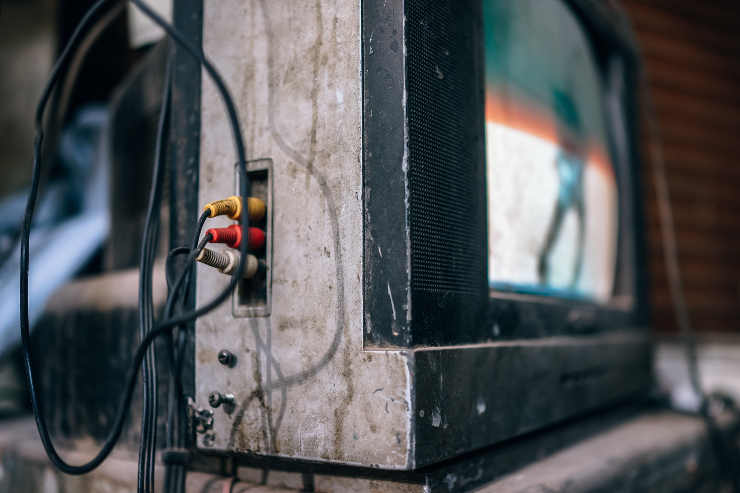
Old TV

I still have a couple of older analog televisions in my home. One of them is almost 20 years old. I have no intention of throwing them away since there is always a way to convert digital signals to analog and make the equipment work properly.

An Apple TV box will connect just fine to an older analog TV if you have the right equipment. You’ll need to convert the signal from digital to analog to make it work. Here’s how it’s done.

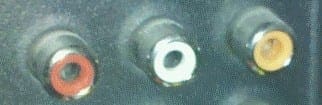
  1. Verify that your analog TV has the standard 3 RCA CRT jacks. They will most likely be colored yellow, white and red.
    3RCA jacks
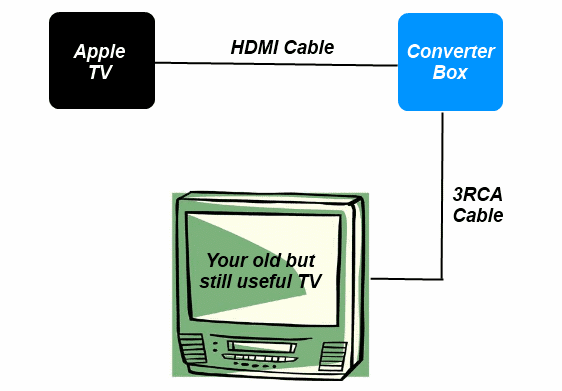
  2. Purchase an HDMI to Composite 3 RCA converter box.
  3. Once you have the box, you can then connect the Apple TV box to the HDMI to composite converter box using a standard HDMI cable.
  4. You can then use a Composite 3 RCA cable to connect the Converter box to the 3 RCA jacks on the TV.
    Apple TV to Analog TV diagram

Now you’re ready to enjoy Apple TV on your analog TV.

Categories: Hardware

Author Mitch Bartlett

Through my career that spans over 20 years I have become an expert in Microsoft Systems Administration, Android, and macOS. I started this site as a technical guide for myself and it has grown into what I hope is a useful knowledgebase for everyone.

You Might Also Like

  • Pioneer DEH-1700: How to Set the Clock

    Mitch BartlettHardware
  • Printer Header

    Xerox WorkCentre 3325: Scan to Email

    Mitch BartlettHardware
  • Where is Remote Desktop Host Configuration in Windows 2016?

    Mitch BartlettHardware

Comments

  1. Susan says:
    September 18, 2022 at 9:34 am

    My TV is connected to my Apple box and it comes up with the last thing that was up there with the last TV support her that I had through Spectrum but it’s a Sony TV and remote will not work what do I do to make the remote work

  2. Mitch Bartlett says:
    October 22, 2021 at 5:02 pm

    Yes. You can leave one of the audio jacks unplugged, or plug both audio jacks into this adapter. https://www.amazon.com/gp/product/B074Z69XCN/ref=as_li_qf_asin_il_tl?ie=UTF8&tag=technipages-20&creative=9325&linkCode=as2&creativeASIN=B074Z69XCN&linkId=fd697b77523b2dc8dd703965dd915637

  3. Ernest says:
    October 22, 2021 at 2:35 pm

    My old analog tv has only two rca jacks.’ Will the converter still work?

  4. Candy says:
    September 29, 2021 at 1:12 pm

    I purchased the HDMA convertor box. And all the cords. Set it all up, doesn’t work. Called APPLE, and they informed me RCA TV doesn’t work with the APPLE TV box. Is this true?

  5. Linda says:
    June 27, 2020 at 5:11 pm

    I’m 72 ys old, This is just way to confusing. i am so frustrated.

  6. Bradley Hove says:
    May 14, 2020 at 10:25 pm

    Paul Elliott, you do the same thing as described but you will also need a device called an RF modulator – this converts from RCA to RF

  7. paul mitchell says:
    March 29, 2020 at 11:14 am

    I have a Polaroid flat screen LCD can I still use HDMI to Composite 3 RCA converter box. or will I need somthing different and what am I plugging into the tv I have three section monitor output , component , A/v in .? Help ,,,,!!!!!!

  8. Sharon says:
    February 20, 2020 at 12:22 pm

    Did everything mentioned and I guess there is some type of set up I must do. Please advise since I only have my regular television set up via satellite. Do not want to loose regular television programs. Please advise. Appreciate your technical expertise.

  9. Paul Elliott says:
    February 18, 2020 at 7:13 pm

    what if we don’t have an RCA hook up on our TV. We only have a coax cable Port hook up?

  10. Mike says:
    October 23, 2019 at 12:31 am

    This is very true. You have DRM and HDCP issues with some apps on Apple TV playing from a converter hdmi to rca. Some apps are a non issue, but other heavy hitter apps are cut off and it tells you on your tv screen. No way around it unless there is something out there that can fix this….

  11. Cindy says:
    June 9, 2019 at 3:29 pm

    Yes, thank you!

  12. Fraser says:
    May 26, 2019 at 8:17 pm

    Thanks Mitch – But what about the issue of HDCP encryption?

Leave a Reply

Your email address will not be published. Required fields are marked *

  • clipchamp unexpected application error

    Clipchamp Unexpected Application Error: Here’s the Solution 

  • winload.efi file missing error

    Winload.EFI File Missing Error on Boot – How to Fix

  • fix error 0x9cfc7550

    How to Fix Error 0x9cfc7550 (We Couldn’t Create a New Partition) in Windows 

  • fix error code 0x3000008 1

    How to Fix Error Code 0x3000008 for Remote Desktop Connection

  • fix error code 0x80190001 1

    How to Quickly Fix Error 0x80190001 for Microsoft or Outlook Account Login 

profile pic

The Experts Behind Technipages

My name is Mitch Bartlett. I've been working in technology for over 20 years in a wide range of tech jobs from Tech Support to Software Testing. I started this site as a technical guide for myself and it has grown into what I hope is a useful reference for all.

Learn More

technipages logo white
linkedin icon

Technipages is part of Guiding Tech Media, a leading digital media publisher focused on helping people figure out technology. Learn more about our mission and team here.

© 2025 Guiding Tech Media All Rights Reserved

  • About Us
  • Contact
  • Terms of Use
  • Privacy Policy

© 2025 Guiding Tech Media All Rights Reserved

Information from your device can be used to personalize your ad experience.
Do not sell my personal information.

Last Updated on October 23, 2020 by Mitch Bartlett