Spending too much time is quarantine can stress out anyone. There comes the point where you run out of things to do and start counting the stains on the ceiling.
There’s a better way to get rid of that stress than counting the stains on the wall. There are free Android apps that have classic things you’ve undoubtedly done to try and relax, such as burst air bubbles or turn a switch on and off various times.
1. Antistress – Relaxation
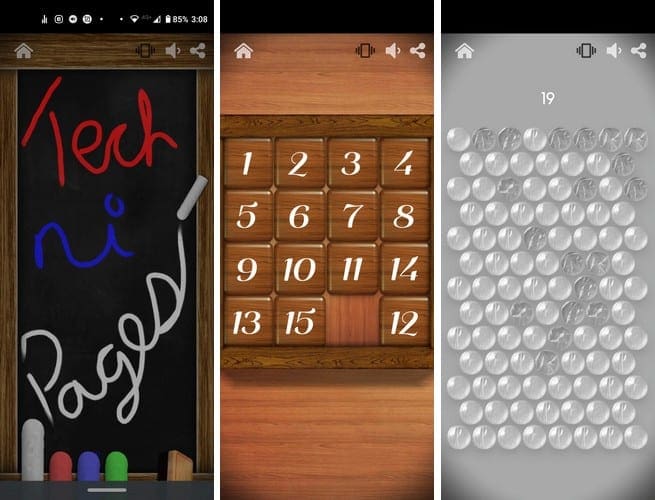
Antistress is an app that contains a large variety of games that’ll help you relax. It has options such as:
- Writing on a chalkboard
- Flipping a switch on and off
- Playing with bamboo wind chimes
- Physics wooden toys
- Fidget spinner
- Sharpening pencils
- Playing with a zipper
- Rapidly cutting a carrot
- Throwing a stone across a pond and more
The games will repeat over and over until you end the game. The app also contains another game section called Quiet Pack. To enjoy this part of the app, you’ll need to buy it for a one-time purchase of $0.99.
But, you if you’re willing to watch an ad, you can play with these game for 10 minutes before they’re locked again.
2. AntiStress, Relaxing, Anxiety & Stress Relief Game

If you like playing those games that don’t you anywhere but sure do an excellent job of distracting you, give Antistress a try. It has games such as throwing a baseball a bunch of cans or placing your thumbs on the screen where the game will tell you that you’ve received a full charge.
Some games are only available in the Pro version, but that’s only a small amount. The majority of the games are free and can be played as long as you want.
If you want to unlock all antistress games and want to remove the ads, you can by subscribing for $1.99. By going Pro, you also get 24/7 customer support.
3. Relax Rain – Rain Sounds: Sleep and Meditation

Hearing soothing rain sounds is another excellent way to relax. Relax Rain – Rain Sounds is a Free app that has all kinds of rain sounds for you to relax hearing. You can choose from soothing rain options such as:
- Inside the car
- Tent in the thunderstorm
- Rain on the roof
- Under the umbrella
- Rain in the gutter
- Light rain in the back yard and more
If you want to also hear music with the rain sounds, tap on the music icon, and choose from options such as:
- Relaxing piano
- Deep serenity
- A touch of zen
- Reiki healing
- Island Paradise
- Eventide
As soon as you select one of these sounds, you’ll hear the music along with the rain sounds. You’ll also see an option to add thunder sounds such as regular thunder, Strong thunder, and Distant thunder. Unless you get the Pro version, you’ll have to deal with ads here and there.
4. Colorfy: Coloring Book – Free-Style Color
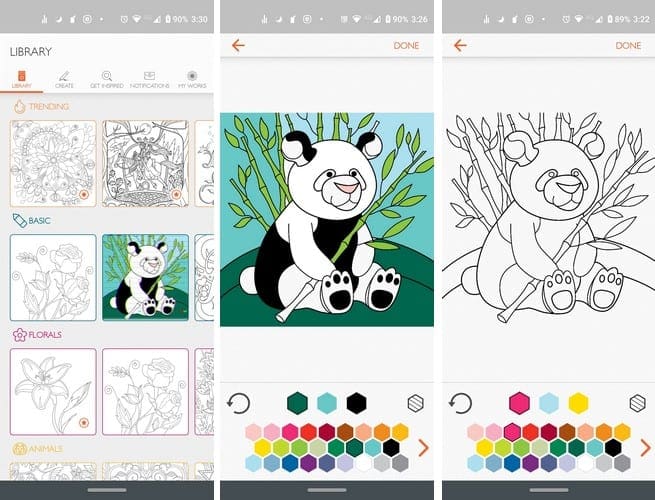
Colorfy is a great way to keep your mind busy with a relaxing activity. This isn’t your kid’s coloring book since the patterns you have to fill in are not easy as they are in coloring books for the little ones.
The app has a section where you’ll find trending coloring patterns and other parts such as:
- Basic
- Florals
- Animals
- Cats
- Famous
- Lifestyle
- Gardens
- Patterns
- Mandalas
- Oriental
- Exotic
- Places
- Fun
- Zodiac signs
- Food
- Fantasy
- Weekly volumes
- Authors
- Special dates
If you don’t see any patterns you like, you can create one by taking a picture of what you want to color, drawing a mandala, or creating one out of stickers the app offers.
To view your creations in the future, just go to the My Works tab, and all the patterns you’ve colored will be saved there.
Conclusion
What one person may find relaxing, another person finds annoying. Whether you like coloring or just sitting back and listening to relaxing sounds, hopefully, you’ll find something you like on the list. Which app do you think you’re going to start with first? Let me know which one you choose in the comments.