In FDM 3D printing, heat is a constant issue that needs to be balanced. You need the right temperature for so many things, and if it’s too high or too low you can face a broad range of issues. In some cases, you can even find that adjusting the heat enough to fix one issue can cause another. One of the many thermal issues you can face is called “heat creep”. This is where the heat from the hot end spreads up through its components and starts melting the filament before it is supposed to.
What is supposed to happen?
In a normal 3D printer, your spool of filament feeds into the extruder. This is then fed into the hot end, either with the extruder at the start, pushing the filament through a tube, as in a Bowden extruder, or with the extruder pulling from the end of the tube, as in a direct drive extruder. The filament is then fed into a heat sink which is connected via a heat break to the heat block and nozzle.
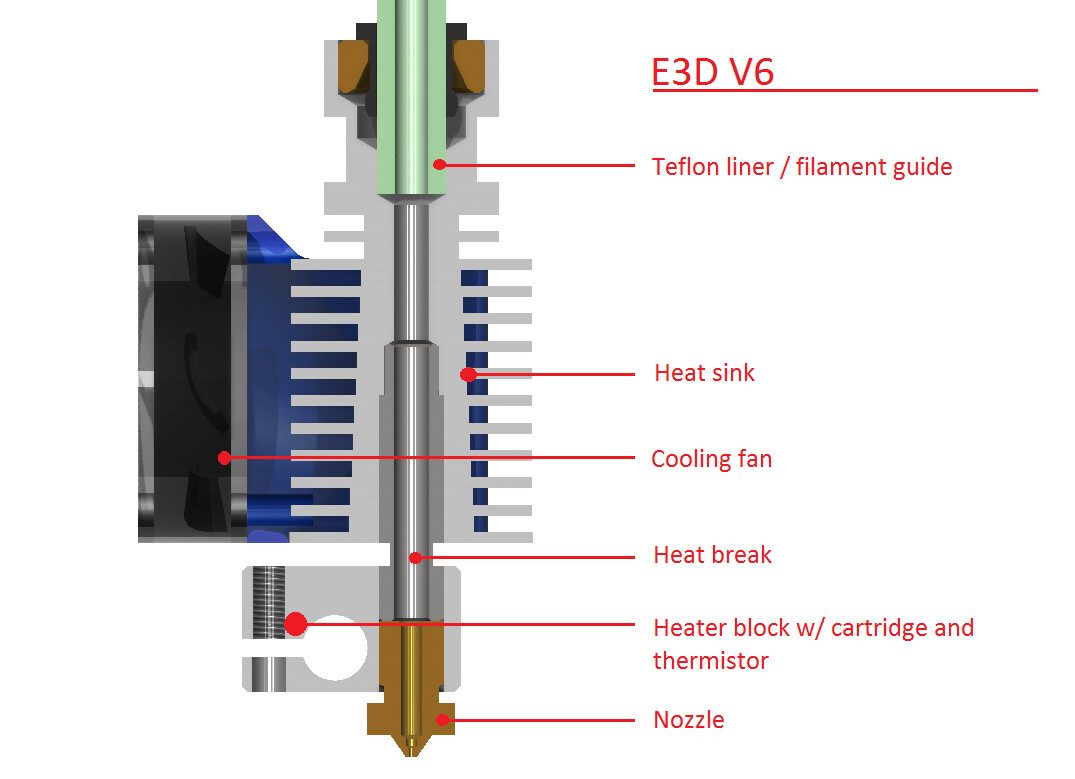
The filament is intended to melt inside the heat block and nozzle exclusively, in an area known as the melt zone. If the filament melts early, it is much more likely to cause clogging issues. The heat break and the heat sink are both intended to help prevent this.
Obviously, you can’t see where the filament melts inside your metal hot end. You can, however, see the effects of heat creep. For example, if you experience clogs and notice that your print looks half complete with a fuzzy-looking top. In particularly bad cases the heat can start to discolour and damage the filament guide feeder tube.
What can you do to fix heat creep?
The most obvious solution is to reduce the temperature of the heating element. Filaments often have a range of temperatures that they can be printed at, so try lowering the temperature by five or ten degrees.
If reducing the temperature doesn’t solve the issue or you need to keep the temperature high, you should look at cooling. Most printers should have a hot-end cooling fan that blows air over the heat sink. Airflow helps to keep it cool, and more airflow keeps it cooler. Try setting the hot end cooling fan to its maximum setting to cool the heat sink as much as possible. If your printer doesn’t have a hot end cooling fan, you should add one. Typically a small 40mm fan is adequate.
It takes time for the filament to heat up enough to melt. Heat creep is much more likely to occur if your print involves a lot of retractions. This is because it leaves the filament in the same area for a while as the heat spreads up the filament. If you’re printing too slowly this can also be an issue. Try minimising retractions and increasing the print speed. This reduces the amount of time the filament has to heat up and melt early.
Have you got any other tips to help prevent heat creep? Let us know down below.