
You may want to learn how to soft or hard reset the Amazon Kindle Fire if are experiencing problems with the device. Just follow these steps.
Soft Reset
A soft reset will simply restart the Kindle Fire without affecting the data on the device. Perform a soft reset using these steps if the Fire is frozen or not responding.
5th through 7th Generation Models (HD8 & HD10)
- Press and hold the “Volume Down” and “Power” buttons simultaneously for 10 seconds until the device shuts off.
1st – 4th Generation Models (HD & HDX)
- Press and hold the and “Power” button for 10 to 20 seconds until the device shuts off.
Hard Reset
A hard reset will reset your Kindle Fire back to factory default settings and clear all data from the memory of the device. Ensure your Kindle Fire has at least a 30% battery charge level before performing these steps.
3rd – 7th Generation Models
Option 1
Go to “Settings” > “Device Options” > “Reset to Factory Defaults” > “Reset”
Option 2
- Starting with the Kindle Fire off, press and hold “Volume Down” and “Power” simultaneously.
- The Amazon system recovery screen should appear. Use the volume buttons to toggle the selection to “wipe data/factory reset“.
- Press the “Power” button to choose the selection.
- Use the volume buttons to toggle the selection to “Yes — delete all user data“.
- Press “Power“.
1st & 2nd Generation Models
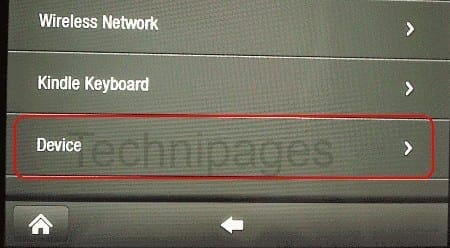
Go to settings gear > “More…” > “Device” > “Reset to Factory Defaults” > “Erase everything“



How can I get my 7 Ed kids kindle off the white screen that shows language choices
Unable to make choices by touch
Help ….,
Fire HD – 2019. I did a hard reset and now my kindle is dead – black and does not respond to anything. Any suggestions.
Thank you so much! My 2016 Fire just stopped, and fortunately I found your suggestion. I don’t know what I would do without my Kindle on a road trip:-)
My Kindle Fire HD 7 was stuck in an endless loop while starting. It took me more than two weeks and estimated 20 not working “solutions” to find your page and your suggestions worked immediately. Thank you very much.
Peter Sy
Brilliant, the volume down/power for 10 seconds worked beautifully! Thank you!
My old Kindle won’t acknowledge my WiFi. My new one does though so nothing wrong with the signal. Have some games on my old one that I don’t want to loose my progress on. Have tried the power/volume button restart. Not sure what else to try without loosing what I have in it.
Very helpful, Thank You sincerely. My gifted FirePro8 was stuck on a manufacturers app.
Was able to successfully reset. Other instructions I found online, elsewhere, were backwardds.
Thank you for your site.
Nothing has helped. I even took it to Best Buy. He saw what it was doing and ask if I had gotten it 2 years ago. He said that is how Kindle works and your Kindle has hit the wall!! Sure enough I have bought 2 in 4 years!
I have tried all of these suggestions and it still won’t go past the kindle fire on the screen what can I do is there a reset button
After a whole day of being ticked because my Fire was working … and then it was not, I found this glorious solution and it worked immediately. I was so surprised that I almost dropped it.
Thank you.
My free time will not reboot the screen stays black. Please help!!!
My kindle 5th generation isn’t going to my different amazon account
I have a kindle fire and the touch screen won’t work. I just replied the touch screen and the LCD display screen and still won’t do anything. I can’t even get it to hard start or anything. It’s a 3HT7G can anybody help me please
I’m seeing that maybe since it was my kids stepmoms and she “let him have it” I might just toss it in the recycle bin , thanks for the help .
My Amazon Fire will not turn on. It was charged when I shut it down. I’ve tried holding the on button for up to 40 seconds, and I’ve also tried holding the on button AND the down volume button. No luck. I have even tried charging the tablet, and it does not light up like it is charging. Any other ideas I can try?
Trying to do a factory reset on fire 7. I set the language and next it ask for Wi-Fi network and password. I put it in and after spinning for several minutes, it tells me the password is incorrect. The reset was suggested because the tablet was NOT charging. Tablet is about 1 1/2 years.
+IF YOU ARE HAVING PROBLEMS+
Press and hold the volume UP and Power key, AFTER the device is turned off, hold it for about 10 seconds then it will bring up the reboot screen.
My son has an 8th Gen and what a piece of crap! It is slow, it freezes, the screen will go insane (like someone or something is just holding a finger on the screen constantly but no one’s touching it and the screen is clean).
Lately, it can be connected to our WIFI and just drop the connection. No pattern, just randomly stop playing and every time it’s dropped the connection.
Also, over the weekend, I noticed our service was super slow. I’m talking dial up slow when dial up was new! Ran a speed test and it was at 3.2 and should have been at LEAST at 6 Mbps. Called my service provider and found that the Kindle was eating bandwidth like a monster w/ a bottomless pit for a belly. Just thought to check it earlier, and just for the last 24 hours, said that thing had gone through 3.8 GB! Ummm, my son’s 5 and that stupid tablet sat on the counter all day except for when we used it to do his school work which was all of 10 minutes. We’re replacing that thing with a regular tablet.
Amazon could have this tip in their help files online but they don’t–or they don’t make it easy to find.
Thanks a million.
My Fire Tablet powers on and off by holding the power button down,but it doesn’t want to go any further then the lit up fire screen. Does anyone have any suggestions? I also factory reset it,and rebooted it as well! It’s not doing anything I even tried to clear the chache and reboot! Simply stuck on fire logo. 8inch 7th generation.
My 10 fire tablet screen went completely black after it came on as normal. Purchased & registered in 2016. I cannot get my fire to do anything. It’s fully charged. Pressing the volume down button simultaneously with the power button does nothing. Looked for a small reset button like phones have, but there is not one. Any ideas to get it working again?
I have tried hard resert and still the it need a password after reserting it
No, my touchscreen is non-functional. How do I reset the tablet? It is a Kindle Fire (probably 2012 or 2013) with no volume button.
I am having the same issue as a lot of the above folks. I have done a soft reset as I only have a single button that turns it off and on but the screen is non responsive, it is keeping time but I can not do much else with it like open books or sign on to WiFi, etc.
any suggestions?
my kindle fire is black screen it responds to taps with different options such as slide left to unlock but the screen is black. how else can i get my device to light up to see the screen?
My Kindle Fire does not have a volume button. It has a power button (small round button about the size of an Uppercase O on a standard computer keyboard. I tried holding down the power button for an extended period of time (perhaps 50-70 seconds). The Kindle Fire flashscreen comes up, but it just keeps recycling. No software access is possible.
My Fire Tablet powers on and off by holding the power button down,but it doesn’t want to go any further then the lit up fire screen. Does anyone have any suggestions? I also factory reset it,and rebooted it as well!
I tried the hard reset several times without success. When I again turn the devise on, after a brief reboot, the devise displays the “fire” logo and the message “installing system update.” The progress bar displays about 20% then stops. Any suggestions?
Yes, thank you very much. This helped greatly. My fire was frozen while it was on the main light up screen. It took a little longer but LONG holding down the “Volume Down” and “Power” worked. It turned off and all I had to do was turn it back on. Thank you.
No! the unit stay on light-up Kindle fire. I can not turn it off or re-boot the device. Please help
I purchased my a little over 2 yr. ago.
When I press to search – My “keyboard” display comes up, but is “Divided/ half on one side half on the other side of screen with a gap between sides ???
Thank you, yes. glad I didn’t have to go to default.
For getting the boot menu: I have a 5th generation Fire 7″ and found I needed to hold the power + volume down, on the off device. Then after the screen first lit up, I let go of the power button and quickly repressed and held down the volume down again. The boot menu then came up.
My fourth gen Fire HD 7 touchscreen still works, but only to select “OK” to turn it off and is otherwise unresponsive, so it’s working but does not respond to other touch (for instance, will not swipe down to reveal the control panel).. The screen looks normal, but (1) the time is fixed at boot time/does not advance; and (2) the navigation bar at the bottom is blank (no back, home, or active apps buttons to choose)..
A soft reset (20 seconds holding the power button) reboots the device, but to the same state as before.
The device is fully charged.
Your Option 2 for a hard reset (volume down and power simultaneously) only seems to boot to the same unresponsive state; I’m not offered a recovery screen. Any further guidance?
Yes it helped but I would like to know Is there a way to not sign into Amazon and apply google to my Amazon kindle fore hd 8
When I factory rest my kindle do I have to have a Amazon prime account
Under Soft Reset the instruction reads,Press and hold the and “Power” button
Should it read: Press and hold the “Volumn Down” and “Power” button?
1st – 4th Generation Models (HD & HDX)
Press and hold the and “Power” button for 10 to 20 seconds until the device shuts off.
Yeah, I thought I had a tablet that became a brick. Tried several searches over several weeks and all but gave up. LUCKILY I came across this very helpful page and I’ve since recovered my tables. Big Thanks!
Last week several of the games I play stopped working. The message is ” The license for this app needs to be refreshed. Please try again”. How do I fix this? It shouldn’t be the app, because it happened to about 5 of my games with different publishers. I was going to try to reset my kindle, but I don’t want my items to be deleted(books, other games, music etc.).
My Kindle has a black screen all the time.
Is there anything I can do.
My 3rd gen won’t reset by doing power button and volume down it don’t show Amazon it just says kindle fire and goes away and nothing else
I have a 7th Gen Kindle Fire. The battery wouldn’t charge past 22%. The Option 1 Factory Reset doesn’t work because the battery needs to be above 30% (even plugged in.) Option 2 worked fine. Now it’s wiped & I can mail it back to Amazon for repair/replacement. Thanks!
I bought this 7th generation in Aug. 2017, I know it is pass it’s warranty but it has never worked since I received it. It won’t go pass the continue button on the Welcome to Fire Page. I try to reset it today to see if I could get it working but it still is frozen at that page.
Is there anything I can do or is it just plain defective? I got as far as a -> fast reboot and nothing else would happen, I reset to get back on as per your instructions. It is back to the welcome page as I explained. Is there anything that can be done or is it just trash?
thanks
My kindle fire tablet x43z50 doesn’t wipe shows wipe failed and the firmware has been removed kindly guide me how to wipe or format when non of the firmware is in tablet
Yes! Was caught in an update cycle that was Neverending! It was new out of the box so wiping was best option. Thanks!!
my kindle fire says it has all internal storage full there is nothing i can remove what can i do?
my kindle fire 5the generation says the internal storage is full there is nothing that I am able to remove what can I do?
Yes this helped a lot. Stuck in the mode of needing parental control passcode. Didn’t know the passcode and couldn’t system factory reset, so did this option. Thanks!
I got this as a gift and love it except for the volume. When watching any media, when you adjust the volume to the lowest setting (before mute) it still sounds normal. I can increase it from there and it will get louder accordingly, but it’s like it’s “starting” volume is set too high.
So far I’ve tried:
Restarting
Hard restart
Restoring factory defaults
Calling Amazon help line (they suggested just using headphones-not helpful)
Installing quick mute volume control app, as I’ve seen it discussed a lot in my searches, however for some reason it is not compatible with this device
Can anyone help?
My screen is all white can’t see anything on it . Is there a way to do it without seeing the screen
Fire just has lines across the screen. Not seen before. Unable to see anything normal on the screen. It has become a brick. Is there a reset method other than what you show? I see a small hole next to the power button. Is that a reset port?
My D01400 use to hang after displaying “kindle fire” and the screen then turns orange in color and it will remain like that till i turne it off with the power button pls can u help me cause I really need this device if I can locate the reset button on the panel I will be very glad pls help
Yes, it helped a lot. I had almost given up. Amazon couldn’t even help. Thank you.