

You open WhatsApp and notice something new in how it looks. To the left of the Chats tab, you saw the icon of three users together. When you tap on that icon, you’ll be entering WhatsApp communities. Unlike groups where you can only add 256 people, Communities will let thousands of users participate. You’ll have more privacy in Communities since users can only see someone else’s phone number if they are in the same group or are an administrator in the Community.
WhatsApp Communities
Thanks to Communities, you can unite different groups and get updates sent to the entire Community. It’ll be easier to create discussion groups. For example, if you want to only talk to the administrators of a particular group without letting the rest of the group find out, you can create a sub-group for that. Thanks to Communities, the user can organize their already existing groups.
You can use Communities to manage groups better, but if you’re good with how things are, there is no obligation to use them. Also, just because you enable them doesn’t mean you have to keep it enabled. If you ever change your mind, you can always turn it off. When you enable or disable Communities, you’ll see a message in the groups added to it.
You have the option of creating a WhatsApp group invite, but if you think that things might get a little out of control with that, you can always only allow admins to invite others to the group. Unlike Telegram, with WhatsApp Communities, you won’t be able to search for other communities. As an Admin, you’ll also be able to erase messages for other users, and the file size limit will go up to 2GB. When launching audio calls, you can add as many as 32 people.
Users will also need to remember that WhatsApp will limit groups to only one Community. Also, users won’t be able to add all the groups they want.
How to Add Your WhatsApp Group to a Community
When you tap on the group icon to the left of the Chats tab, you’ll be greeted with a brief message introducing you to WhatsApp Communities. Then you’ll see where you can add the Community name and a description. You have the option of creating an already existing group, or you can create a new one on the spot. All the groups added to the Community will be listed so you can easily remember which ones you added.
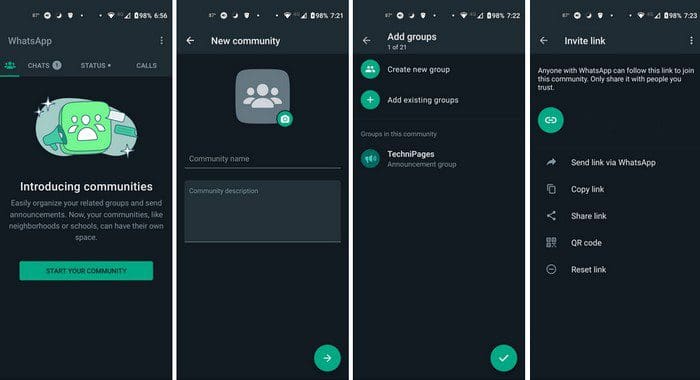
Once you’ve added your groups, you’ll see the different ways you can share the link to invite others. WhatsApp will encourage you only to share the link with those you trust. You can choose from options such as:
- Send link via WhatsApp
- Copy link
- Share link (outside of WhatsApp)
- QR Code
- Reset link
Conclusion
WhatsApp Communities are meant to help you organize your groups better. By sending messages throughout the Community, you can get your message across faster. Who knows what other features users might see in future updates? What features would you like to see? Share your thoughts in the comments below, and don’t forget to share the article with others on social media.




It seems WhatsApp community is not working properly in Canada, admin can not see name of attendance , they can not respond or send texts , anyone can join community by having link without admin confirmation.
It is lot to work on features for Canadian