

For those times when you have something to say, you can use Telegram channels. They allow you to get your message across to a large number of people, and there are no limits to the number of subscribers you can have.
Contents
What is Telegram Channels?
Telegram channels are tools you can use to send messages to all who are subscribers to your channel. Channels are different from groups in that groups can have up to 200,000 users and can be public. The Channels, on the other hand, channels are not made for conversations like groups and are used to send messages to a large number of users who have subscribed or have been added to the channel.
Channels will not show the profile picture and name of the person who sent a message. All that you’ll see is the picture and the name of the channel.
When creating a channel, it can be public or private. Telegram will allow choosing from either one. The difference between public and private channels is that public channels have a username, while private ones don’t. Anyone can find the public channels. With the private ones, you can only join if you’re added by the administrator. An administrator can add as many as 200 subscribers.
In Telegram channels, only the administrator can post a message. You can only post text messages if you want, but there are more things you can post. For example, you can post things such as:
- Polls
- Animated Stickers
- Auto-playing videos and more!
You don’t have to worry about waking anyone up with the videos since they will start playing with no sound. If you want to go full-screen with the videos, tap on them. You can also send large files, regardless of the type and full-resolution uncompressed images are also welcome.

Speaking of images, if you were to send a lot of them, Telegram displays them in a good-looking album, and your subscribers will only get one notification for all the images you sent.
Other Useful Channel Features
Since only the administrators are allowed to comment on channels, you might create a channel discussion group. To create a discussion group for your channel:
- Open your channel
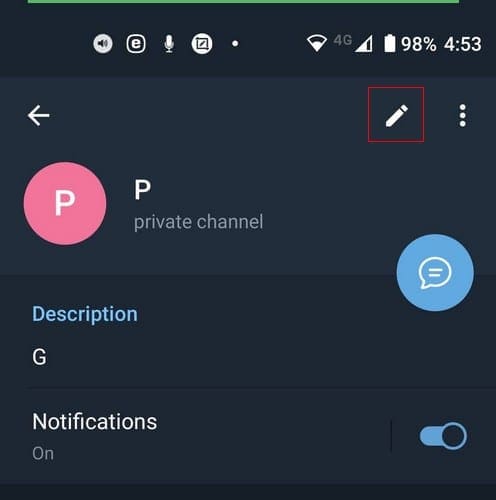
- Tap on the group name at the top
- Select the pencil icon
- Tap on the Discussion option
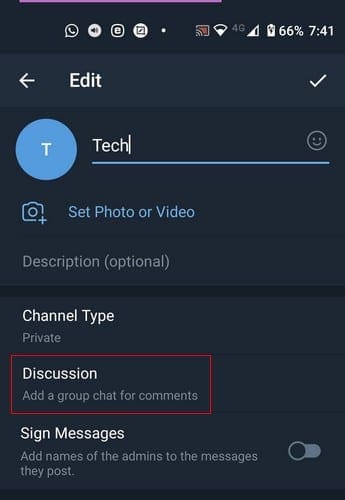
- Choose the create a new group option

After naming your group and adding a group picture, tap on the checkmark at the bottom right. That’s all there is to it. To access your group, tap on the group’s name in the Discussion option, followed by the group’s name again. At the top, you’ll see the option to add more members if that’s what you want to do.
How to Find Telegram Channels
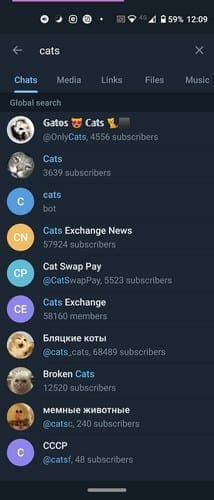
If, after knowing what Telegram channels are you still want to join, here’s what you need to do. To find a Telegram channel, simply type the name of the topic you’re interested in in the search option at the top. The available channels will appear along with the number of subscribers it has.
If you have some time on your hands and want to browse through the available channels, you can. There’s a Telegram Channel site you can look through and find channels separated by interests and topics. You can search the channel’s latest posts to see if you want to join or not. If you do, simply tap on the subscribe or join button, and you’re good to go.

If you ever change your mind and want to leave a channel, tap on the channel’s name at the top, followed by the dots at the top right. Choose the Leave channel option, and you should see a confirmation message. Select Leave channel, and you’re done.
Conclusion
Telegram channels are a great way to keep up with what matters to you most. There’s a channel for just about everything, and joining is as easy as leaving one if you see it’s not for after all. How much of a channel fan are you? Don’t forget to share your thoughts in the comments below.





thanks