Skip to content
LogoTechnipages
LogoTechnipages
  • Topics
        • Android
        • Browsers
        • Gaming
        • Hardware
        • Internet
        • iPhone
        • Linux
        • macOS
        • Office
        • Reviews
        • Software
        • Windows
        • Definitions
        • All Recent Posts
  • Product Reviews
  • About

Fix OneNote Error 0xE401065D, 0xE000145C, 0xE4010640

Madalina DinitaJanuary 13, 2021 Comments (0)

If you’re getting Onenote error 0xE401065D, 0xE000145C, or error 0xE4010640 when syncing your notes, try again later. This is because these error codes indicate that OneNote’s servers are experiencing high traffic volumes. In other words, too many users are using OneNote, and the servers can’t respond promptly.

Contents

  • 1 How to Fix Error 0xE401065D, 0xE000145C, 0xE4010640
    • 1.1 Try Again Later
    • 1.2 Log out and Use a Different OneNote Version
    • 1.3 Check Your Network Connection

How to Fix Error 0xE401065D, 0xE000145C, 0xE4010640

Try Again Later

Since these are only temporary errors indicating OneNote’s servers are under load, try again later. Don’t close the app. Wait 5 or 10 minutes, and relaunch OneNote.

Don’t panic either; you won’t lose your notes. While you’re waiting, OneNote will constantly try to reach the servers to sync your notes. Eventually, the servers will respond, and the app will sync the notes. For greater peace of mind, you can also take a screenshot of your notes.

Log out and Use a Different OneNote Version
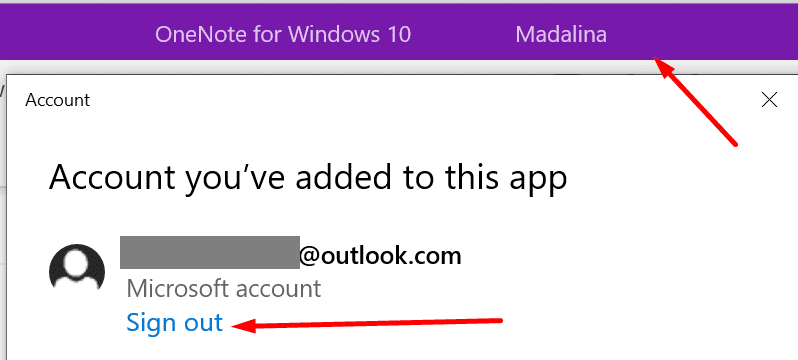
onenote sign out

If you’re using the OneNote app for Windows 10, switch to the web version and check if the error is gone. Of course, if you’re getting one of these errors on the web version of OneNote, launch the stand-alone desktop app.

Ideally, you should log out of your account before switching to a different app version. In this manner, you’ll refresh the connection between your account and OneNote’s servers.

Check Your Network Connection

To make sure the problem is not on your end, restart your modem and computer. If you haven’t completely unplugged your modem in a long time, go ahead and disconnect the power cable. Wait one or two minutes, and then power up your network devices.

Additional Solutions

We published many guides on how to fix OneNote sync issues. Check the posts below as well. Maybe some of the solutions listed there will do the trick for errors 0xE401065D, 0xE000145C, and 0xE4010640.


  • Troubleshooting OneNote Sync Error 0xE40200B4
  • OneNote Needs A Password to Sync This Notebook
Categories: Windows

Author Madalina Dinita

Madalina has been a Windows fan ever since she got her hands on her first Windows XP computer. She is interested in all things technology, especially emerging technologies -- AI and DNA computing in particular.

You Might Also Like

  • Active Directory logo

    How to Find Computer Locking Active Directory Account

    Mitch BartlettWindows
  • surface-pen-not-working-after-update

    Fix Surface Pen Not Working After Update

    Madalina DinitaWindows
  • fix-Windows-10-Webcam-Blurry-Out-of-Focus

    Fix: Windows 10 Webcam Is Out of Focus

    Madalina DinitaWindows
  • Windows-11-cant-move-taskbar-fix

    Windows 11: 3 Helpful Tips to Fix Taskbar Not Moving

    Madalina DinitaWindows

Leave a Reply

Your email address will not be published. Required fields are marked *

  • why is ram so expensive

    Why Is RAM Suddenly So Expensive?

  • how to fix error code 0x800f0922 windows 11

    How to Fix Error Code 0x800f0922 in Windows 11

  • service outage message on Xbox

    What to Do With a Service Outage Message on Xbox

  • signs your hdd is failing

    Signs That Your HDD Is Failing

  • how to fix error code 0x800705b4 in windows 11

    How to Fix Error Code 0x800705b4 in Windows 11

profile pic

The Experts Behind Technipages

My name is Mitch Bartlett. I've been working in technology for over 20 years in a wide range of tech jobs from Tech Support to Software Testing. I started this site as a technical guide for myself and it has grown into what I hope is a useful reference for all.

Learn More

technipages logo white
linkedin icon

Technipages is part of Guiding Tech Media, a leading digital media publisher focused on helping people figure out technology. Learn more about our mission and team here.

© 2026 Guiding Tech Media All Rights Reserved

  • About Us
  • Contact
  • Terms of Use
  • Privacy Policy

© 2026 Guiding Tech Media All Rights Reserved

Information from your device can be used to personalize your ad experience.
Do not sell my personal information.

Last Updated on January 13, 2021 by Judy Sanhz