Skip to content
LogoTechnipages
LogoTechnipages
  • Topics
        • Android
        • Browsers
        • Gaming
        • Hardware
        • Internet
        • iPhone
        • Linux
        • macOS
        • Office
        • Reviews
        • Software
        • Windows
        • Definitions
        • All Recent Posts
  • Product Reviews
  • About

ProtonMail: How to Delete Your Account

Judy SanhzNovember 1, 2022 Comments (0)
ProtonMail Icon

You gave ProtonMal a try and used its helpful features. For example, you used filters and customized your inbox to provide it with your personal touch. But, despite all its features, you think the time has come to part ways. You’re ready to delete your account. The good news is that erasing your ProtonMail account is fast and easy. Even if you change your mind after deleting it, you still have some time to recover your account.

How to Erase Your ProtonMail Account

Some users may want to erase their ProtonMail account to register with the same username again. Before you proceed to erase your account, you must be aware that ProtonMail will not let you see the same username again. Once you create the account, you can’t change it. If that’s your goal, you can always upgrade to premium to change the domain.

You’ll have the chance to combine both accounts but keep in mind that the data with secondary accounts will be lost. But, if you’re sure that you want to erase your account, you’ll need to sign into your account. Once you’re in, click on Settings.

ProtonMail Settings

In Settings, you’re going to see various options to your left. From those options, click on the Account and password option. Once you’re in, scroll all the way down until you come across the Delete account option.
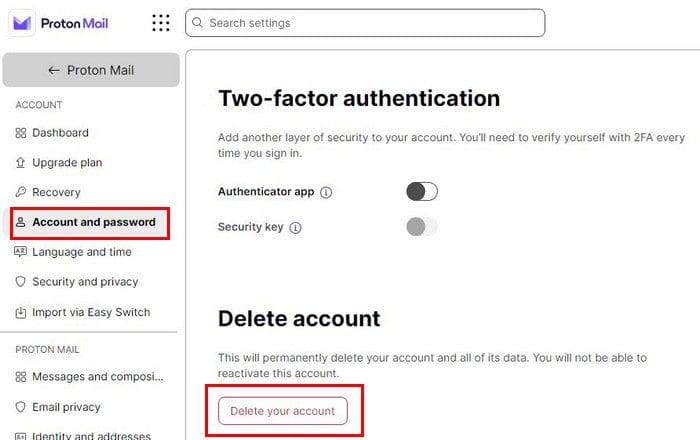
Erase ProtonMail Account

When you click on the Delete button, ProtonMail will show you a warning of what will happen when you erase your account. The warning says that the deletion is permanent and that you will lose access to all connected services. All your contacts will be deleted. You’ll also see an option to tell them why you’re erasing the account. Click on the dropdown menu and choose from the listed reasons.

Warning Delete account

If you go through with it and delete your ProtonMail account, it will take two weeks for the process to be done. If you change your mind after clicking on the delete butt, you can still do something about it. You’ll need to contact ProtonMail support as soon as possible to tell them not to erase your account. ProtonMaill will delete your account if it’s inactive for 12 months.

Conclusion

Sometimes things don’t work out with certain email providers. When that happens, there are simple steps you can follow to erase your account and, in this case, your ProtonMail account. Remember that if you erase your account, you can use the same username. So it’s best to take some extra time to think about it and then erase it hope the support team hasn’t erased it yet. Why are you closing your ProtonMail account? Let me know in the comments below, and don’t forget to share the article with others on social media.


Categories: Internet

Author Judy Sanhz

I am a tech geek who loves technology. I have been writing about tech for over a decade, covering various devices and programs. I write about Android, Apple, and Windows devices and programs. I stay updated on the latest gadgets, upgrades, features, and news. I aim to make complicated tech information easy for everyone to read. I've been with TechniPages from the beginning to help others fix their tech issues with the easy-to-follow guides.

You Might Also Like

  • Firefox for Android: How to Force Enable Zooming

    Mel HawthorneAndroid
  • Troubleshooting Google Chrome Invalid URL Error

    Madalina DinitaInternet
  • automatically-admit-participants-google-meet

    How to Fix Google Meet Can’t Access Camera

    Judy SanhzInternet
  • What Is a Pentest?

    Mel HawthorneInternet

Leave a Reply

Your email address will not be published. Required fields are marked *

  • hdd better than an ssd

    When Is an HDD Better Than an SSD?

  • top graphics cards for 2026

    Top 5 Graphics Cards for 2026

  • roblox error 280

    Having Trouble With Roblox Error 280? Here’s What to Do

  • hard disk smart command error

    Hard Disk SMART Command Failed – How to Fix 

  • files automatically deleted on click

    Files Getting Deleted Automatically? Here Are Some Reasons Why

profile pic

The Experts Behind Technipages

My name is Mitch Bartlett. I've been working in technology for over 20 years in a wide range of tech jobs from Tech Support to Software Testing. I started this site as a technical guide for myself and it has grown into what I hope is a useful reference for all.

Learn More

technipages logo white
linkedin icon

Technipages is part of Guiding Tech Media, a leading digital media publisher focused on helping people figure out technology. Learn more about our mission and team here.

© 2026 Guiding Tech Media All Rights Reserved

  • About Us
  • Contact
  • Terms of Use
  • Privacy Policy

© 2026 Guiding Tech Media All Rights Reserved

Information from your device can be used to personalize your ad experience.
Do not sell my personal information.

Last Updated on November 1, 2022 by Judy Sanhz