Skip to content
LogoTechnipages
LogoTechnipages
  • Topics
        • Android
        • Browsers
        • Gaming
        • Hardware
        • Internet
        • iPhone
        • Linux
        • macOS
        • Office
        • Reviews
        • Software
        • Windows
        • Definitions
        • All Recent Posts
  • Product Reviews
  • About

Fix: Outlook Conversation History Folder Is Missing

Madalina DinitaApril 2, 2021 Comments (0)
fix outlook conversation history folder missing

If you want to check the copies of your saved Skype for Business or Lync conversations, go to Outlook and open the Conversation History folder. To access the folder, click on the Outlook menu, go to More and select Conversation History.

outlook conversation history folder

Unfortunately, many users complained that sometimes there is no Conversation folder in Outlook. Or the folder is stored in Inbox and they can’t move it back to its original location. In this guide, we’ll explore what you can do if the Outlook Conversation History folder disappeared.

Contents

  • 1 How to Restore the Outlook Conversation History Folder
    • 1.1 Repair Office
    • 1.2 Delete the SIP Profile
    • 1.3 Recreate the Conversation History Folder
    • 1.4 Conclusion

How to Restore the Outlook Conversation History Folder

⇒ Quick Fix: Updating your Outlook and Skype for Business apps may solve this issue. Check for updates, install the latest app versions on your computer and check the results.

Repair Office

Outlook is part of the MS Office Suite. If certain Office installation files got corrupted, you’re bound to experience various glitches when using your Office apps.

  1. Launch the Control Panel and select Programs.
  2. Then go to Programs and Features and select Office 365 or Microsoft 365.
  3. Hit the Change option and select Quick Repair. If the issue persists, use the Online Repair option as well.
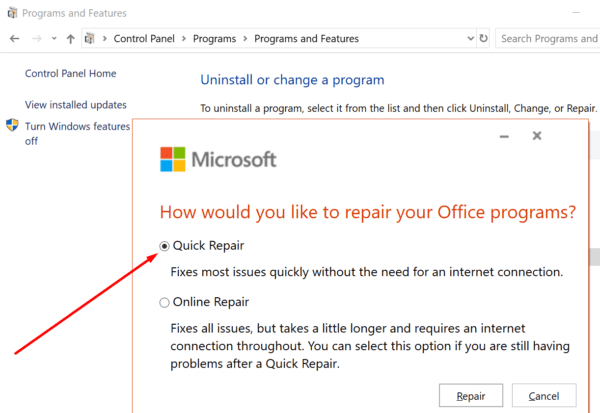
quick repair office windows 10

Delete the SIP Profile

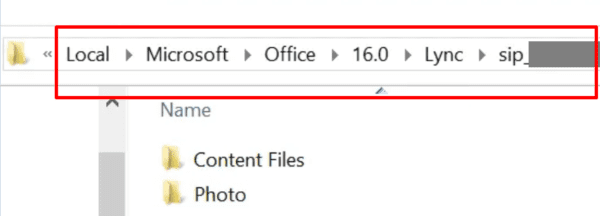
  1. Navigate to %UserProfile%\AppData\Local\Microsoft\Office\16.0\Lync.skype for business sip folder
  2. Then locate and delete the sip_username directory. Double-check to make sure the directory matches the sip address of the user account affected by this issue.
  3. Restart the Skype for Business or Lync to rebuild the directory. This should fix any user profile corruption issues causing this problem.
Recreate the Conversation History Folder

One quick way to troubleshoot this issue is to simply recreate the folder.

  1. Close Outlook. Make sure you exit the app on all the devices connected to your mailbox.
  2. Then download MFCMAPI. Keep in mind this is a 1.1GB file.
  3. Run the MFCMAPI executable file.
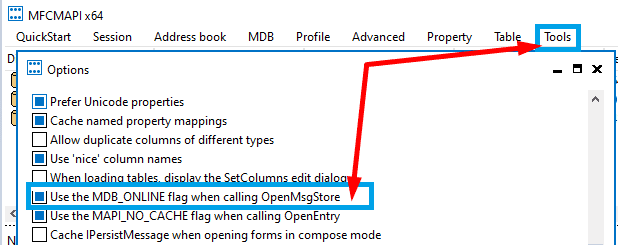
  4. After you launch the tool, navigate to Tools and click Options.
  5. You then need to enable Use MDB_ONLINE when calling OpenMsgStore.Use MDB_ONLINE when calling OpenMsgStore MFCMAPI
  6. Hit the Logon option on the Session menu.
  7. Select your profile name and, in the top pane, double-click your mailbox line.
  8. In the left pane, expand Root Container and select Top of Information Store.
  9. Select Inbox and then locate 0x35E90102 in the Tag column. The 0x35E90102 code is the EntryID for the Conversation History folder.
  10. Delete the line item and exit MFCMAPI. The system will notice the Conversation History EntryId has been deleted and will recreate it automatically.
Conclusion

To conclude, if the Outlook Conversation History folder is missing, repair and update your Office Suite. If the issue persists, recreate the folder using the MFCMAPI tool. Let us know if this guide helped you troubleshoot the problem. On the other hand, if you used other methods to fix this issue, do list the steps to follow in the comments below.


Categories: Office

Author Madalina Dinita

Madalina has been a Windows fan ever since she got her hands on her first Windows XP computer. She is interested in all things technology, especially emerging technologies -- AI and DNA computing in particular.

You Might Also Like

  • Excel Header

    Enable/Disable Display of Formulas in Cells in Excel

    Mitch BartlettOffice
  • MS Word Header

    Word: Divide Page Into Columns

    Mitch BartlettOffice
  • How to Connect Outlook 2023 to Gmail

    Judy SanhzOffice
  • How to Get Microsoft Office Free for Students and Teachers

    Kat ArmstrongOffice

Leave a Reply

Your email address will not be published. Required fields are marked *

  • system32 folder opens on startup

    System32 Folder Opens on Startup – How to Fix

  • browser keeps opening hp support

    Browser Keeps Opening HP Support Assistant Tabs 

  • camera not working in vmware

    Camera Not Working in VMware – How to Fix

  • browser screen goes black

    Browser Screen Goes Black Intermittently 

  • computer heating up in hyper v

    Computer Heating Up When Using Hyper-V – How to Fix 

profile pic

The Experts Behind Technipages

My name is Mitch Bartlett. I've been working in technology for over 20 years in a wide range of tech jobs from Tech Support to Software Testing. I started this site as a technical guide for myself and it has grown into what I hope is a useful reference for all.

Learn More

technipages logo white
linkedin icon

Technipages is part of Guiding Tech Media, a leading digital media publisher focused on helping people figure out technology. Learn more about our mission and team here.

© 2026 Guiding Tech Media All Rights Reserved

  • About Us
  • Contact
  • Terms of Use
  • Privacy Policy

© 2026 Guiding Tech Media All Rights Reserved

Information from your device can be used to personalize your ad experience.
Do not sell my personal information.

Last Updated on April 2, 2021 by Mitch Bartlett