

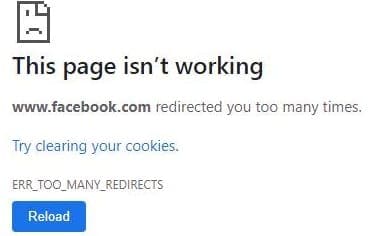
Logging in to your Facebook account should not take more than a few seconds. But sometimes the social media platform may fail to log you in due to too many redirects. This error usually affects desktop browsers, so you should still be able to access your account using the mobile app.
Contents
Fix: Facebook Redirected You Too Many Times
⇒ Note: Many users used to go back to the old Facebook layout to fix this issue. Unfortunately, Facebook took down the original layout, and you can no longer use this troubleshooting method. The Old Layout for Facebook browser extension doesn’t always work but you can still install it on your browser and give it a try.
Use a Broken Link on Purpose
When you use a broken or non-existent Facebook link, the platform automatically displays a Go to News Feed button. Open a new tab and enter this link: https://www.facebook.com/myaccount/login. Then click on the News Feed option and check if you can access your account.

Check Your Browser
If your cache files are interfering with Facebook’s login scripts, you should be able to fix this issue by clearing your cache and cookies.
If you’re using Chrome, navigate to History, select Clear browsing data, and clear your data. Then go to Help, select About Google Chrome and check for updates.
Your browser extensions might also be interfering with Facebook. Disable all your extensions and check if you can log in to your account. It appears that BitDefender Anti-tracker often causes this error.
Check Your Date and Time Settings
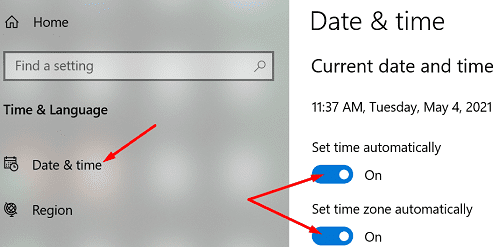
Incorrect date and time settings may prevent you from connecting to Facebook’s servers due to security reasons. So, go to Settings, select Date and time settings, and let your computer set the time and time zone automatically. Restart your machine, and check if the issue is gone.
Use a Different Browser
Maybe your browser is to blame for all those redirects preventing you from accessing your Facebook account. Switch to a different browser and check if you can log in to your account.
By the way, many users confirmed they solved the login problem with Internet Explorer’s help. Although Microsoft phased out the browser, it should still be available on your Windows 10 computer.
Conclusion
Facebook Business users may sometimes experience login issues due to an unusually high number of redirects. To fix this problem, clear your browser cache, disable your extensions, and make sure your date and time settings are correct. If the issue persists, reinstall your browser or switch to a different web browser.
Which of these solutions solved the problem? Let us know in the comments below.



THE SOLUTION:
1. Go to profile picture on the top right
2. Choose setting & privacy
3. Select Security and login at the left menu
4. Go to Apps and Websites
5. At the bottom look for Preferences > Apps, websites and games > Turn Off > Turn On
That how it is work for me after so many trouble shoot. Hope this HELP!
FIXED for me!
The setting: Apps, websites and games
Gives you the ability to use Facebook to log into and interact with third party apps, websites and games as well as connect accounts you have with other apps, websites and games to Facebook.
If you have it turned off you will get the too many redirects error. I turned it on, and no error.
Im having the same issue with no avail.
Hi Everyone, I had the same issue with my business account but I am now able to use it as before. What I did is open the same business account on my Iphone which shockingly worked. I double check again on my laptop and it didn’t work. It worked only my Iphone. Then what I did is i linked the business FB account to my FB personal account. I went to my business account, put my personal account as NEW admin of this page, went back to my personal account and accepted the “invite” of being admin of my business account. I know access to everything as it use to be!!!
Hope that helps!!!
Have tried every suggestion and nothing has worked. Very frustrating and can’t get in touch with Facebook direct.
this error is because you have created multiple account on same IP and device.
No help whatsoever, this has been an ongoing problem for me for over 2 years now. I have sent over 200 emails to support, but have yet to have anything done about it, I’ve not even had an acknowledgement reply to say they would look into it.
None of these suggestions fixed the redirect problem.