Any processor instruction has multiple stages to its operation. Each one of these stages takes a single CPU cycle to complete. These stages are Instruction fetch, Instruction decode, Execute, Memory access, and Writeback. Respectively these get the instruction that needs to be completed, separate the operation from the values being operated on, execute the process, open the register on which the result will be written, and write the result to the opened register.
Historical In Order Processors
In early computers, the CPU didn’t use an instruction pipeline. In these CPUs, each single-cycle operation needed to happen for every instruction. This meant it took five clock cycles for the average instruction to be processed entirely before the next one could be started. Some operations may not need to write any result out to a register, meaning that the memory access and writeback stages can be skipped.

There’s a problem lurking, though, when running a complete instruction in order before being able to move on to the next instruction. The problem is the cache miss. The CPU stores data it is actively processing in the register. This can be accessed with a one-cycle latency. The problem is that the register is tiny because it’s built into the processor core. The CPU must go to the larger but slower L1 cache if the data hasn’t already been loaded. If it’s not there, it must go to the larger and slower L2 cache again. The next step is the L3 cache; the final option is the system RAM. Each of these options takes more and more CPU cycles to check.
Now, this extra added latency can be a big problem in a system that must complete each instruction in order in full before starting the next instruction. What had been a 5-cycle per instruction processor, can suddenly get hung up on one instruction for dozens or hundreds of clock cycles. All the while, nothing else can happen on the computer. Technically, this can be alleviated somewhat by having two independent cores. Nothing, however, stops them both from doing the same thing, potentially simultaneously. So going down the multi-core route doesn’t fix this.
The Classic RISC Pipeline
RISC stands for Reduced Instruction Set Computer. It’s a style of processor design that optimizes performance by making decoding each instruction easier. This is in comparison to CISC or Complex Instruction Set Computer, which designs more complex instruction sets allowing fewer instructions to be necessary to perform the same tasks.
The classic RISC design includes an instruction pipeline. Instead of running any of the five instruction stages in any given cycle, the pipeline allows all five stages to be performed. Of course, you can’t run all five stages of one instruction in a cycle. But you can queue up five consecutive instructions with an offset of one stage each. This way, a new instruction can be completed each clock cycle. Offering a potential 5x performance increase for a relatively low rise in core complexity.
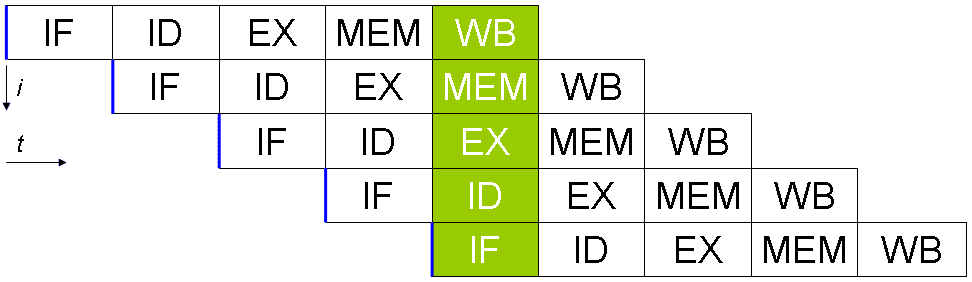
Processors that don’t have a pipeline can only ever be sub-scalar, as they can’t execute one complete instruction per cycle. With this primary five-stage pipeline, you can make a scalar CPU that can complete an instruction for every process. By creating even more far-reaching pipelines, you can make superscalar CPUs that can execute more than one instruction per clock cycle. Of course, there are still potential issues.
Still Sequential
None of this solves the issue of waiting for many cycles for a response when needing to query the different levels of cache and RAM. It also introduces a new problem. What if one instruction relies on the output of the previous instruction? These problems are independently solved with an advanced dispatcher. It carefully plans the order of execution so that no instructions that rely on the output of another are too close together. It also handles cache misses by parking an instruction and replacing it in the pipeline with other instructions that are ready to run and don’t require its result, resuming the instruction when it’s ready.
These solutions can work on unpipelined processors, but they are required for a superscalar processor that runs more than one instruction per clock. A branch predictor is also highly useful as it can try to predict the outcome of an instruction with more than one potential outcome and continue assuming it’s correct unless proven otherwise.
Conclusion
A pipeline allows for all of the processor’s distinct capabilities to be used in every cycle. It does this by running different stages of different instructions simultaneously. This doesn’t even add much complexity to the CPU design. It also paves the way to allow more than one instruction to perform a single stage per cycle.