Skip to content
LogoTechnipages
LogoTechnipages
  • Topics
        • Android
        • Browsers
        • Gaming
        • Hardware
        • Internet
        • iPhone
        • Linux
        • macOS
        • Office
        • Reviews
        • Software
        • Windows
        • Definitions
        • All Recent Posts
  • Product Reviews
  • About

What is an Infinite Loop Error on a Computer?

Madalina DinitaJanuary 11, 2021 Comments (0)

An infinite loop error describes a technical glitch that forces your computer to repeat the same actions over and over again. For example, you just restarted your device after you installed the latest OS version. But instead of booting up, your computer keeps on restarting. And it seems that nothing can end that unusual behavior. In other words, your computer is stuck in an infinite restart loop.

The annoying Blue Screen of Death issue or BSoD is another example of infinite loop errors on Windows 10.

What Causes Infinite Loop Errors?

Infinite loop issues often occur after users update the OS, install a new program on their computers, or update existing programs and apps. Simply, put, the new program files or system files fail to replace the old ones. Or, if you will, old and new files conflict leading to infinite loop errors.

How to Troubleshoot Infinite Loop Issues on Windows 10

Disconnect External Devices

The first step consists of disconnecting all the peripherals connected to your computer. That includes your mouse, keyboard, external storage devices, etc. If the problem persists, go to the next solution.

Use Advanced Boot Options

If you can access the Power option before the machine restarts, press the Shift key and click on Power → Restart. In this manner, you can restart the computer and enter Advanced Boot Options.troubleshoot advanced options windows 10
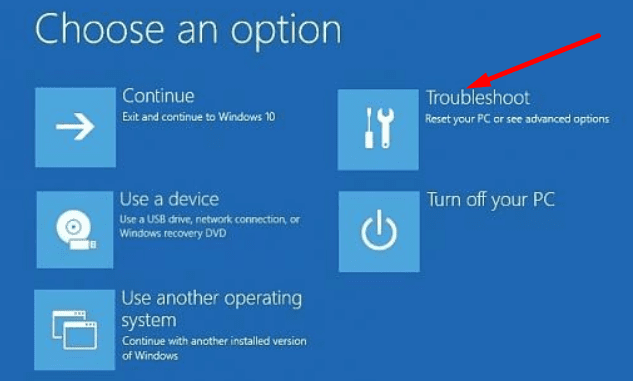
Then, navigate to the Troubleshoot section → Advanced → Startup. Hit the Restart button. Then press F5 to login with safe mode with networking.

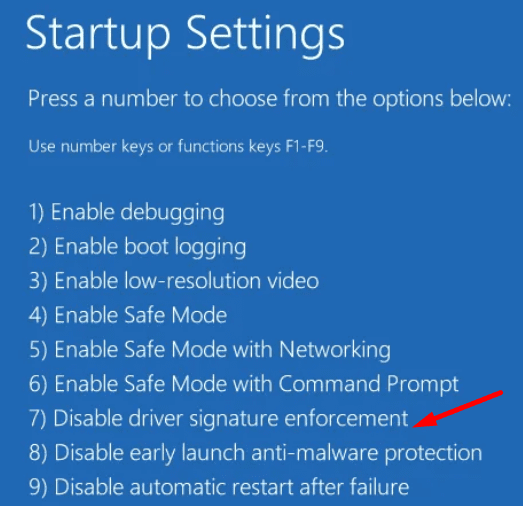
Uninstall recent updates or remove the problematic programs that might be causing the infinite loop problem. If all this fails, go back to Advanced settings and press the F7 key to disable Driver signature enforcement. disable driver signature enforcement windows 10Many users confirmed the infinite loop errors stopped after turning off the driver signature feature.
Categories: Windows

Author Madalina Dinita

Madalina has been a Windows fan ever since she got her hands on her first Windows XP computer. She is interested in all things technology, especially emerging technologies -- AI and DNA computing in particular.

You Might Also Like

  • Single Click Windows Header

    How to Enable or Disable Single-Clicking Feature in Windows 11

    Mitch BartlettWindows
  • caps lock on windows 10 disable notification

    Windows 10: Disable Caps Lock Notifications

    Madalina DinitaWindows
  • authentication-error-function-requested-not-supported-windows-10

    Fix Windows 10 Remote Desktop Authentication Errors

    Madalina DinitaWindows
  • microsoft-word-pasting-not-working

    How to Quickly Erase All Images in a Word Document

    Judy SanhzWindows

Leave a Reply

Your email address will not be published. Required fields are marked *

  • pc can't enroll for windows 10 extended security updates

    PC Can’t Enroll for Windows 10 Extended Security Updates – How to Fix

  • hdd better than an ssd

    When Is an HDD Better Than an SSD?

  • top graphics cards for 2026

    Top 5 Graphics Cards for 2026

  • roblox error 280

    Having Trouble With Roblox Error 280? Here’s What to Do

  • hard disk smart command error

    Hard Disk SMART Command Failed – How to Fix 

profile pic

The Experts Behind Technipages

My name is Mitch Bartlett. I've been working in technology for over 20 years in a wide range of tech jobs from Tech Support to Software Testing. I started this site as a technical guide for myself and it has grown into what I hope is a useful reference for all.

Learn More

technipages logo white
linkedin icon

Technipages is part of Guiding Tech Media, a leading digital media publisher focused on helping people figure out technology. Learn more about our mission and team here.

© 2026 Guiding Tech Media All Rights Reserved

  • About Us
  • Contact
  • Terms of Use
  • Privacy Policy

© 2026 Guiding Tech Media All Rights Reserved

Information from your device can be used to personalize your ad experience.
Do not sell my personal information.

Last Updated on January 11, 2021 by Mitch Bartlett