

Using public WiFi without taking the necessary precautions can result in some severe problems. Public WiFi is dangerous because you don’t know who set it up and what kind of users are on that network, much less their intentions.
The following tips will help you stay safe when connected to public WiFi. Know the do’s and don’t when sharing an Internet connection with absolute strangers.
Contents
What to Never Do When Using Public WiFi

When using a public WiFi network, there are things you need to keep in mind. For example, you should never:
- Have your device auto-connect to any available public WiFi network
- Log into sites that require you to enter sensitive information such as credit card numbers/pins, social security, or ID.
- Leave Bluetooth or WiFi on after using it
- Use/log into any app that asks for financial info or any other type of delicate information
- Don’t visit sites that don’t use HHTPS
- Leave your laptop or phone unattended, even if it is for just a few seconds
- Never check your Email
- Turn on Network discovery, this feature allows you to find other devices and computers on the same network. It also makes your computer visible to others
- Don’t update apps over public WiFi. Malware could be introduced into the update and onto your device
Safety Tips to Follow When Using Public WiFi
There are times when you have no choice but to use public WiFi. Maybe you ran out of mobile data, or it’s not working some reason. If you follow the following rules, you have a chance of using public WiFi and live to tell about it.
When using public WiFi:
- Make sure that your antivirus is up to date
- Use a VPN (Virtual Private Network). A VPN can keep you safe in a public WiFi because it’ll encrypt the traffic between the VPN server and the device you’re using.

- Remember to turn off file sharing. If you’re on a Windows computer go to Control Panel > Network > Sharing Center > Change Sharing Settings Log out of all your accounts before connecting
- Only go to sites with HTTPS
- Treat all links as suspicious
- Turn off Bluetooth
- Enable two-factor authentication before joining. This is a great way to protect your information is someone does manage to get your password while using public WiFi.
- Remember to log out of any sites you used
- Forget the network. If you’re using your Android Oreo device go to Settings > WiFi > Long-press on the network and choose to Forget network.
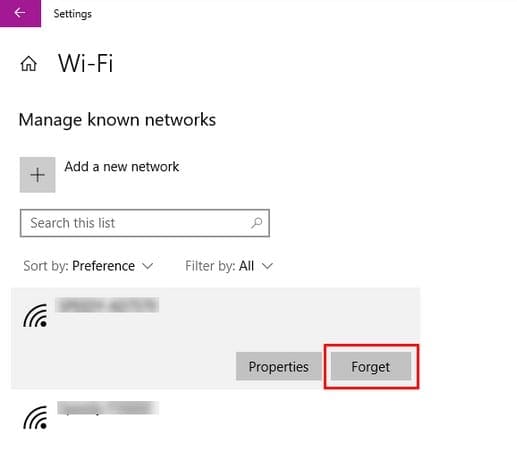
To forget a WiFi network on your Windows computer, go to Settings > Network & Internet > WiFi > Manage known networks > Click on network and choose Forget.

The best way to stay safe when it comes to public WiFi is not to use it at all. Try and resist until you get home or can connect to a secure WiFi network. But, if it’s a real emergency, try to find a WiFi network from a coffee shop, even if you have to ask an employee for the password.
Conclusion
Hopefully, having to use a public WiFi won’t be something you’ll have to do often. But, when you do have to use it, you know what to do to keep your information private. How do you stay safe when using public WiFi? Share your tips with me in the comments.



Hi, I’m a widow with ONLY an iPhone, I use it for everything. I’ve recently cancelled my wifi connection because of difficult Telstra. I try to do updates from my swim bag whilst swimming thru my surf club who have strong quick wifi public. It’s so much faster than the library connection. Is this risky? I’m not sure what you mean by VPN’s and other acronyms etc I’m at a loss as to best practice. I’m a pensioner do I keep things financially simple.
What would your advice to me be please? Thanks m ????
Thank you for the article. Just… “never check your Email” is not realistic! Same as “never cross a street” on a list about walking safely. To communicate through Email is one of the main reasons why we use a public wifi in the first place. I think we could use suggestions on how to manage the risks specific to Email.
Ever since I was hacked I use VPNs. My latest discovery was Surfshark. Speed is nice and the price is more than satisfying. Thank for the tip about forgetting the Network, never do that, will start now.