Skip to content
LogoTechnipages
LogoTechnipages
  • Topics
        • Android
        • Browsers
        • Gaming
        • Hardware
        • Internet
        • iPhone
        • Linux
        • macOS
        • Office
        • Reviews
        • Software
        • Windows
        • Definitions
        • All Recent Posts
  • Product Reviews
  • About

iPhone 6: Install or Remove SIM Card

Mitch BartlettDecember 7, 2018 Comments (4)
Apple logo

It occurred to me, that it is difficult for some people to find where the SIM card slot is on the iPhone 6. So I figured I would make this tutorial to help install or remove the SIM card in the device.

Ejecting SIM Card

  1. Power the iPhone off by pressing and holding the “Sleep/Wake” button until the “slide to power off” switch appears, then swipe the switch left to right.
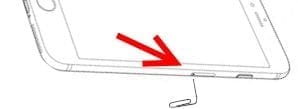
  2. With the device placed screen up, locate the SIM card tray on the right side of the device.
  3. Insert the end of a paper clip in the SIM card eject hole. The SIM tray should eject.
    iphone-6-SIM-eject
  4. Remove the SIM card from the SIM card tray.
Inserting SIM Card

  1. Power the iPhone off by pressing and holding the “Sleep/Wake” button until the “slide to power off” switch appears, then swipe the switch left to right.
  2. Place the SIM card in the SIM card tray.
  3. Gently push the tray face up into the SIM card slot until you hear it click into place.
Categories: iPhone

Author Mitch Bartlett

Through my career that spans over 20 years I have become an expert in Microsoft Systems Administration, Android, and macOS. I started this site as a technical guide for myself and it has grown into what I hope is a useful knowledgebase for everyone.

You Might Also Like

  • Does Wi-Fi Data Count Toward Wireless Plan Data Usage?

    Mitch BartlettAndroid
  • How to Use Game Emulators on iPhones

    MonaiPhone
  • Sync iOS with Google Accounts

    MonaAndroid
  • How to Set Default Card in Apple Wallet in 2023

    How to Set Default Card in Apple Wallet in 2023: 3 Proven Methods

    Tamal DasiPad

Comments

  1. Christine Dunn says:
    August 23, 2022 at 8:30 am

    I cannot locate the little hole to insert a sim card on my renewed 6 s apple i Phone .my instruction book says it should be on the right side of the phone HELP

  2. Charlie sims says:
    June 25, 2022 at 2:49 pm

    No, there is no try on right side.

  3. Harry says:
    April 12, 2018 at 12:19 am

    I don’t have any paperclips, what do I use?

  4. KC says:
    August 24, 2016 at 6:08 pm

    I tried to do this as you described, but no little tray pops out when I insert the paper clip and apply slight pressure.

Leave a Reply

Your email address will not be published. Required fields are marked *

  • hdd better than an ssd

    When Is an HDD Better Than an SSD?

  • top graphics cards for 2026

    Top 5 Graphics Cards for 2026

  • roblox error 280

    Having Trouble With Roblox Error 280? Here’s What to Do

  • hard disk smart command error

    Hard Disk SMART Command Failed – How to Fix 

  • files automatically deleted on click

    Files Getting Deleted Automatically? Here Are Some Reasons Why

profile pic

The Experts Behind Technipages

My name is Mitch Bartlett. I've been working in technology for over 20 years in a wide range of tech jobs from Tech Support to Software Testing. I started this site as a technical guide for myself and it has grown into what I hope is a useful reference for all.

Learn More

technipages logo white
linkedin icon

Technipages is part of Guiding Tech Media, a leading digital media publisher focused on helping people figure out technology. Learn more about our mission and team here.

© 2026 Guiding Tech Media All Rights Reserved

  • About Us
  • Contact
  • Terms of Use
  • Privacy Policy

© 2026 Guiding Tech Media All Rights Reserved

Information from your device can be used to personalize your ad experience.
Do not sell my personal information.

Last Updated on December 7, 2018 by Mitch Bartlett