Skip to content
LogoTechnipages
LogoTechnipages
  • Topics
        • Android
        • Browsers
        • Gaming
        • Hardware
        • Internet
        • iPhone
        • Linux
        • macOS
        • Office
        • Reviews
        • Software
        • Windows
        • Definitions
        • All Recent Posts
  • Product Reviews
  • About

How to Listen to Your Spotify Wrapped 2022

Judy SanhzDecember 21, 2022 Comments (1)
Spotify Music

It may feel a little weird having Spotify know every single song you listen to, but if they didn’t do that, you wouldn’t be able to enjoy Wrapped 2022. This is a wrap up of everything you listened to in 2022, including music, genres, etc. With wrapped, you can listen to the songs that were number one to you.

Contents

  • 1 Access Your Spotify Wrapped 2022 List
  • 2 Desktop
  • 3 Final Thought

Access Your Spotify Wrapped 2022 List

To access your Spotify 2022, open the Spotify app and swipe down until you see 2022 Wrapped.
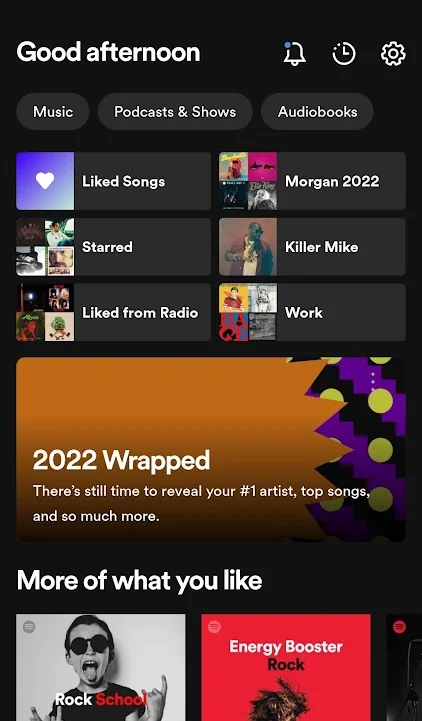
Spotify 2022 Wrapped

On the next page, you’ll find the songs you listened to the most in 2022. If you think that Spotify made a mistake with a song, tap on the dots to the song’s right and select the Hide Song option.


Desktop

This year, Spotify only made the 2022 Wrapped playlist available on the mobile apps. It is not available on desktop.

Final Thought

If you share your account with someone, don’t be surprised if you see songs you would never hear since Spotify’s 2022 Wrapped includes every single song that is played.

Categories: Android | Internet

Author Judy Sanhz

I am a tech geek who loves technology. I have been writing about tech for over a decade, covering various devices and programs. I write about Android, Apple, and Windows devices and programs. I stay updated on the latest gadgets, upgrades, features, and news. I aim to make complicated tech information easy for everyone to read. I've been with TechniPages from the beginning to help others fix their tech issues with the easy-to-follow guides.

You Might Also Like

  • Samsung Android Browser: Enable the QR Code Scanner

    Mel HawthorneAndroid
  • Google Duo on Android: How To Add Automatic Captions To Video and Audio Messages

    Mel HawthorneAndroid
  • Mastodon Social

    Mastodon: How to Enable or Disable Dark Mode

    Judy SanhzAndroid
  • How to Set up and Use a Passkey for Your Google Account

    Andrew MyrickAndroid

Comments

  1. daissy says:
    February 23, 2021 at 8:05 pm

    Thanks for the tips. I listened to my Spotify wrapped 2020 on my computer. I also listen to it on my Android device. I had downloaded some of them via the DRmare Music Converter. So, I can listen to the Spotify songs offline on my Android device on the go.

Leave a Reply

Your email address will not be published. Required fields are marked *

  • system32 folder opens on startup

    System32 Folder Opens on Startup – How to Fix

  • browser keeps opening hp support

    Browser Keeps Opening HP Support Assistant Tabs 

  • camera not working in vmware

    Camera Not Working in VMware – How to Fix

  • browser screen goes black

    Browser Screen Goes Black Intermittently 

  • computer heating up in hyper v

    Computer Heating Up When Using Hyper-V – How to Fix 

profile pic

The Experts Behind Technipages

My name is Mitch Bartlett. I've been working in technology for over 20 years in a wide range of tech jobs from Tech Support to Software Testing. I started this site as a technical guide for myself and it has grown into what I hope is a useful reference for all.

Learn More

technipages logo white
linkedin icon

Technipages is part of Guiding Tech Media, a leading digital media publisher focused on helping people figure out technology. Learn more about our mission and team here.

© 2026 Guiding Tech Media All Rights Reserved

  • About Us
  • Contact
  • Terms of Use
  • Privacy Policy

© 2026 Guiding Tech Media All Rights Reserved

Information from your device can be used to personalize your ad experience.
Do not sell my personal information.

Last Updated on December 21, 2022 by Mitch Bartlett