
Skip to content
LogoTechnipages
LogoTechnipages
  • Topics
        • Android
        • Browsers
        • Gaming
        • Hardware
        • Internet
        • iPhone
        • Linux
        • macOS
        • Office
        • Reviews
        • Software
        • Windows
        • Definitions
        • All Recent Posts
  • Product Reviews
  • About

How to Find Someone’s Birthday on Facebook

Judy SanhzFebruary 20, 2021 Comments (2)
permanently delete facebook messages both sides

You don’t want your friends to get mad at you for forgetting their birthday. So, to make it seem like you always knew the date. You look for a way to remember the date without asking them. One option you can go for is Facebook. You’ll be able to see what birthdays have passed, which ones are coming up, and what friends have their birthday on that specific day.

Contents

  • 1 How to Lookup a Friend’s Birthday on Facebook
  • 2 How to Find Someone’s Birthday on Facebook – Android 10
    • 2.1 Conclusion

How to Lookup a Friend’s Birthday on Facebook

Birthdays are a happy occasion for some but a day they would rather forget for others. But if you like celebrating anyone’s birthday nut your own here’s how you can find someone’s birthday on Facebook. To find someone’s birthday on Facebook, you’ll need to go to the Facebook Events section. This part of the social network is easy to find since it’s going to be on the left side of your display.
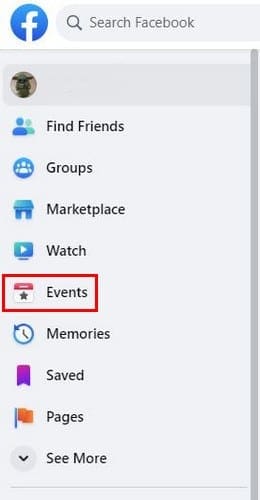
Once you click on Events, the Birthday option will appear. It’ll be to your left and right below the Your Events section.
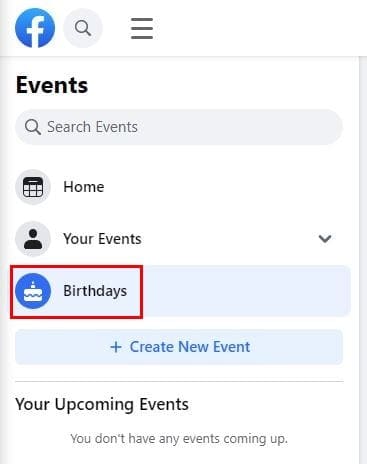
On the next page, you’ll see the birthdays that have passed, the ones that are coming up, and the ones you missed. Right below the person’s name, Facebook will show you how old that person is turning.

How to Find Someone’s Birthday on Facebook – Android 10

You’re not always going to be on your computer, so you’ll also want to know how you can find someone’s birthday on your Android device. To get started, open the Facebook app and find the person whose birthday you want to find.
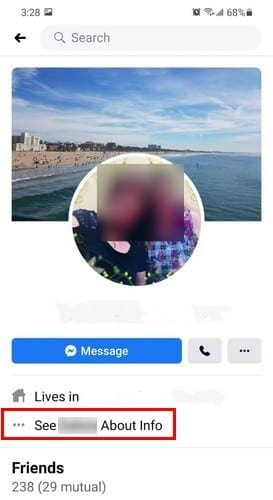
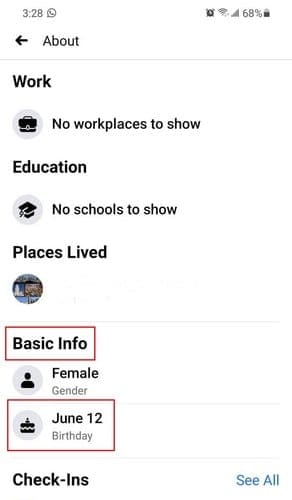
If the person has it enabled, you should see their birthday in the Basic Info section.
Conclusion

You have so many dates to remember that it’s normal that you want to be reminded of important dates. Thanks to Facebook’s birthday reminder, you’ll never have to forget a birthday and then have to deal with the consequences. Has the Facebook birthday reminder saved you from forgetting an important birthday? Let me know in the comments below.

Categories: Internet

Author Judy Sanhz

I am a tech geek who loves technology. I have been writing about tech for over a decade, covering various devices and programs. I write about Android, Apple, and Windows devices and programs. I stay updated on the latest gadgets, upgrades, features, and news. I aim to make complicated tech information easy for everyone to read. I've been with TechniPages from the beginning to help others fix their tech issues with the easy-to-follow guides.

You Might Also Like

  • Slack: How To Stop Slack from Setting Your Status To “on a Call”

    Mel HawthorneInternet
  • Slack: How To Configure Who Can Use “@Everyone”, “@Channel”, and “@Here”

    Mel HawthorneInternet
  • Dropbox: How to Change Your Language

    Mel HawthorneInternet
  • Chrome Extensions to Take a Break from Your Computer

    Judy SanhzInternet

Comments

  1. Savara kiran says:
    October 3, 2022 at 7:34 pm

    Please my account help me

  2. Pamela Wiles says:
    April 6, 2022 at 2:20 pm

    No, when I pressed events, it came up with a load of events, no birthday button.

Leave a Reply

Your email address will not be published. Required fields are marked *

  • battery issues after windows 11 update

    Battery Issues After Windows 11 Update? Here’s the Fix

  • why is ram so expensive

    Why Is RAM Suddenly So Expensive?

  • how to fix error code 0x800f0922 windows 11

    How to Fix Error Code 0x800f0922 in Windows 11

  • service outage message on Xbox

    What to Do With a Service Outage Message on Xbox

  • signs your hdd is failing

    Signs That Your HDD Is Failing

profile pic

The Experts Behind Technipages

My name is Mitch Bartlett. I've been working in technology for over 20 years in a wide range of tech jobs from Tech Support to Software Testing. I started this site as a technical guide for myself and it has grown into what I hope is a useful reference for all.

Learn More

technipages logo white
linkedin icon

Technipages is part of Guiding Tech Media, a leading digital media publisher focused on helping people figure out technology. Learn more about our mission and team here.

© 2026 Guiding Tech Media All Rights Reserved

  • About Us
  • Contact
  • Terms of Use
  • Privacy Policy

© 2026 Guiding Tech Media All Rights Reserved

Information from your device can be used to personalize your ad experience.
Do not sell my personal information.

Last Updated on February 20, 2021 by Judy Sanhz