Skip to content
LogoTechnipages
LogoTechnipages
  • Topics
        • Android
        • Browsers
        • Gaming
        • Hardware
        • Internet
        • iPhone
        • Linux
        • macOS
        • Office
        • Reviews
        • Software
        • Windows
        • Definitions
        • All Recent Posts
  • Product Reviews
  • About

How to Change the Language on Spotify

Judy SanhzJanuary 19, 2022 Comments (0)
Spotify Music

Many may know more than one language or may be learning a new one. Whatever your case may be, you might be tempted to change the language on the Spotify app. The good news is that changing the language is easy and won’t take long.

If you are learning a new language, Spotify can help you with your new language. Keep reading to see how you can change the Spotify app and the desktop client’s language.

Contents

  • 1 Spotify: How to Switch to Another Language
    • 1.1 Desktop Client
    • 1.2 Conclusion

Spotify: How to Switch to Another Language

Android

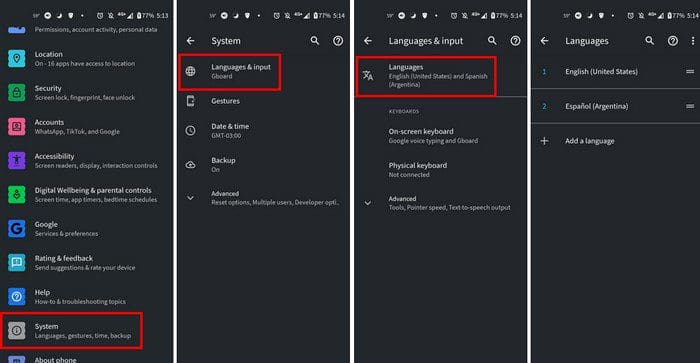
To change the language on the Spotify app for Android, you have to change your Android device’s language first. To do this, open your device’s Settings app and go to the System option. It’ll be towards the bottom.
Change Spotify Language

Now go to Language and input > Languages > Slide the language you want to the top. If you go into the app’s settings hoping to look for an option to only change the language, you’re not going to find anything. Now that you’ve changed the language, you can start using those Spotify playlist tips and tricks.

Desktop Client

Suppose you’re using Spotify on your computer. In that case, you can change the language by clicking on the dropdown menu to the right of your username. Click on Settings, and the Language option will be the first one on the list.

Desktop Spotify changing Language

When you select the new language, you’ll see an option to restart the app so you can start using Spotify in another language. That’s all there is to it. Whether you’re using an Android device or a desktop client, changing the language on Spotify is that easy.

Conclusion

The amount of languages you can choose from is massive. It would be great if the app didn’t have to restart, but I guess you can’t have everything. Where do you use Spotify the most on your Android device or computer? Let me know in the comments below, and don’t forget to share the article with others on social media.


Categories: Android

Author Judy Sanhz

I am a tech geek who loves technology. I have been writing about tech for over a decade, covering various devices and programs. I write about Android, Apple, and Windows devices and programs. I stay updated on the latest gadgets, upgrades, features, and news. I aim to make complicated tech information easy for everyone to read. I've been with TechniPages from the beginning to help others fix their tech issues with the easy-to-follow guides.

You Might Also Like

  • Play Classic Arcade Games On Your Android With MAME4droid

    Mitch BartlettAndroid
  • Samsung Galaxy S8 App “Incompatible with your Device”

    Mitch BartlettAndroid
  • How to Use Zedge to Set Ringtones and Notification Sounds on Android

    Kat ArmstrongAndroid
  • Google Keep

    Google Keep: Useful Productivity Tips You May Not be Using

    Judy SanhzAndroid

Leave a Reply

Your email address will not be published. Required fields are marked *

  • unable to create notebook error in onenote

    We Were Unable to Create Your Notebook Error in OneNote – Common Fixes 

  • error code 0x800704f8 fix

    Error Code 0x800704f8 – How to Fix 

  • back button in browsers doesnt work

    What to Do if the Back Button in Browser Doesn’t Work 

  • could not find this item

    “Could Not Find This Item” When Trying to Remove Files

  • no graphics signal on first boot

    No Graphics Signal on First Boot – How to Fix

profile pic

The Experts Behind Technipages

My name is Mitch Bartlett. I've been working in technology for over 20 years in a wide range of tech jobs from Tech Support to Software Testing. I started this site as a technical guide for myself and it has grown into what I hope is a useful reference for all.

Learn More

technipages logo white
linkedin icon

Technipages is part of Guiding Tech Media, a leading digital media publisher focused on helping people figure out technology. Learn more about our mission and team here.

© 2026 Guiding Tech Media All Rights Reserved

  • About Us
  • Contact
  • Terms of Use
  • Privacy Policy

© 2026 Guiding Tech Media All Rights Reserved

Information from your device can be used to personalize your ad experience.
Do not sell my personal information.

Last Updated on January 19, 2022 by Judy Sanhz