Skip to content
LogoTechnipages
LogoTechnipages
  • Topics
        • Android
        • Browsers
        • Gaming
        • Hardware
        • Internet
        • iPhone
        • Linux
        • macOS
        • Office
        • Reviews
        • Software
        • Windows
        • Definitions
        • All Recent Posts
  • Product Reviews
  • About

Galaxy Note8: Insert and Remove SIM/SD Card Tray

Mitch BartlettAugust 28, 2018 Comments (2)

Learn how to insert and remove the hybrid SIM and SD Card tray on the Samsung Galaxy Note 8 smartphone with this tutorial.

Note: It is recommended that you turn the phone off before performing these steps.

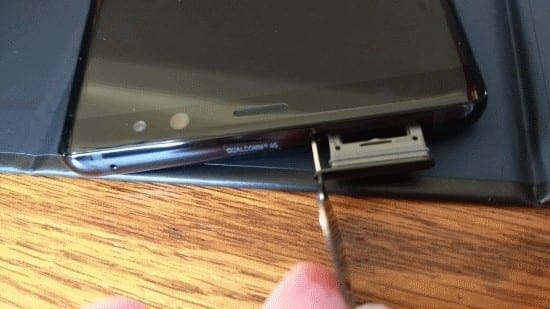
  1. to eject the tray, insert the SIM pin tool included with your Note 8 or a paperclip into the SIM/SD Tray hole located on the top left side of the device. The tray should eject out of the slot.
    Note: Be sure you are inserting the tool in the correct hole. You should see a small compartment door on the correct one.
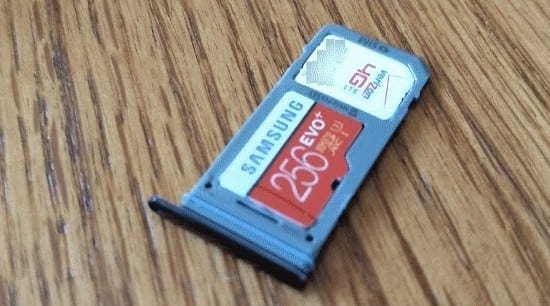
  2. Place the SIM card and SD card in the tray as picture. Make sure they are not sticking out. The fit is pretty snug.
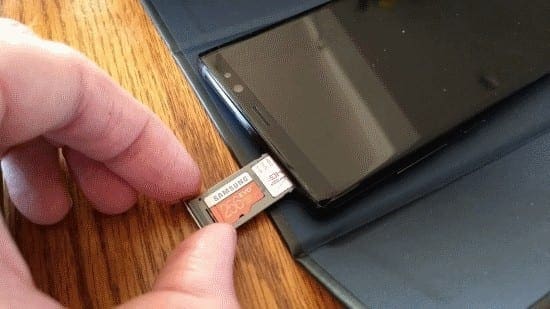
  3. Insert the tray back into the device as pictured. Push it until it clicks into place. Do not force it too hard as it is fragile and may break.
Categories: Android

Author Mitch Bartlett

Through my career that spans over 20 years I have become an expert in Microsoft Systems Administration, Android, and macOS. I started this site as a technical guide for myself and it has grown into what I hope is a useful knowledgebase for everyone.

You Might Also Like

  • Connect Nexus 5X to Computer

    Mitch BartlettAndroid
  • Chrome header

    Chrome: How to Delete Stored Passwords

    Mitch BartlettAndroid
  • Galaxy Note8 & S8: How to Send Picture or Video Text Message

    Mitch BartlettAndroid
  • samsung-phone-says-something-went-wrong

    Fix: Samsung Phone Says Something Went Wrong

    Madalina DinitaAndroid

Comments

  1. Gaspar Gerald says:
    December 21, 2022 at 3:49 am

    Yes. it helped a lot.

  2. Lisa S. says:
    September 16, 2017 at 11:13 pm

    I was able to cast my 7 edge to my vizio tv with my new note 8 I’m not able to do that. Does anyone know how to fix that?

Leave a Reply

Your email address will not be published. Required fields are marked *

  • no graphics signal on first boot

    No Graphics Signal on First Boot – How to Fix

  • system32 folder opens on startup

    System32 Folder Opens on Startup – How to Fix

  • browser keeps opening hp support

    Browser Keeps Opening HP Support Assistant Tabs 

  • camera not working in vmware

    Camera Not Working in VMware – How to Fix

  • browser screen goes black

    Browser Screen Goes Black Intermittently 

profile pic

The Experts Behind Technipages

My name is Mitch Bartlett. I've been working in technology for over 20 years in a wide range of tech jobs from Tech Support to Software Testing. I started this site as a technical guide for myself and it has grown into what I hope is a useful reference for all.

Learn More

technipages logo white
linkedin icon

Technipages is part of Guiding Tech Media, a leading digital media publisher focused on helping people figure out technology. Learn more about our mission and team here.

© 2026 Guiding Tech Media All Rights Reserved

  • About Us
  • Contact
  • Terms of Use
  • Privacy Policy

© 2026 Guiding Tech Media All Rights Reserved

Information from your device can be used to personalize your ad experience.
Do not sell my personal information.

Last Updated on August 28, 2018 by Mitch Bartlett