

In today’s busy world, employees need to take care of tens of tasks daily. While major video conferences are usually scheduled weeks before, sometimes unexpected events occur, and you can’t join your colleagues via Teams. Maybe the app stopped working unexpectedly, or your computer won’t boot up. Don’t panic; you can still join Teams meetings using your phone.
Contents
Can Microsoft Teams Call My Phone?
You can make and take phone calls from within the Microsoft Teams app without any problems. Teams supports both cell and landline calls. To dial a phone number directly from Teams, click on Calls, select Dial a number, and enter the phone number you want to reach. If you’re in a meeting, click on Add people to dial out to a phone number. Make sure to enter the full phone number.
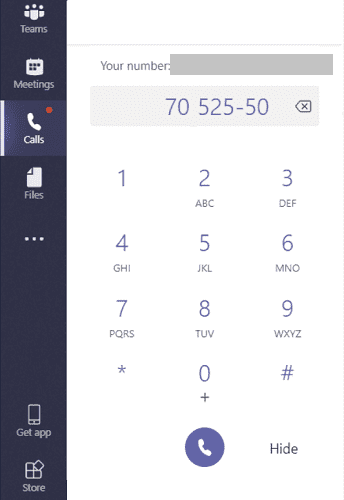
You need to purchase the Microsoft Teams Voice add-on or an Audio Conferencing license to use this functionality.
Microsoft Teams Voice
Microsoft Teams Voice is an add-on that you can add to your existing Microsoft 365 license. By integrating the add-on with Microsoft 365, you can also call your contacts directly from Outlook.
In other words, you can call any phone number you want, and the person at the other end doesn’t even need to install Teams on their device. Teams Voice supports direct calls, call forwarding and transfers, holding, and many more useful options.
The feature is compatible with many third-party handsets, just in case you may want to keep yours on the desk. With Teams Voice, you no longer need to manage tens or hundreds of cell phones and SIM cards. The app will take care of everything. Install it on your device, plug in your handset, and you’re ready to focus on your work tasks.
- For more information, see Microsoft Teams add-on licenses and Voice and video calling on Microsoft Teams.
Audio Conferencing
Microsoft Teams has another interesting feature called Call me that’s available as part of the Audio Conferencing license. You can use this option to join a meeting by phone audio. For example, you can use your cell phone or landline to listen to the audio output while watching the video output on your computer. You can use the Call Me feature to successfully bypass audio issues on Teams.
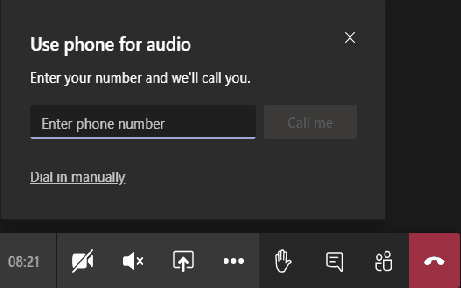
For more information, see Try or purchase Audio Conferencing in Microsoft 365 for Microsoft Teams.
Conclusion
Microsoft Teams lets you call cell or landline phones to let people join the meeting using the phone audio. To use this functionality, you need to purchase a calling plan for Microsoft 365, such as the Microsoft Teams Voice add-on or an Audio Conferencing license. How often do you make phone calls using Teams? Let us know in the comments below.




Not helpful, as there is no “Calls” button like in your picture.
It is a freakin shame that a product holder can’t call you people up. Just horrible. I want to talk to a tech supporter. This bs going thru the computer does not help me. What kind of people are you. I want to talk to someone as I am having trouble with my system.