
Did you see the AirTag Found Moving With You notification on your Apple devices like iPhone, iPad, or iPod? Be watchful because someone might be tracking your movements!
Apple AirTag helps you track your lost stuff easily. It has cool features like a replaceable battery that could last a year, Bluetooth Low Energy (BLE), near-field communication (NFC), Find My network, and a built-in speaker.
However, bad actors can use the same features of an AirTag to track your movements and residences. To prevent such misuse, Apple employs many strategies and privacy filters. One of these is the anti-track notification on your Apple device.
But why should you care or turn off the “AirTag Found Moving With You” notification? Read on until the end to learn everything you need to know about this strange Apple device notification.
Contents
- 1 What Is AirTag Found Moving with You?
- 2 What Does It Mean When It Says AirTag Found Moving with You?
- 3 How Do You Know if Someone Is Tracking You with an AirTag?
- 4 How Do I Stop an AirTag from Tracking Me?
- 5 How to React if You See “AirTag Found Moving with You” Notification
- 6 Can You Get a False AirTag Alert?
- 7 How to Resolve the Notification and Ensure You’re Safe
- 8 Contact the Local Authorities
- 9 Conclusion
What Is AirTag Found Moving with You?
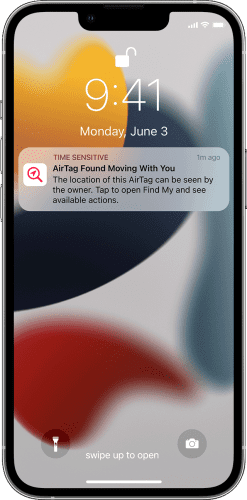
“AirTag Found Moving With You” is a notification you might see on your iPhone, iPad, or iPod device if you’re carrying someone else’s AirTag.
Apple maintains an extraordinary network of BLE using its hundreds of millions of iPad, iPhone, iPod, and Mac devices worldwide. Hence, your iPhone or iPad can track your AirTags even if it is miles away from you.
Similarly, if someone silently slipped an AirTag in your bag or jacket pocket, your Apple device will notice it when the AirTag owner’s Apple device goes out of the range of the AirTag.
Your task is to locate the AirTag and check its ownership information. If you know the owner, it could just be a harmless misplacing of stuff that you can return easily. However, it becomes a headache if you don’t know the owner of the AirTag.
What Does It Mean When It Says AirTag Found Moving with You?
It could mean someone has deliberately put an AirTag in your clothing, car, or bag to monitor your movements. The owner can track your location since they’ve got access to the AirTag through the Find My network.
The AirTag is on you or inside your bag. Hence, via proxy, the AirTag is giving away your whereabouts.
How Do You Know if Someone Is Tracking You with an AirTag?

Likely, you don’t know all these, and to help you, Apple included this anti-track feature. First, your iPhone or iPad will show the “AirTag Found Moving With You” notification. If you ignore it, after some time, the AirTag will start emitting a sound to alert you.
Now, you might also ask the following question at this juncture:
How Do I Stop an AirTag from Tracking Me?
To find the best answers, keep reading!
How to React if You See “AirTag Found Moving with You” Notification
First off, don’t panic! It could be a false alert. Now you may also ask the following:
Can You Get a False AirTag Alert?
Yes, you may get a false alert in the following scenario:
You’re traveling on public transport. A nearby passenger has an AirTag on them without the owner’s iPhone or iPad. If you’re close enough, your Apple device will show an alert.
However, if you’ve deboarded and then noticed the alert, there’s nothing you can do.
Secondly, you need to locate the AirTag. Follow these steps to locate a misplaced AirTag:
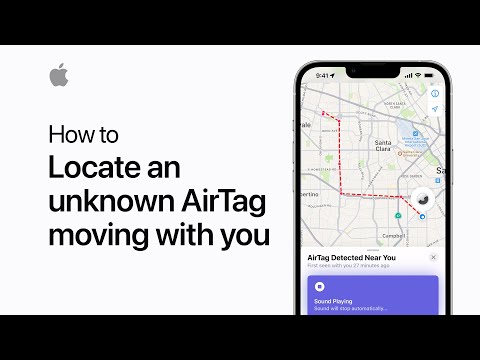
- Swipe down the notification and select the “AirTag Found Moving With You” alert.
- You’ll see a Continue button. Tap on that.
- The Play Sound option will show up. Tap to play sound using the AirTag’s speaker.
If you cannot hear the sound, you must search for yourself and your belongings. The tracking device could be in your car, in an outer pocket of your backpack, or in your jacket pocket that you rarely check.
Finding the AirTag is extremely important!
How to Resolve the Notification and Ensure You’re Safe
Try these steps when you’ve located the AirTag:
- Position the white side of the AirTag and the top of the iPhone/iPad face-to-face.
- A notification will appear.
- Tap on it to open a website portal with further information about the AirTag, like the serial number, the last four digits of the registered phone number, etc.
- Do you recognize the phone number? If yes, you may contact the owner and hand over the AirTag.
- If you don’t recognize the number, look for the marked-as-lost message. The text should contain information on whom to contact in case the AirTag is missing.
- If there are no such instructions, remove the battery by following the on-screen guidance.

Once you’ve removed the battery, you won’t see the notification anymore. Also, the owner won’t be able to track the AirTag and, indirectly, your location.
Contact the Local Authorities
If you’ve just found and disabled an AirTag that was traveling with you, someone may have already tracked your current location.
Inform the local authorities without any delay. Also, stay in a crowded public place until the authorities get back to you for further assistance.
You can use this Law Enforcement Information resource on Apple Website to know whom to contact if you suspect someone is tracking you.
Conclusion
AirTag is undoubtedly an extraordinary tracker to track objects. However, Apple suspected that bad actors might use it to track people and hence installed anti-track technologies.
Pay attention to notifications like “AirTag Found Moving With You” when they surface on your Apple device. Follow the above steps to secure yourself.
Help others if it’s not a stalking incident, but someone has lost their belongings containing an AirTag.
Next up are Apple HomePod settings and features to experience Siri smartly.