There is a broad range of types of computer memory. Most of them are obsolete as computer technology has advanced rapidly. One type of memory technology is core memory, also known as magnetic core memory. Magnetic core memory is a type of random-access memory or RAM first commercialized in 1951. It became the dominant form of RAM by 1955 and stayed that way until the mid-1970s when semiconductor-based DRAM chips were developed.
Structure
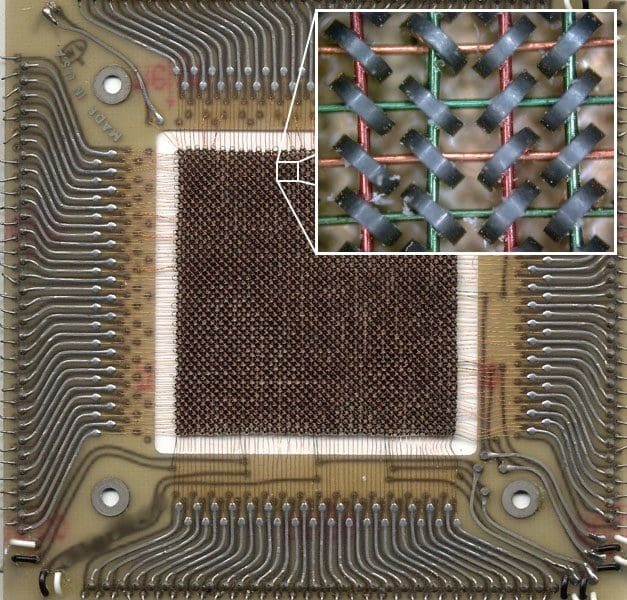
Magnetic core memory has an array of ferrous metal toroids through which various wires are run. Each metal ring represents a single bit of storage. The value of the bit is stored in the ring’s magnetic field. This magnetic field can be driven by charging specific wires. Data can be read from a core by setting it to 0. If it was already set to 0, nothing happens. But if it previously contained a 1, a sense wire has a current induced by the change in the magnetic field. The read process, as you can see, however, is destructive, so a process was required to write the data back after a read operation automatically.
As you can probably imagine, memory density wasn’t great. The metal rings were each 2.5mm in diameter when magnetic core memory was first invented. The rings also needed to be physically separated from each other. By 1966, the rings were down to just 0.33mm in diameter. This decreased manufacturing time and material costs. It also reduced the power consumption, based on the rings’ volume, by a factor of 125.
One example was the 1.2MiB of magnetic core memory included in MIT’s PDP-6 computer in 1964. At the time, this was considered an unimaginably large amount of memory. It costs $380000, or four cents per bit. It was 69 inches wide, 50 inches tall, and 25 inches deep, including the required supporting circuitry. Over the lifetime of the technology, the memory price went from around $1 per bit to $0.01 per bit.
Invention and Manufacture
Since the early days of computers, the hysteresis effect of certain magnetic materials has been considered viable as a storage or switching device, from experience with electrical transformers. Early work on the concept began in the 1940s. While some steps were taken in the intervening years, two significant breakthroughs led to the commercialization of magnetic core memory in 1951.
The first was the write-after-read operation, required due to the destructive nature of the read operation, developed by An Wang. Jay Forrester also developed the coincident-current system that enabled a relatively small number of wires to be used to control a large number of cores.
Magnetic core memory uses a 2D array of cores. Each row and column of cores could use a single cable to drive the cores. Another two wires were required, a sense and inhibit wire. These went diagonally through all of the cores in the array. Multiple arrays could be stacked in a third dimension, though they were electrically independent. This could significantly increase performance by spreading each byte across various banks.
The array structure and the wires’ need to be run through the cores made manufacturing difficult. Many attempts were made to automate the process but weaving the sense and inhibit wires proved to be best done by hand. Part of the difficulty came from the cores needing alternately angled at 45 degrees. An early advancement was a machine that could thread straight-charge wires. This machine reduced threading those wires in a 128-bit by 128-bit array from 25 hours by hand to 12 minutes. Later, economics was further enhanced by combining the sense and inhibit wires that were never needed simultaneously.
Characteristics
Based on magnetic remanence, core memory didn’t require a power supply to retain data, making it non-volatile. It was also unaffected by EMP events and radiation and relatively resilient to physical shock. This saw its use in military aircraft, especially those designed to carry nuclear weapons. It was also used in spacecraft such as the space shuttle, where it was used in the flight computer. Magnetic core memory is so resilient that it and its data survived the tragic Challenger accident, which destroyed the shuttle shortly after blast-off with the loss of all hands.
Magnetic core memory was temperature sensitive when writing data. Some systems changed the voltage based on a temperature sensor to allow this. Others placed the entire memory assembly in a heater or even a pool of heated oil to ensure a stable temperature. Heaters were used rather than coolers because it was easier and cheaper to maintain a high temperature than a cool one.
In 1980, a 32KB core memory array could be mounted on a 25cm by 20cm PCB, costing around $3000. Hardware issues were tricky to diagnose; software diagnostics were slow but thorough. The problem could sometimes be resolved by tapping the PCB, on which the core array was mounted, against a desk—doing so, slightly adjusted the position of the wires, which could be enough to solve the problem. Due to the general reliability of core memory, though, this wasn’t a common issue.
Conclusion
Core memory or magnetic core memory was the dominant form of RAM between the mid-1950s and the mid-1970s. It involves an array of magnetic core rings, which can adjust the magnetic field by combining electrical current through the charge lines. Production times and costs were high due to the need to manually weave some or all of the cables through the cores by hand.
Magnetic core memory was superseded in 1975 by semiconductor DRAM chips. Core memory should not be confused with core rope memory, a form of ROM based on similar principles from the same period.