Most memory is stored and accessed in the same way. Content is saved and then retrieved using a memory address. This is generally useful and is almost universally used. Unfortunately, there is a slight issue with this style of storage. It’s excellent if you know where the data you need is stored. It doesn’t perform well if you want to search for a specific entry.
Let’s say you want to find a file; you remember its name but not which folder you saved. Your computer can search for the file name, but unless you’ve used it recently, it’s often pretty slow at performing the search. And that’s taking into account that file systems are stored as file names and addresses.
Associative memory, also known as Content Addressable Memory, or CAM, is designed to be searched by its contents. Unfortunately, implementing associative memory is very expensive. This means it is only used in a few cases, typically in high-end networking hardware. The associative name memory comes from the fact that it’s a hardware implementation of an associative software array.
Cell Structure
Associative memory is only used where extremely high performance is needed. As such, it’s based on SRAM rather than DRAM. As a starting point, this alone makes it expensive. DRAM uses one transistor and one capacitor per bit, and SRAM uses a total of 6 transistors. To efficiently search the content of a memory cell, each cell is modified to have comparison circuitry. This adds a total of 4 more transistors to each cell. This means associative memory is significantly less dense than SRAM, which is already an expensive form of storage.
Usage
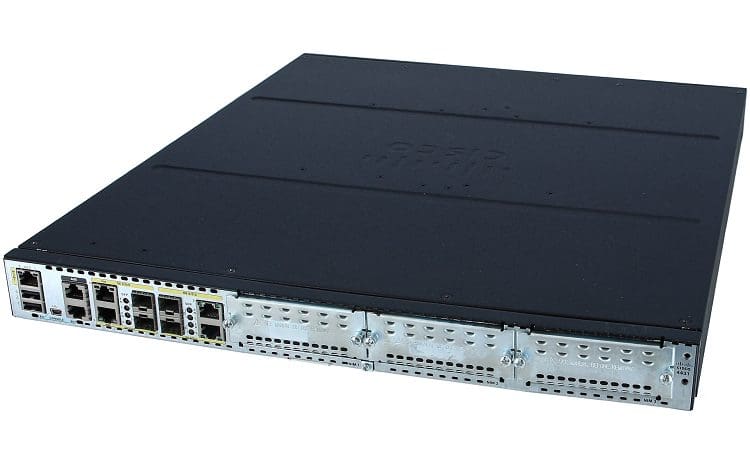
Associative memory is expensive and optimized exclusively for matching content-based searches. As such, it’s only really used in devices that constantly need to perform this type of search; even then, it is typically limited to high-end models. There are generally only two main places associative memory is used, network switches and routers.
Networking hardware like switches and routers must offer high-performance levels to keep multiple gigabits of network traffic flowing constantly. Within a network, MAC addresses are used to route traffic. A switch will know which of its many network ports data needs to be sent to so it will get to the device with the correct MAC address. To ensure that each packet is sent to the right place, its destination MAC address is searched for. In a traditional memory format, that would take some time, adding to every network communication’s latency. With associative memory, that search can be much faster.
Binary and Ternary
Most associative memory is based on binary, but some are based on ternary. A ternary associative memory cell is similar to the binary one described above. Instead of having one SRAM cell, however, it has two. Both then together have the four extra transistors needed to perform the comparison. This, of course, makes ternary associative memory even more expensive than its binary cousin, so what is it used for?
The ternary cell’s second bit indicates “care” or “don’t care.” This adds a third state to the cell and overall search function. It can now store a 1, 0, or X for don’t care. This is particularly useful when dealing with network routing tables based on variable-length subnet masks and with access control lists. You may have multiple positive responses to a single search address in both of these. Within both, you only want to take note of the most precise instruction.
As such, a search for 192.168.20.19 may match the following rules 192.168.20.16/28 and 192.168.0.0/16. If you were performing a standard binary search, you’d have to perform computations to verify that the address falls within the specified address ranges. With ternary logic, however, you can determine if your search address matches 192.168.x.x in a single operation. You can also determine that the /28 match is much more precise than the /16 match because there are fewer “don’t care” bits. This allows you to apply the related access control rules preferentially.
As ternary associative memory is even more expensive than the binary form, it is even less common. It can generally only be found in top-end routers and multi-layer switches.
Conclusion
Associative memory is a form of memory that works very differently from standard memory. Rather than requesting the data stored in a specific address, it searches the whole memory in one go for matches to a search term. To achieve this with high-performance levels, memory cells are based on a modified form of SRAM featuring one or two SRAM cells combined with four extra transistors used to perform the bit comparison logic.
Single SRAM cells are used in binary associative memory, while two SRAM cells are used in ternary associative memory. The ternary variant allows storing a third value, typically a 1, 0, or “don’t care.” This allows content to indicate that it should match even if the search term isn’t precise.
Because associative memory cells are based on the expensive SRAM, they are costly, with ternary being the most costly. Because of this and its structure being optimized explicitly for searching by content, associative memory is not used in most devices.
Only devices that particularly benefit from it and where performance outweighs the upfront cost feature it. As such, it’s typically exclusively found in enterprise-grade networking hardware. Within that setting, it is often referred to as CAM and TCAM, for Content Addressable Memory and Ternary Content Addressable Memory, respectively.