
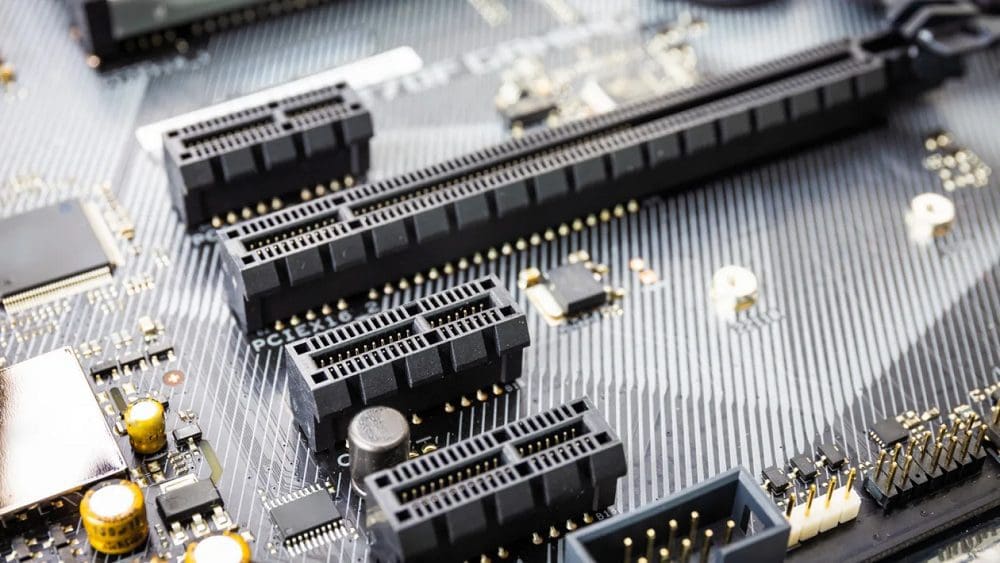
The motherboard is the backbone of a computer, connecting everything together. While it contains many components, they are standard and will be found in essentially all computers. More specific components, especially those with a high cost and/or a high thermal output, are typically not included directly on the motherboard. Instead, a set of sockets are provided for these components.
This design actually comes with several advantages. The main advantage is the choice of the end user. Suppose the motherboard had the RAM, CPU, and GPU all baked directly onto the motherboard. In that case, there’d have to be many motherboards from each manufacturer.
Having these components be separate means that users can pick and mix the combination of components they want or can afford. It also allows for future upgrades, as the parts can be easily swapped. Generic motherboards that can add a range of parts also help reduce the complexity of the motherboards, which keeps costs low and inventory stocks high.
Another advantage of providing connectors is that daughterboards can be used that stick up further into clean air. This helps to keep some components like RAM and GPUs cool. While coolers could stick out directly from the motherboard, they wouldn’t have as clear an airflow, decreasing cooling efficiency and becoming more and more of an issue with modern components as power usage increases.
Technically, some of the sockets on the motherboard aren’t considered expansion slots. These are generally single purposes, such as the CPU socket, RAM sockets, and M.2 slots. General purpose slots, though, are usually referred to as expansion slots.
Expansion Slots – The Past
Historically, there has been a broad range of physical expansion slots and the transmission buses they use to communicate. In modern computers, however, a single connector and bus, PCIe, has won out and is used essentially exclusively.
AGP or Accelerated Graphics Port was an expansion slot for graphics cards in the late 90s and early 00s. It offered a direct connection to system RAM, which allowed textures to be stored there rather than in VRAM. It is now defunct and not present on modern motherboards. The VESA connector was another expansion port for video cards. However, this one was tied heavily into the Intel 486 CPU and superseded when the Pentium processors were released.
AMR was an expansion slot for audio and/or modem cards. The Audio Modem Riser was designed in 1998 to support one or both functions. However, it never saw much adoption. In 2000 the AMR standard was revised into the Communications and Network Riser, or CNR. It offered audio, modem, USB, and LAN connectivity. The Advanced Communications Riser, or ACR, was a competing standard that retained backward compatibility with AMR. None of these technologies remain in use as all functionality has now been integrated onto the motherboard.
ISA or Industry Standard Architecture was the original expansion slot for the IBM PC in 1984. However, the name is actually a retronym. In 1987 IBM attempted to replace it with the proprietary Micro Channel Architecture or MCA. Other computer manufacturers countered by trying to standardize the Extended Industry Standard Architecture. However, neither caught on. Both were eventually replaced by PCI, though ISA lived alongside PCI for a long time, eventually being dropped from all but legacy devices.
Expansion Slots – The Present
PCI or Peripheral Component Interconnect was an expansion slot defined in 1992. It was a general purpose and relatively high-speed for the time. It also supported plug and play, meaning no settings or even switches needed to be adjusted by the user for connected devices to work. In the server market, PCI-X, with the X standing for “eXtended,” was standardized in 1998 to offer higher speed connectivity. However, this didn’t see much use in the consumer market.
PCI and PCI-X were superseded in 2002 with the release of PCIe, also known as PCI Express. PCIe offered high-speed complete duplex transmission with a configurable number of lanes depending on the overall bandwidth desired. PCIe quickly became the dominant expansion slot. It eventually pushed all other expansion slot standards off motherboards as the components they served either were integrated onto the motherboard or the products started offering PCIe versions.
Today essentially all motherboards exclusively use PCIe expansion slots. However, some devices aimed at markets with a heavy dependence on legacy hardware still release motherboards with support for outdated expansion slots.
PCIe has seen several revisions, with PCIe Gen 5 just starting to make its way to market. Each PCIe generation has doubled the bandwidth of the previous generation allowing the PCIe bus to transfer a lot of data very quickly. This makes it ideal for connecting modern graphics cards, which need a lot of bandwidth. The PCIe bus and, in some cases, PCIe expansion slots are also used for high-speed SSDs. A modern standard ATX motherboard will have four 16x PCIe slots. However, there may also be several smaller ones. not all physical 16x PCIe slots are connected with 166 logical PCIe lanes.
Conclusion
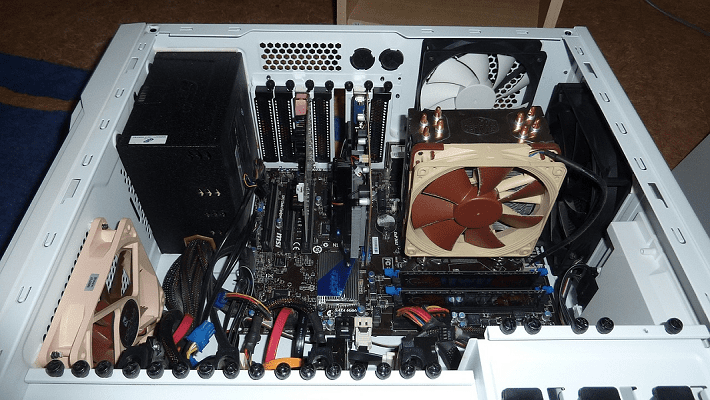
Expansion slots are connectors on the motherboard that allow the addition of a daughterboard known as an expansion card. These expansion cards typically provide hardware for a specific function, though some can be multi-function. The expansion slot itself usually allows for a range of cards and functions of those cards. In modern motherboards, expansion slots are exclusively PCIe slots and utilize the PCIe bus.
Other expansion slots and busses have been superseded and are now legacy or completely unsupported. The primary use for expansion slots in modern computers is for discrete graphics cards. However, some computers may feature network cards, RAID cards, PCIe SSDs, capture cards, sound cards, or other more specific and less common hardware.


Expansion slots are explained but no picture to identify these slots wes forthcoming