Skip to content
LogoTechnipages
LogoTechnipages
  • Topics
        • Android
        • Browsers
        • Gaming
        • Hardware
        • Internet
        • iPhone
        • Linux
        • macOS
        • Office
        • Reviews
        • Software
        • Windows
        • Definitions
        • All Recent Posts
  • Product Reviews
  • About

HP Ink: There Was a Problem Finalizing Your Subscription

Madalina DinitaMarch 18, 2022 Comments (2)
Problem-finalizing-your-subscription-HP-Ink

If you own an HP printer, you should definitely get an HP Ink subscription, especially if you print hundreds of pages every month. This subscription includes ink or toner, free delivery, and prepaid recycling. HP monitors your ink or toner levels via the HP Smart app and ships new cartridges before you need them. In this manner, you’ll never run out of ink.

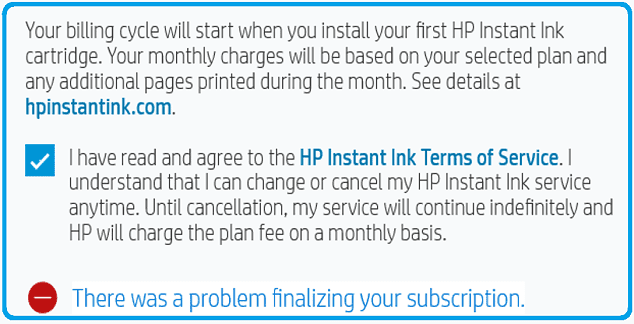
But sometimes, a strange error message may pop up on the screen preventing you from finalizing your HP Ink subscription. Wait for 30 seconds, try again, and check if you notice any changes. If the issue persists, follow the steps below.

Contents

  • 1 Fix: Cannot Finalize HP Ink Subscription
    • 1.1 Use a Browser to Finalize the Subscription
    • 1.2 Update Your Printer Firmware
    • 1.3 Ensure Your Printer and Cartridge Are Compatible With HP Ink
    • 1.4 Conclusion

Fix: Cannot Finalize HP Ink Subscription

HP-Ink-Problem-finalizing-your-subscription

Use a Browser to Finalize the Subscription

The best way to manage your HP printer is through the HP Smart application. If you’re getting this error message when using the HP Smart app, open a new browser tab, and go to the HP Instant Ink page. Sign in to your HP account and check if you can activate the subscription online.

Update Your Printer Firmware

Be sure to update your printer firmware to the latest version. Go to HP’s support page and identify your printer model. Then, download and install the latest printer firmware version.

Update-HP-Printer-Firmware

Printers are sometimes stored for months before getting sold. Most likely, the firmware is outdated. This can lead to various issues, including not being able to finalize your HP Ink subscription. Your printer should automatically install the latest updates when it connects to Wi-Fi. That doesn’t always happen, which means that you’ll need to manually install the latest printer firmware.

Ensure Your Printer and Cartridge Are Compatible With HP Ink

Make sure your printer is compatible with HP Ink. Most HP printers manufactured in the last 5 years that support Wi-Fi are eligible for HP Ink. If you’re using an old printer, maybe it’s time to upgrade to the latest HP Ink-enabled printers.

Additionally, make sure your ink is compatible with HP Instant Ink. The following ink and toner cartridges are supported:

  • HP 62
  • HP 63
  • HP 64
  • HP 65
  • HP 67
  • HP 902
  • HP 910
  • HP 950/951
  • HP 952
    HP 962
  • HP 134 (toner)

If the issue persists, contact HP Support for further help. Maybe the service is temporarily unavailable.

Conclusion

If you can’t finalize your HP Ink subscription, wait for 30 seconds, and then use a browser to activate your subscription. Then, update your printer firmware to the latest version. Additionally, ensure your printer and cartridges are compatible with HP Ink. If nothing works, contact HP Support.

Did you manage to solve the problem? Hit the comments below and let us know which solution worked for you.


Categories: Hardware

Author Madalina Dinita

Madalina has been a Windows fan ever since she got her hands on her first Windows XP computer. She is interested in all things technology, especially emerging technologies -- AI and DNA computing in particular.

You Might Also Like

  • Oculus

    VR Oculus Quest 2: How to Troubleshoot Hand-Tracking Issues

    Mel HawthorneGaming
  • Oculus

    VR Oculus Quest 2: How to Change the Color of Your Guardian Boundary

    Mel HawthorneGaming
  • fix-chromebook-not-connecting-to-bluetooth-device

    Fix: Chromebook Won’t Connect to Bluetooth Devices

    Madalina DinitaHardware
  • Must-Have Google Lens Alternatives – Android

    Judy SanhzHardware

Comments

  1. Kirsty says:
    January 8, 2023 at 1:12 pm

    No and spent over an hour on the phone and still not sorted!!

  2. Kate says:
    November 23, 2022 at 5:35 am

    Nope and spent nearly two hours on the phone to hp support – still not sorted – sending it back

Leave a Reply

Your email address will not be published. Required fields are marked *

  • fix page fault in nonpaged area bsod

    How to Fix “Page Fault in Nonpaged Area” BSOD 

  • fix ERROR_SYSTEM_SHUTDOWN

    How to Fix ERROR_SYSTEM_SHUTDOWN

  • cant set a new default browser

    Can’t Set a New Default Browser Automatically? Here’s What to Do

  • fix error 0x8000ffff

    How to Fix Error 0x8000ffff

  • how to fix this device cannot start code 10

    This Device Cannot Start (Code 10) – How to Fix

profile pic

The Experts Behind Technipages

My name is Mitch Bartlett. I've been working in technology for over 20 years in a wide range of tech jobs from Tech Support to Software Testing. I started this site as a technical guide for myself and it has grown into what I hope is a useful reference for all.

Learn More

technipages logo white
linkedin icon

Technipages is part of Guiding Tech Media, a leading digital media publisher focused on helping people figure out technology. Learn more about our mission and team here.

© 2025 Guiding Tech Media All Rights Reserved

  • About Us
  • Contact
  • Terms of Use
  • Privacy Policy

© 2025 Guiding Tech Media All Rights Reserved

Information from your device can be used to personalize your ad experience.
Do not sell my personal information.

Last Updated on March 18, 2022 by Mitch Bartlett