
Ever been greeted by a popup saying, “The certificate doesn’t come from a trusted authority?” when trying to access a website? These security certificates tell a user if a website or app is trusted by Android and if your information is safe on that platform. When your Android detects a security certificate, it downloads it to your device. If you need to delete these stored certificates, you can.
But first, let’s address what use Android certificates are to everyday Android users.
Certificates of Security
Private keys are encryption techniques used alongside certificates to secure communications between a network and a device. Once a developer is done making an app, they need to sign the app’s credentials before uploading it.
When a user installs a third-party application, Android checks the certificate to see if it is signed by a trusted source. If it is not, users are advised against installing the app or logging into the network.
Android Security Credentials
Now more than ever, privacy is a concern when accessing the web. Android OS certificates use public key infrastructure to encrypt data on both ends. They are used over exchange servers, private networks, and Wi-Fi to access secure data from a device.
Some applications, like Access or Microsoft Exchange, download the credentials themselves. You can usually access the certificates in advanced security settings but may need administrative status to interact with them.
Certificate Authority
Certificate Authority is one of the trusted certifications on Android and is in charge of digital certifications and public key distribution. You can store these credentials on your device, external storage, or memory card.
Most times, when an app is downloaded, it comes with a Certificate Authority that is installed along with the app. If that is not the case, then the user can download and install the Certificate Authority manually.
How to Clear all Certifications for Android
If you wish to remove all certifications on your device, you can, in a few steps. You would usually remove a certificate if you no longer trust a source. Removing all credentials will delete both the certificate you installed and those added by your device.
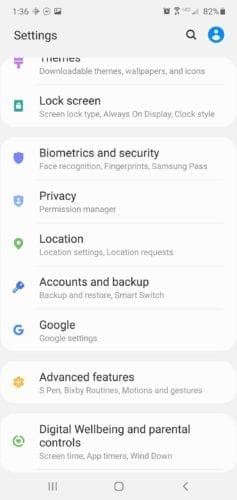
- Go to your device Settings. In Settings, navigate to Security and Location. This is usually at the bottom of the application.
- In Security and Location, under device Admin, go to Encryption and Credentials.
- In Encryption and Credentials, under Credential Storage, you will see options like Storage Type, Trusted Credentials, User Credentials, Install from SD cards, and Clear All Credentials.
- Before you clear all your credentials, you may want to view them first. Click on trusted credentials to view device-installed certificates and user credentials to see those installed by you. If you are still sure, you want to clear everything, then go to the next step.
- Click on Clear Credentials, and a pop up will ask you if you want to remove all contents. Clicking OK will delete all stored certificates.
How to Add a Certificate for a Third-Party App
On the few occasions that an app fails to install its certification, you can install that certificate yourself.
Not all certificates are recommended for manual install — your device will warn you about untrusted certificates — but you can still install it at your own risk. Depending on your device and Android software version, these steps may vary slightly.
- To add a certificate, navigate to your device Settings. That is where all the magic happens.
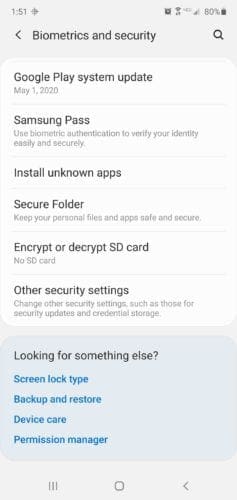
- Once in settings, scroll down to Security. For some devices, you will see an option for Security and Location, click on it.
- In Security and Location, under device Admin, click on Encryption and Credentials.
- In Encryption and Credentials, go to Install from SD card.
- To install from SD card, open the menu by clicking on the three stacked lines and navigate to where your credentials are stored.
- Select the file and enter the device password (if your device is protected).
- Name the credential; however, you please and select VPN and apps or Wi-Fi.
- When done, select OK to save the credential on your device.
Conclusion
It just goes to show you that even technology has its trust issues. If an app gives you reason not to trust it, delete that certificate. If you do trust the app but want to show your device that you do, install the proof!




“Certificates of Security
Private keys are encryption techniques used alongside certificates to secure communications between a network and a device. Once a developer is done making an app, they need to sign the app’s credentials before uploading it.”
I cannot see any logical connection between the first sentence and the second one.
What is a Certificate of Security, how do it relate to a credential, and does someone signing mean anything at all? Signatures are only as valid as the reality and trustworthiness of the person signing.
I’m computer/technology savvy..I have privacy issues,the viewed certificates,top see bunch not installed, then see google, then none,strow down,see Nederlanden(?); Tawain,Turkiye(??) I don’t know any those place..under settings saw Encryption and no SD..how can I get certificate list I should have and get rid of rest..IM GETTING ALL KINDS JUNK, PRONO IN EMAIL, CAN’T OPEN LINKS, PRIVACY ISSUES,,I’VE NEVER HAD THIS MUCH TROUBLE..PLEASE HELP
All questions, no answers … not helpful, except that now I know others have the same questions I have.
Im afraid my phone has been hacked and there is a phone listed on my devices that is not mine that I am unable to remove now I find these credentials im not sure whether to delete them or not can you help
What is the key in removing existing certificate ? And replace it for my protection ?
What if I cleared all trusted certificates ? What happens to my files ? And create a new personal glass wire firewall with VPN ?
Is it possible that all the scammers won’t reach me anymore ?
May I know the true trusted certificate that you used for Android device ? So I can used it for my family safety ?
Is this trusted certificate may used the sites for spying intelligence network . So in the future this trusted certificate may scammed money from you ?
I’m using glass wire firewall and it does use the VPN settings of the phone and the certificates keeps popping up saying one uses personal certificate one key and one VPN bypass or something and I keep clearing credentials and deleting into keeps coming back up now my phone has a work profile on it for the certificates can you meet me give you some advice as to what’s going on here
What is the of removing of remove all user certificates on android mobile please tell me?