Skip to content
LogoTechnipages
LogoTechnipages
  • Topics
        • Android
        • Browsers
        • Gaming
        • Hardware
        • Internet
        • iPhone
        • Linux
        • macOS
        • Office
        • Reviews
        • Software
        • Windows
        • Definitions
        • All Recent Posts
  • Product Reviews
  • About

How to Change Gender on Facebook

Madalina DinitaMarch 10, 2022 Comments (3)
Change-Gender-Facebook

When signing up for a Facebook account, you’re prompted to fill out basic profile information. These details include your name, email address, gender, and so on. The good news is that you can edit many of your account details later on. In this quick guide, we’ll show you can edit gender information on Facebook.

Contents

  • 1 Steps to Change Gender on Facebook
    • 1.1 Custom Gender Options on Facebook
    • 1.2 Tweak Your Gender Privacy Settings
    • 1.3 How many gender options does Facebook have?
    • 1.4 When did Facebook add gender options?
    • 1.5 Conclusion

Steps to Change Gender on Facebook

  1. Log in to your Facebook account.
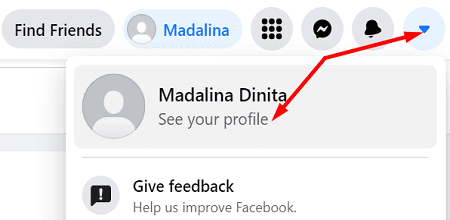
  2. Click on your Account menu.
  3. Select See your Profile.Facebook-See-Your-Profile
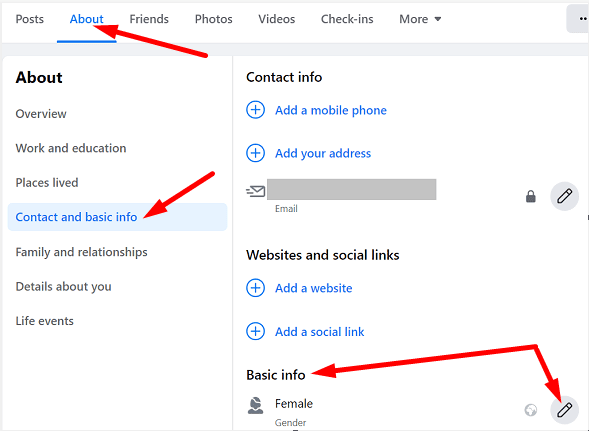
  4. Then, click on the About tab.
  5. Go to Contact and Basic Info.
  6. Scroll down to Basic Info.
  7. Select the Gender option.
  8. Use the drop-down menu and select the appropriate option for you: Female, Male, or Custom.
Facebook-Basic-Info

Custom Gender Options on Facebook

Facebook supports a plethora of custom gender options. Use the drop-down menu to select the one(s) you want to add to your profile.

Facebook-gender-drop-down-menu

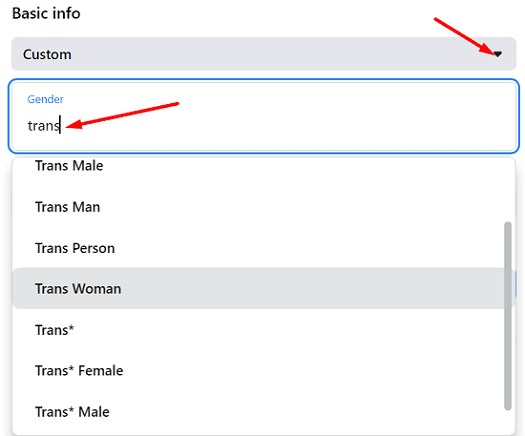
For more gender identity options, type the first letter of the gender you want to add. Then, select the gender you want to use from the drop-down menu.

Facebook-additional-gender-options

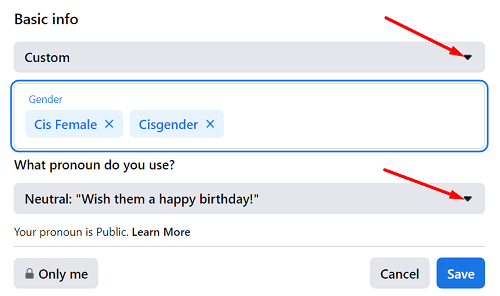
You can also specify which pronouns you want to use. Facebook lets you select between three pronoun options: him, her, or their.

Facebook-custom-gender-and-pronouns

Tweak Your Gender Privacy Settings

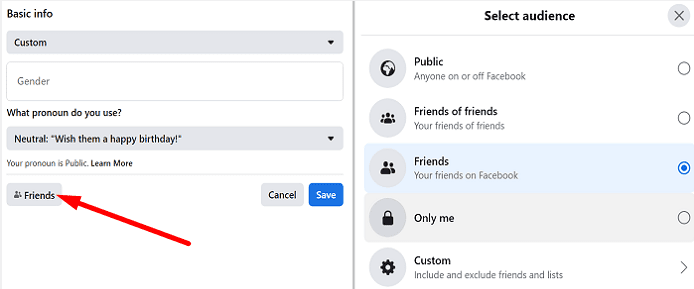
You can then edit your privacy settings and select who can see gender information on your profile. For example, you can make that information public, share it with friends only, or use custom settings.

Facebook-gender-pronoun-privacy-settings

How many gender options does Facebook have?

Facebook currently supports 61 gender options. Here’s the list of the gender options available on Facebook:

  • Agender
  • Androgyne
  • Androgynous
  • Bigender
  • Cis
  • Cis Female
  • Cis Male
  • Cis Man
  • Cis Woman
  • Cisgender
  • Cisgender Female
  • Cisgender Male
  • Cisgender Man
  • Cisgender Woman
  • Female
  • Female to Male
  • FTM
  • Gender Fluid
  • Gender Identity
  • Gender Nonconforming
  • Gender Questioning
  • Gender Variant
  • Genderqueer
  • Intersex
  • Male
  • Male to Female
  • MTF
  • Neither
  • Neutrois
  • Non-Binary
  • Non-binary
  • Not specified
  • Other
  • Pangender
  • Trans
  • Trans Female
  • Trans Male
  • Trans Man
  • Trans Person
  • Trans Woman
  • Trans*
  • Trans* Female
  • Trans* Male
  • Trans* Man
  • Trans* Person
  • Trans* Woman
  • Transfeminine
  • Transgender
  • Transgender Female
  • Transgender Male
  • Transgender Man
  • Transgender Person
  • Transgender Woman
  • Transmasculine
  • Transsexual
  • Transsexual Female
  • Transsexual Male
  • Transsexual Man
  • Transsexual Person
  • Transsexual Woman
  • Two-Spirit

When did Facebook add gender options?

Facebook started expanding their list of gender identity options in February 2014. That was the moment that allowed people who identify as neither male nor female to select the gender that best defines who they feel they are.

In 2015, the company added the “Fill in the blank” gender option. If you don’t identify with the list of gender options available, you can simply add your own.

Conclusion

To change your gender on Facebook, go to “Contact and Basic Info”, select the “Gender” option, and then use the drop-down menu to select the appropriate option for you: Female, Male, or Custom. Facebook supports a total of 61 gender identity options.
Is there any gender identity option that Facebook forgot to add to the list? Comment down below.

Categories: Internet

Author Madalina Dinita

Madalina has been a Windows fan ever since she got her hands on her first Windows XP computer. She is interested in all things technology, especially emerging technologies -- AI and DNA computing in particular.

You Might Also Like

  • Twitch.tv: How to Configure a Stream Schedule

    Mel HawthorneInternet
  • Picture-in-Picture Mode in Firefox: How to Turn It On

    Judy SanhzInternet
  • Slack: How To Export a Workspace Member List

    Mel HawthorneInternet
  • Dropbox: How to View Which Browsers and Devices Are Signed into Your Account

    Mel HawthorneInternet

Comments

  1. Viki says:
    November 24, 2022 at 12:26 pm

    Facebook don’t allow me to change my gender. It says “There was a problem saving profile changes. Please try again!”

  2. Jade says:
    October 10, 2022 at 8:49 pm

    My gender is and always has been FEMALE, but when in the Facebook gaming section, Facebook thinks I’m a man. Why?

  3. omar says:
    September 26, 2022 at 6:38 am

    thanks! this is helpful

Leave a Reply

Your email address will not be published. Required fields are marked *

  • service outage message on Xbox

    What to Do With a Service Outage Message on Xbox

  • signs your hdd is failing

    Signs That Your HDD Is Failing

  • how to fix error code 0x800705b4 in windows 11

    How to Fix Error Code 0x800705b4 in Windows 11

  • does chromebook need an antivirus

    Does Chromebook Need an Antivirus?

  • top vpns

    Top 5 VPNs to Keep Your Information Private in 2026

profile pic

The Experts Behind Technipages

My name is Mitch Bartlett. I've been working in technology for over 20 years in a wide range of tech jobs from Tech Support to Software Testing. I started this site as a technical guide for myself and it has grown into what I hope is a useful reference for all.

Learn More

technipages logo white
linkedin icon

Technipages is part of Guiding Tech Media, a leading digital media publisher focused on helping people figure out technology. Learn more about our mission and team here.

© 2026 Guiding Tech Media All Rights Reserved

  • About Us
  • Contact
  • Terms of Use
  • Privacy Policy

© 2026 Guiding Tech Media All Rights Reserved

Information from your device can be used to personalize your ad experience.
Do not sell my personal information.

Last Updated on March 10, 2022 by Mitch Bartlett