Skip to content
LogoTechnipages
LogoTechnipages
  • Topics
        • Android
        • Browsers
        • Gaming
        • Hardware
        • Internet
        • iPhone
        • Linux
        • macOS
        • Office
        • Reviews
        • Software
        • Windows
        • Definitions
        • All Recent Posts
  • Product Reviews
  • About

How to Fake Your Location on Facebook

Madalina DinitaDecember 28, 2020 Comments (0)
fake location on facebook

If you want to play a trick on your Facebook friends, you can fake your location and make it look as if you were in a faraway exotic country. Well, if you haven’t done that before, we’ll show you what are the steps to follow.

The good news is that you can use Facebook Check In to select any location you want. The platform does not check if you’re actually located where you say you are. You can select any city in the world and pretend you’re there.

Of course, if you want to make your story more credible, you can also add some photos you edited beforehand. Or maybe some old photos of you visiting that place many years ago.

Steps to Fake Facebook Location on Mobile

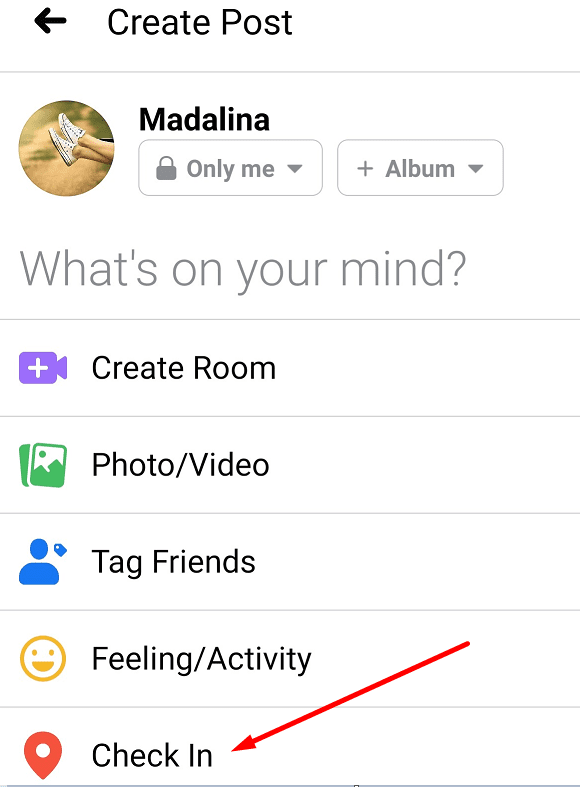
  1. Tap on What’s on your mind.
  2. Then select Check-In.facebook check in mobile
  3. If you’re prompted to enable Location Services, deny the permission. After all, you want to fake your location.
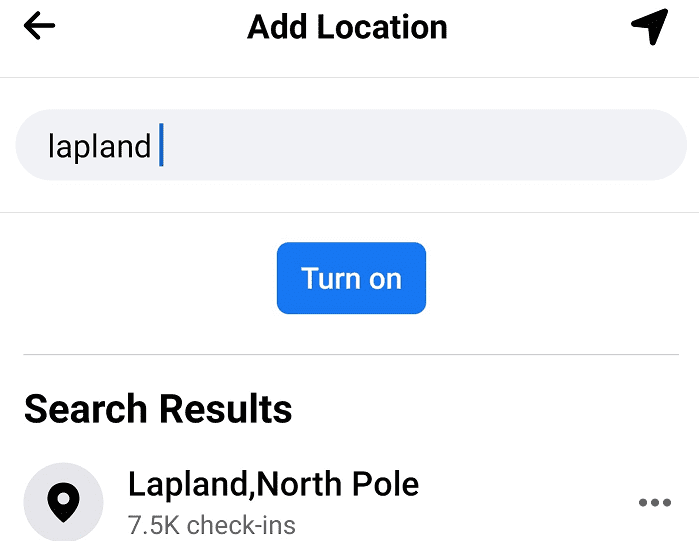
  4. Tap Search and type the name of the place or city you want to check in to.search for check in location facebook
  5. Then scroll up to see the search results.
  6. Select the location you like and publish your post.add fake location facebook mobile

Steps to Fake Facebook Location on PC

  1. Click on What’s on your mind.
  2. Then click on the Check In icon.facebook check in icon
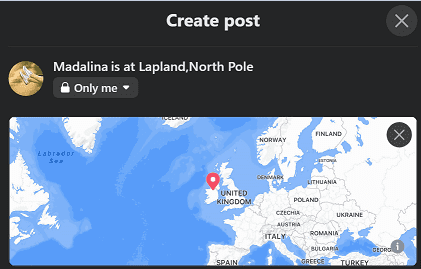
  3. Enter the name of the place you want to check in to.add fake facebook location
  4. Hit the Post button to let everyone know where you are. Actually, where you want them to think you are.

You can also use an app to fake your real GPS location if you like. But this is not really necessary. As you’ve already seen, Facebook lets you pick any location you want.

We just hope the company does not add strict check-in rules in the future so as to prevent users from faking their location. Facebook is currently waging a major war against fake news. So, the idea of Facebook blocking users from faking their location does not seem that far-fetched anymore.

Categories: Software

Author Madalina Dinita

Madalina has been a Windows fan ever since she got her hands on her first Windows XP computer. She is interested in all things technology, especially emerging technologies -- AI and DNA computing in particular.

You Might Also Like

  • fix zoom login issues

    Troubleshooting Zoom Login Errors

    Madalina DinitaSoftware
  • How to Generate a Hash in Notepad++

    Mel HawthorneSoftware
  • Outlook Get Add-ins Button Is Grayed Out Top 5 Solutions in 2023

    Outlook Get Add-ins Button Is Grayed Out: Top 5 Solutions in 2023

    Tamal DasOffice
  • How to Access Recent Notes in OneNote

    Danny MaiorcaSoftware

Leave a Reply

Your email address will not be published. Required fields are marked *

  • error 400 when signing in

    Encountered Error 400 When Signing In to Microsoft? Here’s What You Can Do 

  • unable to create notebook error in onenote

    We Were Unable to Create Your Notebook Error in OneNote – Common Fixes 

  • error code 0x800704f8 fix

    Error Code 0x800704f8 – How to Fix 

  • back button in browsers doesnt work

    What to Do if the Back Button in Browser Doesn’t Work 

  • could not find this item

    “Could Not Find This Item” When Trying to Remove Files

profile pic

The Experts Behind Technipages

My name is Mitch Bartlett. I've been working in technology for over 20 years in a wide range of tech jobs from Tech Support to Software Testing. I started this site as a technical guide for myself and it has grown into what I hope is a useful reference for all.

Learn More

technipages logo white
linkedin icon

Technipages is part of Guiding Tech Media, a leading digital media publisher focused on helping people figure out technology. Learn more about our mission and team here.

© 2026 Guiding Tech Media All Rights Reserved

  • About Us
  • Contact
  • Terms of Use
  • Privacy Policy

© 2026 Guiding Tech Media All Rights Reserved

Information from your device can be used to personalize your ad experience.
Do not sell my personal information.

Last Updated on December 28, 2020 by Mitch Bartlett