
Skip to content
LogoTechnipages
LogoTechnipages
  • Topics
        • Android
        • Browsers
        • Gaming
        • Hardware
        • Internet
        • iPhone
        • Linux
        • macOS
        • Office
        • Reviews
        • Software
        • Windows
        • Definitions
        • All Recent Posts
  • Product Reviews
  • About

Bitwarden: How to Edit or Delete a Folder

Mel HawthorneMay 10, 2021 Comments (0)

Over time as you create and delete accounts, you may find that the folder structure you created isn’t ideal anymore. You may want to rename an existing folder, making sense as you add related items to it. You may also wish to delete a folder entirely if you no longer need it and have deleted all of the accounts it once contained. Thankfully in Bitwarden, it is easy to edit or delete folders whenever you want.

How to Edit or Delete a Folder in the Bitwarden Browser Extension

To edit or delete a folder in the Bitwarden browser extension, open the extension pane by clicking on the Bitwarden icon. Once it’s open, switch to the “Settings” tab, and click “Folders.”

Click on “Folders” in the “Settings” tab of the extension pane.

Click on the name of the folder you want to edit or delete. To change the name of a folder, type the new name you want, then click “Save.” To delete a folder, click “Delete folder,” then click “Yes” in the confirmation popup.
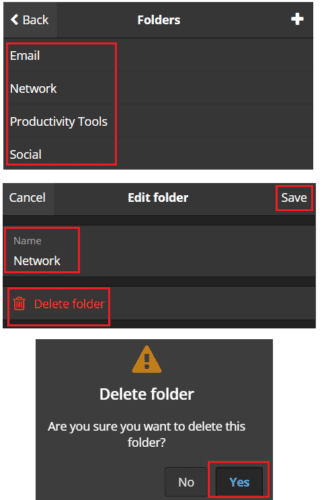
Type a new name for the folder and click “Save” or click “Delete folder” and then “Yes” to confirm.

Tip: Deleting a folder will not delete the items in that folder.

How to Edit or Delete a Folder on the Bitwarden Website

To edit or delete a folder on the website, click on the “Edit folder” button with a pencil icon next to the name of the folder you want to edit or delete in the “Filters” bar on the left of the default “My vault” tab. Next, in the popup, type the name you want to change the folder to click “Save.”

Click on the pencil icon next to the name of the folder you want to edit in the “Filters” list on the “My vault” tab. Edit the name and click “Save” or click “Delete folder” and click “Yes” to confirm.

Changing the folder structure of your password manager can be helpful as your entries change over time. By following the steps in this guide, you can edit or delete an existing folder.

Categories: Internet | Software

Author Mel Hawthorne

You Might Also Like

  • 7 Chrome Extensions to Make Gmail More Productive

    Judy SanhzInternet
  • Slack: How To Export a Workspace Member List

    Mel HawthorneInternet
  • Dropbox: How to View Which Browsers and Devices Are Signed into Your Account

    Mel HawthorneInternet
  • Bitwarden: How to Unlock the Browser Extension with a PIN or Biometrics

    Mel HawthorneInternet

Leave a Reply

Your email address will not be published. Required fields are marked *

  • browser keeps opening hp support

    Browser Keeps Opening HP Support Assistant Tabs 

  • camera not working in vmware

    Camera Not Working in VMware – How to Fix

  • browser screen goes black

    Browser Screen Goes Black Intermittently 

  • computer heating up in hyper v

    Computer Heating Up When Using Hyper-V – How to Fix 

  • clipchamp unexpected application error

    Clipchamp Unexpected Application Error: Here’s the Solution 

profile pic

The Experts Behind Technipages

My name is Mitch Bartlett. I've been working in technology for over 20 years in a wide range of tech jobs from Tech Support to Software Testing. I started this site as a technical guide for myself and it has grown into what I hope is a useful reference for all.

Learn More

technipages logo white
linkedin icon

Technipages is part of Guiding Tech Media, a leading digital media publisher focused on helping people figure out technology. Learn more about our mission and team here.

© 2025 Guiding Tech Media All Rights Reserved

  • About Us
  • Contact
  • Terms of Use
  • Privacy Policy

© 2025 Guiding Tech Media All Rights Reserved

Information from your device can be used to personalize your ad experience.
Do not sell my personal information.

Last Updated on May 10, 2021 by Judy Sanhz