
Skip to content
LogoTechnipages
LogoTechnipages
  • Topics
        • Android
        • Browsers
        • Gaming
        • Hardware
        • Internet
        • iPhone
        • Linux
        • macOS
        • Office
        • Reviews
        • Software
        • Windows
        • Definitions
        • All Recent Posts
  • Product Reviews
  • About

Android 11: How to Find and Play the Easter Egg for Some Fun

Judy SanhzOctober 20, 2021 Comments (7)
Fix-Blue-Screen-Errors-Android

Every time a new Android version comes out, there’s a new Easter Egg to discover and play. They’re usually easy to find and one you just have to try, even though it may not be the best game in the world.

The good news is that the Easter Egg you’ll find in Android 11 is, once again, easy to find. With a few taps here and there, you can see what the Easter Egg for this Android version looks like.

Contents

  • 1 How to Discover the Easter Egg for Android 11
    • 1.1 How to Play Android 11 Easter Egg Game
    • 1.2 Conclusion

How to Discover the Easter Egg for Android 11

Android 11 Easter Egg

To see what the Easter Egg is for this Android version, got o Settings > About Phone > Swipe down to Android version 11. Tap on Where it says Android Version 11 until you see a volume dial.

Android 11 Easter Egg

Once you see the volume dial, tap on the white circle and turn the dial three times. On the third turn, you’re going to see the number eleven. When you see a cat emoji at the bottom of the volume dial, that means that you’ve turned on the game.

How to Play Android 11 Easter Egg Game

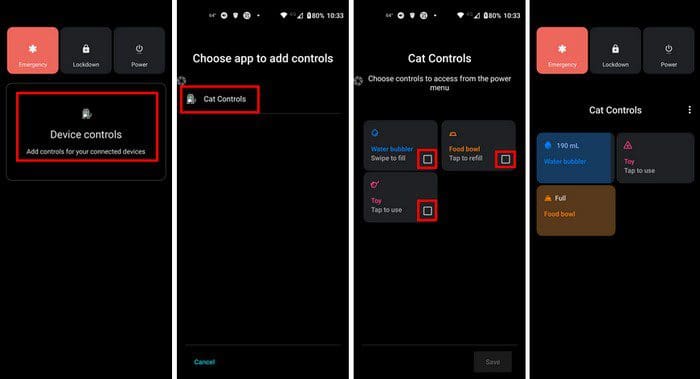
Once you’ve enabled the game, this is what you can do to play. Long-press on the power button and tap on Device Controls, followed by Cat Controls.
Play Android 11 Easter Egg

In the next step, you’re going to see three boxes for Water, Food, and toys. Check the boxes for all three to enable them. Once they’re on, you’ll need to tap on them to fill the water and food bowl and play with the toys.

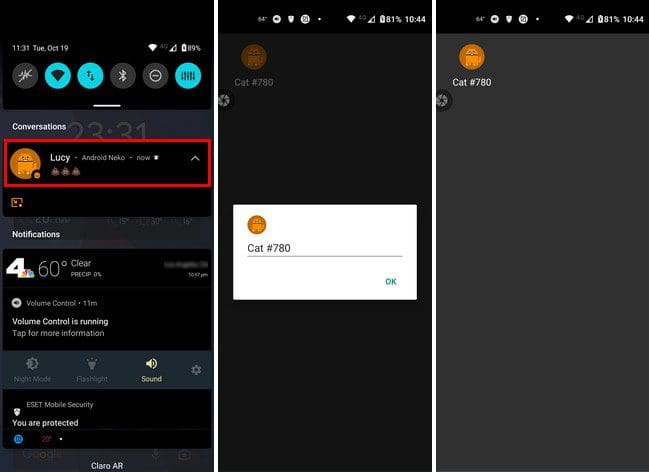
You can also name your cats. After a while, you’ll see a notification with a cat emoji. Long-press on it, and you’ll see the option to rename the cat. Don’t be surprised if you see another unnamed cat in your notification bar.
Notification Android 11 Easter Egg

If you want to name the cat, simply repeat the process. To refill the cat’s water and food bowl, you’ll only need to tap on the box for that option. You can access the bowl simply by long-press on the power button.

Conclusion

That’s all there is to the new Easter Egg in Android 11. It’s not the game of the year, but it’ll keep you busy. You’ll have more than one cat to feed, so remember to check on them from time to time. What do you think about this Easter Egg game? Share your thoughts in the comments below, and don’t forget to share the article with others on social media.

Categories: Android

Author Judy Sanhz

I am a tech geek who loves technology. I have been writing about tech for over a decade, covering various devices and programs. I write about Android, Apple, and Windows devices and programs. I stay updated on the latest gadgets, upgrades, features, and news. I aim to make complicated tech information easy for everyone to read. I've been with TechniPages from the beginning to help others fix their tech issues with the easy-to-follow guides.

You Might Also Like

  • Android: Restore Prompt For Default Application

    Mitch BartlettAndroid
  • Block Text Header

    Galaxy S23: Block Text Messages & Calls

    Mitch BartlettAndroid
  • Android 10: How to Erase Saved Wifi Connections

    Judy SanhzAndroid
  • fix whatsapp error you cannot place another call

    Fix WhatsApp Error: You Cannot Place Another Call

    Madalina DinitaAndroid

Comments

  1. BG says:
    August 29, 2022 at 3:48 pm

    I can follow along up to turning the knob and getting the [????] but after holding the power button, there’s no 3 dots to push except in the drop down. But those 3 dots don’t give me anything even remotely close to anything mentioned…

  2. Robert says:
    August 15, 2022 at 9:19 pm

    I love how the above comments bash the “Easter egg”….

    Thank you for the tutorial. Excellent screenshots & very informative….. Ikea should take the time & learn from your methods. I’m sure they wouldn’t have so many confused customers

  3. Ashley Schuler says:
    July 30, 2022 at 2:40 am

    Game is lame. If I wanted a pet I’d get a real one.

  4. Meg Tee says:
    June 5, 2022 at 10:57 am

    My cats never showed up even after playing with toys multiple times

  5. Harold parks says:
    April 14, 2022 at 7:03 pm

    No the app is useless and makes my phone slow and unresponsive as soon as I’m able I’m going to upgrade do I don’t half to worries bout this problem any more thank you.

  6. Jeff says:
    January 2, 2022 at 2:10 pm

    Yes it was very informative and well explained. Thank you for your assistance.

  7. Eff says:
    January 1, 2022 at 1:21 pm

    I only found it by accident and had to do a deep dive just to find this one article to tell me what the dial was about ,then to find out it’s a little kitty tamaguchi game was pretty cool

Leave a Reply

Your email address will not be published. Required fields are marked *

  • system32 folder opens on startup

    System32 Folder Opens on Startup – How to Fix

  • browser keeps opening hp support

    Browser Keeps Opening HP Support Assistant Tabs 

  • camera not working in vmware

    Camera Not Working in VMware – How to Fix

  • browser screen goes black

    Browser Screen Goes Black Intermittently 

  • computer heating up in hyper v

    Computer Heating Up When Using Hyper-V – How to Fix 

profile pic

The Experts Behind Technipages

My name is Mitch Bartlett. I've been working in technology for over 20 years in a wide range of tech jobs from Tech Support to Software Testing. I started this site as a technical guide for myself and it has grown into what I hope is a useful reference for all.

Learn More

technipages logo white
linkedin icon

Technipages is part of Guiding Tech Media, a leading digital media publisher focused on helping people figure out technology. Learn more about our mission and team here.

© 2026 Guiding Tech Media All Rights Reserved

  • About Us
  • Contact
  • Terms of Use
  • Privacy Policy

© 2026 Guiding Tech Media All Rights Reserved

Information from your device can be used to personalize your ad experience.
Do not sell my personal information.

Last Updated on October 20, 2021 by Judy Sanhz