
If you made friends that live far away during the pandemic, there’s a good chance you still use Zoom to keep in touch with them. If you’re not much of a talker, then your Zoom meeting may experience that uncomfortable silence. So if you don’t want to just stare at the screen and pretend your screen froze, why not play some fun game.
Contents
Free and Fun Games to Play During a Zoom Meeting
Who says that a Zoom meeting has to be all talk and no play. To keep you participants entertained, there are different games you can play that’ll help make the time pass by faster. Let’s see what games you can play during your Zoom meeting.
1. AskAway

How well do you think you know your friends? With AskAway, you can answer questions about each other such as what the person in question would drink or do in a specific situation. You’ll see the question and three answers to choose from below. The game only asks a few questions, so your attendees won’t get too bored with too many questions. No installation is required, so all you have to do is click on apps when you’ve started your Zoom meeting and play.
2. Heads Up

If you like playing charades, then you’re going to like playing Heads Up. In this game, you’ll need to describe what’s on the card, but without saying the words on the card. When the person has guessed what it is, click on correct and continue to the next card. If you can’t guess what it is, click on the pass option to continue. Make sure you don’t take too long since the clock will be ticking, so ensure you get your answer in before the time is up.
3. Team Games by BoomTV
Thanks to Team Games, you’ll have various games to choose from. You can choose from games such as UnBlock it, Mini Golf, 8-ball, Match three. Other games that’ll be added soon include board games, trivia, puzzles, Pictionary, and card games.
Your Zoom guests will go through various rounds of chosen games and be assigned subgroups and time limits. Those subgroups are rotated across those games. That way, they get a great multiplayer experience.
4. Just Say the Word
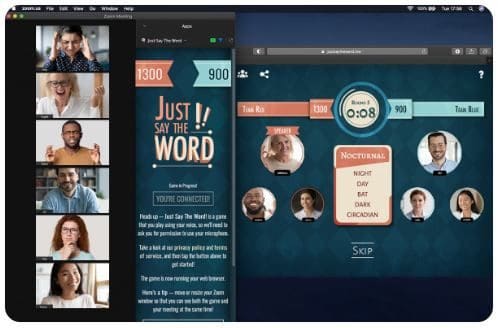
In this game, there are no buttons to click on. All you have to do is describe the best you can the word on the card. For example, if the card says donkey, you have to describe the animal the best you can but without using keywords on the card. This makes it more difficult and fun since the others have to guess the word before the time is up. The game has two teams, making it a competitive game.
5. LGN Poker

Get together with friends to show them who’s the boss at poker. You can play with a maximum number of 10 friends, and you can play two modes: tournament and standard. You can set custom blinds, and you can count on customizable rebuy and amounts and limits. The game even counts on party favors you can send friends, and there are also many avatars to choose from.
6. Werewolf with Friends
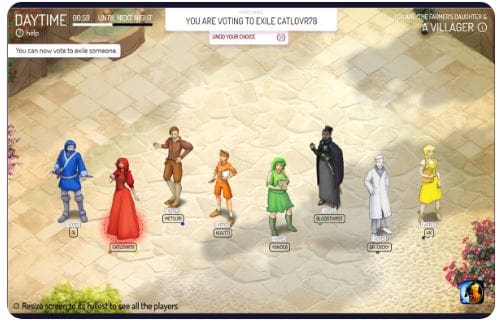
If you’re more into role-playing games, then Werewolf and Friends might interest you more. The Zoom participants are divided into two groups. One group makes up the villagers, and the other is the werewolves. The villagers have the goal to find out the identity of the werewolves. In contrast, the werewolves try to overrun the village.
The werewolves will try their best to blend in with the other villagers. When they get the chance, they will get and eat one of those villagers. The players in the game have to discuss among themselves who might be the werewolf. If everyone comes to an agreement, that suspect is voted off the game, regardless if they are the werewolf or not. The game only ends when the werewolves have overrun the village, or the villagers have kicked out all the werewolves.
7. Funtivity

If you don’t want to install only one game, you can try Funtivity. It comes with various activities to choose from depending on the occasion. You can choose from games such as escape room, Harry Potter, May the 4th be With You, trivia, and more.
Conclusion
You can never go wrong with trivia games, but just in case you want to try other kinds of games, you can get them at Zoom’s app marketplace. Thanks to these games, your Zoom participants will have so much fun at your meetings that they’ll keep asking you when the next meeting is. Which game are you going to try first? Let me know in the comments below, and don’t forget to share the article on social media.