
You can learn how to enable or disable JavaScript in Microsoft Edge using these easy steps.
JavaScript Settings in Edge for Android & iPhone
- Open Edge and select ⋯ at the bottom of the screen.
- Select Settings.
- Select Privacy and security.
- Select Site Permissions.
- Choose JavaScript.
- Flip the switch On to allow JavaScript. Switch it off to completely disable it. You can also list individual websites as exceptions to the setting.
JavaScript Settings in Edge for Windows & macOS
- Open Edge, then select ⋯ at the upper-right part of the screen.
- Open Settings.
- Select Cookies and Site Permissions on the left pane.
- Select JavaScript.
- Flip the switch On to allow JavaScript. Switch it off to completely disable it. You can also list individual websites in the Block or Allow settings if you wish to block or allow JavaScript on specific sites respectively.
JavaScript Settings in Windows
- Select the Gear in the upper-right corner of the screen or the “Tools” menu if you have the menu bar enabled, then select “Internet Options“.
- Select the “Security” tab.
- Select the zone you wish to modify. In most cases, it will be “Internet“.
- Select the “Custom level…” button.
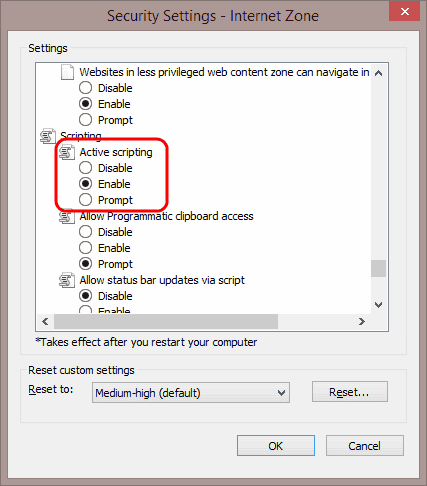
- Scroll down to the “Scripting” area and select the radio button to “Enable” or “Disable” it “Active scripting“. You may also opt for Edge to “Prompt” you to allow scripts to run.
- Select “OK“, then “OK” again.

FAQ
Why is the “Custom Level…” button grayed out for me?
You may not have permission to modify settings. Try closing Edge, then re-open it by right-clicking the icon, then choosing “Run as Administrator”. If that doesn’t work, you may need to login as an admin to the system. If you are working in a corporate or school environment, you may need to contact your IT department.




in IE 11 the param is now called : “Scripts ASP” instead of “Active Scripting”
i have been trying to turn on my java script so that i can log in to my emails its been weeks now, i tried the instructions
but keeps on giving me an error
I had enabled the active scripting on my IE 11, but system still throw me with error message:
“Access denied! Active Scripting permission needed in Internet Explorer (Tools/ Internet Options/ Security tab/ Customer Level button/ Scripting/ Active Scripting)”.
Lifesaver – my IE 11 (fresh reinstall to try and fix the following issue-) would refuse to interact with Flash even though it was installed correctly for IE (showed in addons and was “enabled”)
Once Javascript was enabled Flash was too.
A big thank you.
I have done this several times and the website I’m trying to use still says that java script is disabled.
Thanks Mate!
thanks. useful info.
Thank you instructions were very clear and esay to follow
Thanks, Internet explorer always is difficult….
Just what I needed—thanks
Thank you for the instructions.
Thank you and helpfull