WhatsApp prank apps are a great way to get some laughs for free. You’ll get to confuse your friends, making them think that there is something wrong with their phones. For example, sending them blank messages will surely get them thinking something is wrong with their device.
To perform these pranks on your friends through WhatsApp, you’ll need the help of some third-party apps. The prank apps for WhatsApp are free, so if they are not what you are looking for, you only have to uninstall them.
Contents
1. WhatsPrank – Create Fake Conversations on WhatsApp
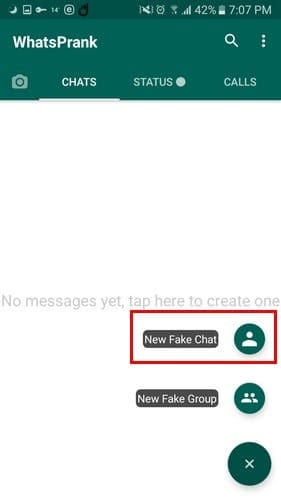
WhatsPrank is an excellent app for making up WhatsApp conversations. The app lets you make up the conversation and the user as well. To create a fake contact, open the app, and tap on the plus button at the bottom right and choose New Fake Chat.
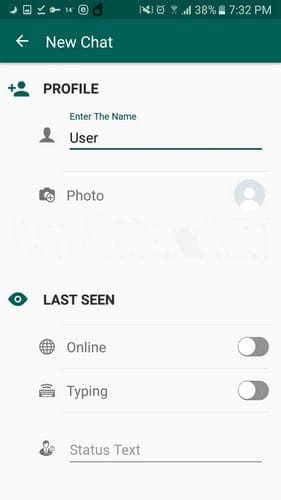
Just like any other contact on WhatsApp, you will need to create a name, upload a picture, enter status text, and decide if you want the fake contact to be online or be typing.
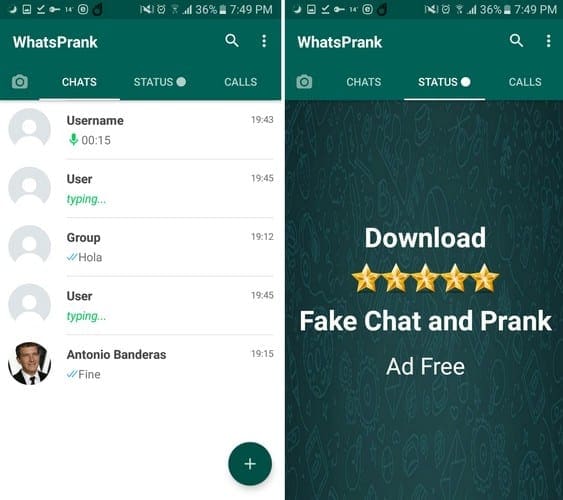
Once you’ve filled in all the necessary information, click on the Save option at the bottom. Your new and fake user will appear in the Chat tab with the green typing label below the username. Even if you selected for the phony user to only be online, you would only see the online option if you open that fake chat.
If you’re in the app’s main page, it will appear as if they are only typing. You’ll also see the status and calls tab, but you won’t find anything there. You’ll only see an advertisement to buy the ad-free versions of the app.
The WhatsApp prank app can also have your fake contact “send” you audio. Tap on the audio, and you will have to decide who is sending the audio, you or your false contact.
There is no point in pressing the audio file since it doesn’t contain anything. By pressing it, you’ll only see the settings for the audio feature where you can change things such as the duration of the audio. Tap on the duration time of the audio and manually add how much the fake audio lasts.

You can also change things such as the time sent, the sender, and the delivery status. Select the checkmarks, and with each tap, they will switch to sent, but not delivered, delivered, and read.
Other options such as emojis and sending attachments, call options work just fine. It’s not possible though, to tap on the camera icon to take a picture, it will only open your gallery to send a picture.
Keep in mind that the search, camera, and the three dots at the top right to access settings don’t work. If you press them, nothing is going to happen. WhatsPrank is a fun app, but the ads can get annoying. Other than that, it’s a fun app to use.
2. Blank Message (for WhatsApp)
Blank Message (for WhatsApp) keeps things simple by allowing you to prank your friends with short or long blank messages. The app is not a feature-rich one, but it completes its purpose of allowing you to send as many blank messages as possible.
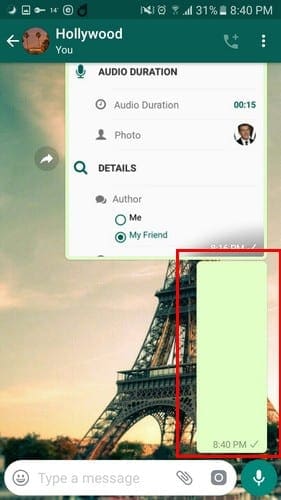
The length of the blank messages will depend on the number of rows you decide to add. To choose the number of rows, open the app and tap on the number of rows drop-down menu.
It’s possible to add as little as one row or as many as 10,000 rows. At the bottom, you’ll see two options, such as to send and clipboard. By tapping on the clipboard option, you copy the blank space where you can paste it on any other app you want.
By choosing the Send option, WhatsApp will open. Choose the contact you want to send the blank message to and send as usual.
Conclusion
Friends wouldn’t be friends if you couldn’t have some fun with them. These apps are an excellent choice to confuse your friend and not spend a dime in the process. Which app are you going to use first? Don’t forget to let me know how your friends reacted in the comments below.