
Skip to content
LogoTechnipages
LogoTechnipages
  • Topics
        • Android
        • Browsers
        • Gaming
        • Hardware
        • Internet
        • iPhone
        • Linux
        • macOS
        • Office
        • Reviews
        • Software
        • Windows
        • Definitions
        • All Recent Posts
  • Product Reviews
  • About

What is USB Type-C?

Mel HawthorneAugust 5, 2021 Comments (0)

USB-C is one of several types of USB connectors. The ‘standard’ you recognise from your computer, memory stick or data transfer cable is called a USB-A. There are also types like USB-B (used with printers) and things like mini-USB or micro-USB (older phone chargers).

USB-C is a recent invention – it was approved for use in 2016 and has been in heavy use in tech manufacturing since then.

Why USB-C?

While USB-A as a connector was an effective way of transmitting data or charging, the connector itself wasn’t without it’s issues – for one, it was too large to be implemented in something like mobile devices, and more importantly, it, along with other USB types like mini or micro wasn’t omnidirectional.

That means that it only works ‘the right way up’ – meaning users often had to either carefully check which way was up or just flip it until it would fit – except that jamming it in wrong or too hard could damage the connectors.

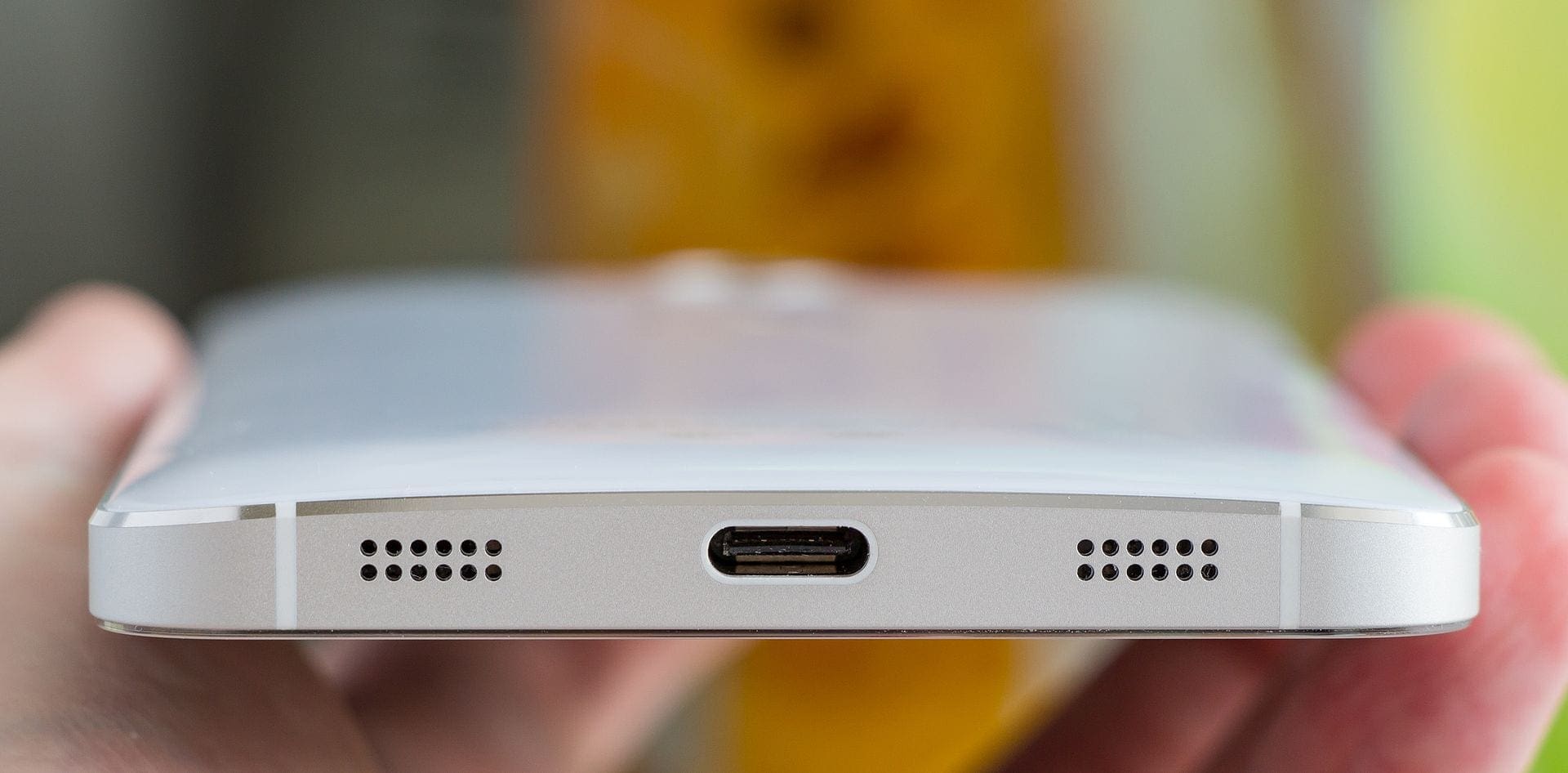
USB-C can be plugged in either way ‘up’ – the oval, 24-pin connector is therefore much more convenient to use. As it was developed more recently and with newer USB protocols as well, it can also serve as a more powerful connector, offering higher data transfer speeds for example. While the actual speeds depend on several factors, USB-C connectors using the USB 3.2 standard, for example, can support transfers of up to 2.4GB/s. best ukranian online casinos by Sport XL

Where can I find USB-C connectors?

Current generation phones use the USB-C connector (with the exception of Apple devices), as do recent generation mice, keyboards, speakers, and even storage devices like flash drives. Some smaller, light-weight laptop models are starting to forego USB-A ports entirely, using only USB-C ones – the smaller connectors allow for a more space-saving design for the laptop.

Categories: Hardware

Author Mel Hawthorne

You Might Also Like

  • How To Batch Uninstall Apps on Android

    MonaHardware
  • Upcoming Flagship Phones – a First Look at the Ulefone Power Armor 14 Pro

    Mel HawthorneAndroid
  • What Are the System Panel Cables?

    Mel HawthorneHardware

Leave a Reply

Your email address will not be published. Required fields are marked *

  • how to fix error code 0x800f0922 windows 11

    How to Fix Error Code 0x800f0922 in Windows 11

  • service outage message on Xbox

    What to Do With a Service Outage Message on Xbox

  • signs your hdd is failing

    Signs That Your HDD Is Failing

  • how to fix error code 0x800705b4 in windows 11

    How to Fix Error Code 0x800705b4 in Windows 11

  • does chromebook need an antivirus

    Does Chromebook Need an Antivirus?

profile pic

The Experts Behind Technipages

My name is Mitch Bartlett. I've been working in technology for over 20 years in a wide range of tech jobs from Tech Support to Software Testing. I started this site as a technical guide for myself and it has grown into what I hope is a useful reference for all.

Learn More

technipages logo white
linkedin icon

Technipages is part of Guiding Tech Media, a leading digital media publisher focused on helping people figure out technology. Learn more about our mission and team here.

© 2026 Guiding Tech Media All Rights Reserved

  • About Us
  • Contact
  • Terms of Use
  • Privacy Policy

© 2026 Guiding Tech Media All Rights Reserved

Information from your device can be used to personalize your ad experience.
Do not sell my personal information.

Last Updated on August 5, 2021 by