If you want two or more computers to be able to communicate, you will need to connect them in some manner. With two devices, you don’t really have many choices. A point-to-point link is the best, and basically only, choice. If you want to connect more than two computers together, things get a little more complicated as you have many more options. One potential network topology is the mesh topology.
Mesh Topology
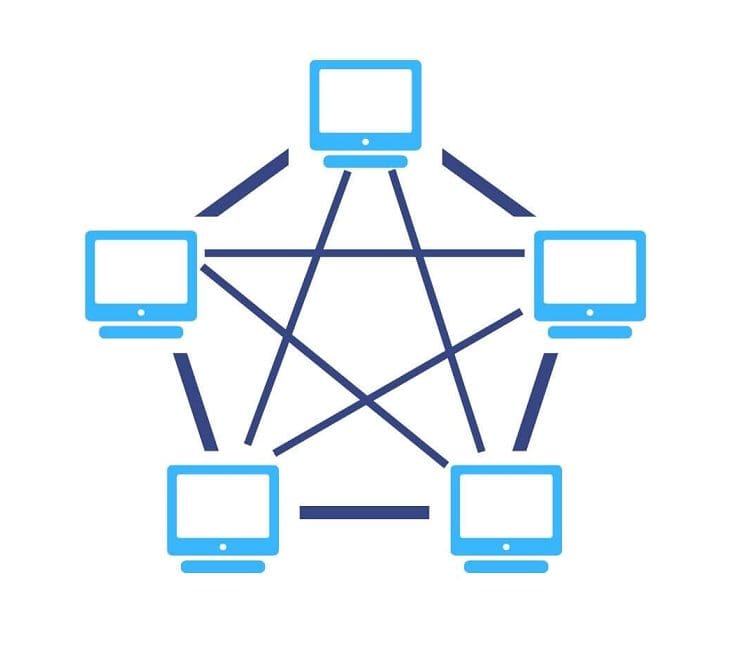
In a mesh topology, devices are interconnected with multiple possible routes. There are two variants of the mesh topology, the partially connected mesh, and the fully connected mesh.
In a fully connected mesh, every device is connected to every other device. This provides excellent connectivity but can be expensive and complex to scale up. In a partially connected mesh, many, though not all, devices have multiple connections. This variant provides most of the benefits of a full mesh but with adjustable levels of complexity and associated costs based on risk tolerance.

Advantages
Any form of mesh network offers increased connectivity. This offers extra potential bandwidth, which can be helpful for surges of activity that would have overwhelmed a single link. The key advantage of increased connectivity is the presence of redundant routes. When combined with a network routing protocol that can detect connectivity issues in the network and adjust on the fly, a mesh network can potentially suffer multiple failures and still maintain almost all activity.
The exact ability for a network to continue to offer nominal functionality depends on the specific failure or failures. If a network cable is cut, breaks, or is accidentally disconnected, as long as there is another circuitous route. There would only be minimal disruption between the two – now disconnected – devices. In contrast, the network identifies the link is down and routes traffic differently. The situation is slightly different if an actual computer or server crashes or is turned off. In this case, that device is, obviously, entirely inaccessible. However, the rest of the network can identify this and route traffic over alternative connections.
Adding any device to the network involves no downtime, though it may take a small amount of time for the network to use as a route to transport data. Removing a device can have some impact if done suddenly. However, it’s also possible to cleanly remove a device from the network if some planning involves. The fault tolerance in a mesh network can also make it comparatively easy to remotely diagnose issues. However, the issue may still require someone on-site to fix the issue.
Disadvantages
Cost is the main downside of mesh topology, especially for fully connected meshes. Even at relatively small scales, the number of network cables and interfaces needed gets ridiculous. For example, in a five-device network, each device needs four ethernet ports, and you need a total of nine ethernet cables. With ten devices, you’d need each device to have nine ethernet ports and a capacity of forty-five ethernet cables. Connectivity-wise, this is excessively complex to cable and costs a lot.
The connectivity cost and complexity can be managed in a partial mesh, allowing for redundant connectivity at much more reasonable costs. For example, it may be much more reasonable to ensure that all endpoints, like servers and computers, have two independent connections to the network. In contrast, the backbone routers have a more complex and complete mesh.
As much as connection redundancy is excellent, it’s also a cost that isn’t earning its way. It’s a little like insurance. If you have it and need it, it’s excellent; if you need it but don’t have it, it’s terrible. Having redundancy and not needing it, however, can be challenging to sell, especially in some tight corporate environments. Many companies implementing mesh networks for redundancy might still face single points of failure when it comes to an actual connection to the broader internet. This is the same issue with redundancy costing money without being used most of the time.
Another issue that some companies might have is the distributed nature of connections. This can make overall network monitoring more complex, especially when performing tasks like “deep packet inspection.”
Conclusion
A mesh topology is a network of computers where many, though not all, devices have multiple network connections. This redundancy in the network topology makes mesh networks fault-tolerant but also contributes to high costs.
When combined with an appropriate network routing protocol that verifies link status, a mesh network can be self-healing and suffer a minimal loss of connectivity in the case of an incident. Mesh topologies typically aren’t used for end-user devices. Still, they are instead favored for backend connectivity, such as connectivity to servers and between routers.