Skip to content
LogoTechnipages
LogoTechnipages
  • Topics
        • Android
        • Browsers
        • Gaming
        • Hardware
        • Internet
        • iPhone
        • Linux
        • macOS
        • Office
        • Reviews
        • Software
        • Windows
        • Definitions
        • All Recent Posts
  • Product Reviews
  • About

What is a Codec?

Mel HawthorneJuly 20, 2020 Comments (0)

Codec is a portmanteau of coder-decoder, and is a device or computer program that encodes or decodes a digital data stream – typically an audio- image- or video file.

Hardware vs software

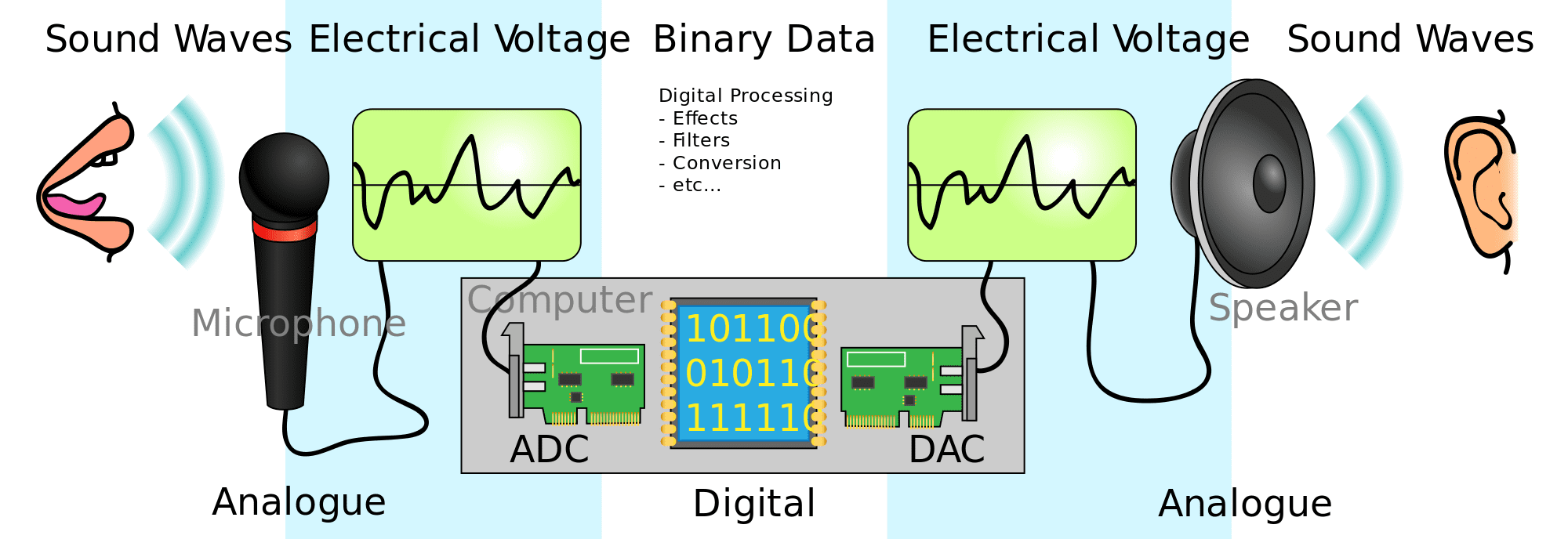
Hardware codecs are only really used for audio purposes. A hardware audio codec typically includes a DAC, Digital to Analogue Converter, and an ADC, Analogue to Digital Converter in a single device. This device can then convert sounds into a digital audio file and then play that audio file again as sound.

A software codec is a piece of computer software that can process the original source of data and convert it to a specific standard format so it can be easily read by other software that is configured to understand the relevant codec.

Lossy vs lossless

Codecs include compression in their processing, this is necessary as RAW file formats can be unreasonably large for long term storage or transmission over the internet. The inclusion of compression in codecs aims to reduce file sizes to a more manageable level.

Most codecs use lossy compression, which means that some quality of the resulting file is lost in the name of minimizing the file size. By using a high bit-rate, which includes more data per second, a lossy file can maintain a reasonably high level of quality while still not being unreasonably large. These types of codecs are ideal for audio or video files being streamed over the internet or stored on a home computer. The minimized file size means that your home internet can stream the data in real-time and that single files don’t fill entire hard drives.

Some codecs use lossless compression, which allows for the original file to be replicated with no data or quality loss. This is ideal for files that will still be processed, such as video and audio files that still need to be edited. If lossy codecs were used at each stage, the loss in quality would be compounded with each level of processing.

Categories: Hardware

Author Mel Hawthorne

You Might Also Like

  • Headphones That Are Made In the U.S.A.

    Mitch BartlettHardware
  • Google Play header

    How to Redeem a Google Play Gift card

    Judy SanhzAndroid
  • 3D printing header

    3D Printing: Fix Fine Details Missing from Prints

    Mel HawthorneHardware

Leave a Reply

Your email address will not be published. Required fields are marked *

  • system32 folder opens on startup

    System32 Folder Opens on Startup – How to Fix

  • browser keeps opening hp support

    Browser Keeps Opening HP Support Assistant Tabs 

  • camera not working in vmware

    Camera Not Working in VMware – How to Fix

  • browser screen goes black

    Browser Screen Goes Black Intermittently 

  • computer heating up in hyper v

    Computer Heating Up When Using Hyper-V – How to Fix 

profile pic

The Experts Behind Technipages

My name is Mitch Bartlett. I've been working in technology for over 20 years in a wide range of tech jobs from Tech Support to Software Testing. I started this site as a technical guide for myself and it has grown into what I hope is a useful reference for all.

Learn More

technipages logo white
linkedin icon

Technipages is part of Guiding Tech Media, a leading digital media publisher focused on helping people figure out technology. Learn more about our mission and team here.

© 2026 Guiding Tech Media All Rights Reserved

  • About Us
  • Contact
  • Terms of Use
  • Privacy Policy

© 2026 Guiding Tech Media All Rights Reserved

Information from your device can be used to personalize your ad experience.
Do not sell my personal information.

Last Updated on July 20, 2020 by Mitch Bartlett