

It is generally not recommended that you save your passwords on your browser for security reasons. But, if it’s something you’ve gone ahead and done anyway, it’s a good idea to know how to manage them. That way, you’ll have everything set up just the way you like it.
Managing passwords in an easy task but since not all browsers are made the same and may have they’re options in different areas. The following guide will show you how to manage your passwords on most popular browsers out there. Don’t forget to bookmark this article for future reference.
Contents
How to Manage Passwords in Google Chrome
Since Chrome is the most popular browser out there, it’s only fair that it’s at the top of the list. To manage your Chrome passwords click on the three vertical dots at the top right of Chrome and select settings.
Scroll all the way down and choose Advanced and slowly scroll down until you get to the Passwords and forms section. The second option will be Manage Passwords.
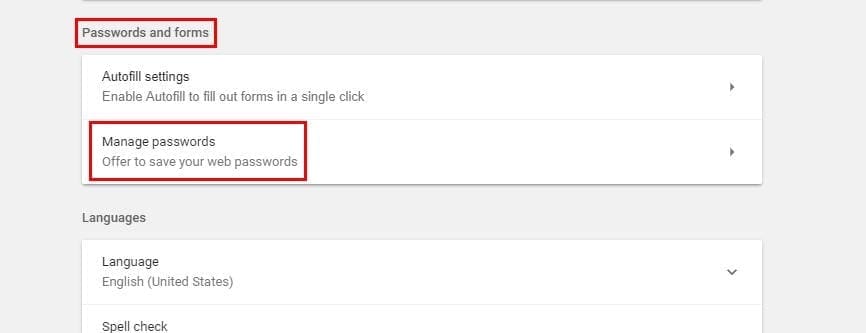
You should see your saved passwords on the next page, but you’ll only see dots for security reasons. If you need to see your passwords merely click on the show button. To remove any password, click on the X next to the Show button. It’s that easy.
How to Manage Your Passwords in Firefox
It’s also possible to manage your password in the latest version of Firefox as well. Click on the three horizontal lines and choose options. Select Privacy and Security and the option to manage your passwords should be the very first option.

Under the exceptions button, you can see all the passwords that Firefox has saved. If you need to look for a particular password in the sea of passwords you have, you can always use the search bar.

At the bottom, you have the options to either eliminate all your passwords, import some, or show passwords. Firefox won’t automatically show you your passwords, but it does have an option if you do want to see them.
How to Manage Your Passwords in Microsoft Edge
Managing your passwords is just as easy on Microsoft Edge. Just click on the three vertical dots and click on Options. Scroll down until you see Advanced Options and after selecting it you should see Manage Passwords.

You will need to toggle that on if it’s not already and then click on Manage Passwords. You should see a list of all the passwords that Edge has saved. To delete a password, just click on the x but if you want to modify it click on it. You can now change the password or make any other changes.
Conclusion
If it weren’t for services that help you remember your password, things would definitely be a mess trying to remember them. If you prefer to save your passwords on your favorite browser, now you know how to manage them. What do you think about saving passwords in any browser? Leave a comment and share your thoughts.





How to I stop Firefox from saving logons? My passwords settings are to NOT save and there are no exceptions.