As a genre of gaming, VR has managed to break through several ‘accepted’ standards of gaming. One of them is the idea that in order to play video games, you need to stand or sit still. That’s no longer the case – and VR has turned out to be a great tool to boost your fitness while having fun.
You should on;y really use VR exercise as a complement to a standard fitness routine. It can, however, be a useful addition to your existing routine. It can also be a fun and motivating way to start an exercise routine after a period of inactivity. There are multiple ways to use your VR headset to supplement your fitness regime, and here are some of our favourites!
Contents
Use Oculus Move to track yourself
Installed by default on any Oculus Quest 2, you only need to set it up to use Oculus Move. Open the app from within your app list, and give it the relevant info. You’ll have to enter your age, weight, height, gender, and goals. If you don’t want to give some of this info, the program will assume average values – though this could affect the accuracy of your results.
Move tracks two stats – active time, and calories burned. You can set yourself goals for what you want to achieve. You can adjust these goals whenever you want. Once you’ve activated the trackers, you can always check them by looking up (or into the app itself) to see how your activity and time goals are coming along.
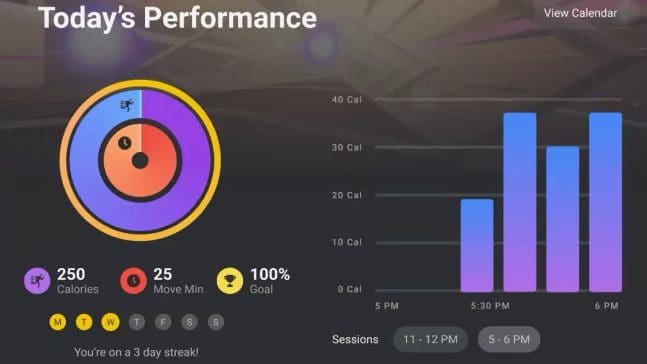
You can also check your historic data by going through the calendar in the Move app. That way you can always check back on your milestones and track your improvements.
While the Oculus Quest 2 comes with the Move software pre-installed and all you need to do is set it up, you will need to get some actual exercise apps for the movement part of your VR fitness routine. There are lots of options, some of which are even compatible with multiplayer options.
Invest in some exercise apps
There is a surprising variety of different sports that you can do in the context of VR. Perhaps one of the most popular options would be Beat Saber, an easy-to-learn but hard-to-master rhythm game. It has a huge variety of music available in it for you to choose from, including Billie Eilish, Green Day, BTS, and more. Rounds take as long as a song does, so it’s easy to play for just a few minutes at a time. The game does rely on fast reflexes, but the adjustable difficulty means it can be suitable for just about anyone.
For a more involved experience, you could pick up Boxing – there are games such as Creed, Thrill of the Fight, and Liteboxer. These games let you ‘shadowbox’ against your virtual opponent or trainer while holding the controllers. There are both structured workouts and actual ‘fights’ in which you’ll need to dodge, block, and punch in a fighting ring. All in all, these games are a great medium-difficulty exercise, although you’ll need to pay special attention to your surroundings and any people who might enter your space. Otherwise, you could end up decking your flatmate or punching your TV by accident!

If boxing and music aren’t your cup of tea, there are also sport collections such as Sports Scramble similar to the very successful Wii Sports. Games such as bowling, tennis, and baseball are included in the collection – however, instead of selecting which one you want to play, the game will switch between sports randomly! The game requires a larger play space but offers a lot of replayability. It makes the actual ‘exercise’ seem like a side-effect of a fun activity, rather than the main focus.
Get into a healthy VR exercise routine
As with any sort of exercise, make sure that you don’t just use your Quest 2 to workout once, but rather regularly – whether you play ten minutes of Beat Saber a day in the evening, or play for an hour once a week isn’t so important, as long as you keep it up!
Remember to take regular breaks if you play for longer, to give your eyes a break in between sessions and games. You might also want to invest in a silicone face cover for your headset so that the original foam padding doesn’t end up soaking up sweat and getting grosser over time! Always wipe down your headset and accessories with a damp cloth after you’ve used them for exercise – that way, it will stay clean and comfortable to use over time.
Conclusion
VR can be a great tool to help encourage and develop healthy exercise routines. The gamification and simple fun of virtual reality can help to motivate you if you’re just starting a fitness plan or if you’re just looking for a new twist. There are plenty of games with a range of ways to help get you active. Some of them can be clear about this, while for others it’s simply part of the game.