
Masked Stereolithography Apparatus or MSLA printing is a modified form of SLA printing. MSLA printing works on the same concept, with resins that are cured by exposure to ultraviolet light. Instead of using a controlled laser beam to trace each layer, MSLA printers use a larger UV light source and then mask it with an LCD screen.
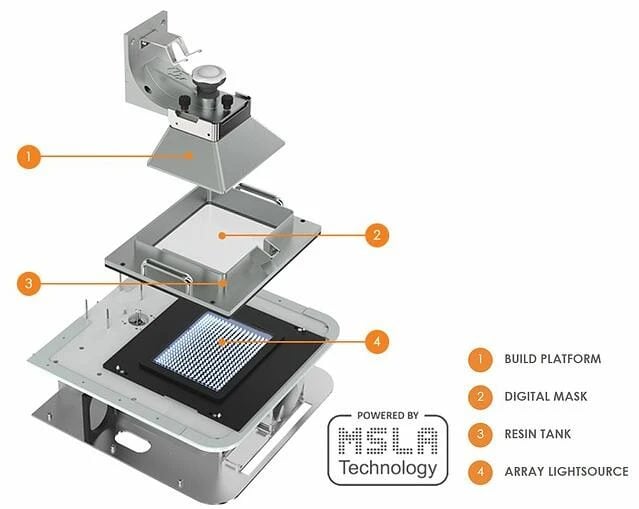
How Do MSLA Printers Work?
If you’re not familiar with SLA printers, a photosensitive resin is precisely cured using an ultraviolet light source. Standard SLA printers use a laser whose beam is directed with a controlled mirror. MSLA printers instead use an LCD screen to mask an ultraviolet backlight, essentially casting a shadow on the resin.
By changing the image on the LCD screen, different patterns of light are let through to create the print. This has the massive advantage of curing the entire layer at once in roughly three to five seconds, rather than needing to trace every detail before moving on to the next layer. This means that MSLA printers are significantly faster than SLA printers and don’t suffer any time penalty for printing multiple models at once.
The use of an LCD masking system does mean that this process only really works for bottom-up printers. As this is the popular style for home users, this is not much of an issue.
One of the downsides of using an LCD screen like this is that the backlight needs to be so bright to cure the resin that it causes a burn-in effect and degrades the screen over time. This means that the screen is a consumable item that you will eventually need to replace.
Modern MSLA printers have adapted to this issue by starting to use monochromatic LCD screens. Monochrome LCD screens don’t include a color filter. This color filter blocks two-thirds of the backlight from getting through a clear screen. This change means that the backlight doesn’t need to be as bright to achieve the same or greater output.
Ultimately, this means that monochrome LCD screens last longer as the dimmer backlight does less damage. At the same time, the resulting light can be brighter, meaning layer cure times can be even faster. A monochrome LCD screen is a no-brainer upgrade for an MSLA printer.
Resolution
While the layer height of an MSLA printer is identical to that of an SLA printer, the horizontal resolution is different. With an SLA printer, this is based on the diameter of the laser beam. For an MSLA printer, it is based on the resolution of the LCD screen. High resolution 4K and better screens are now becoming available; they are, however, quite expensive.
SLA printers also see a small advantage here. Because the laser beam is smoothly adjusted by the mirror, there are no steps in the x- or y-axes. However, the use of a pixel-based screen means that MSLA printers do face x- and y-axis stepping, although the severity of the effect is based on the pixel density of the screen.
MSLA printers are an almost downside-free upgrade over standard SLA printers. The print time reduction is a huge bonus over any other form of additive manufacturing technology. The prices for these are generally high, especially for larger models. As prices continue to decrease over time, standard SLA printers will likely lose popularity.
Conclusion
Have you got a resin printer? What made you choose an MSLA printer over an SLA one or vice versa? Let us know down below.


Thanks! now I know which type to buy and how it works
Very helpful